About Me

My photo
This is a blog for John Weber. One of my joys in life is helping others get ahead in life. Content here will be focused on that from this date forward. John was a Skype for Business MVP (2015-2018) - before that, a Lync Server MVP (2010-2014). I used to write a variety of articles (https://tsoorad.blogspot.com) on technical issues with a smattering of other interests. I have a variety of certifications dating back to Novell CNE and working up through the Microsoft MCP stack to MCITP multiple times. FWIW, I am on my third career - ex-USMC, retired US Army. I have a fancy MBA. The opinions expressed on this blog are mine and mine alone.
Showing posts with label OCS 2007. Show all posts

2014/05/16

NextHop Archive


If, like me, you have stretches of your life where you are living under a rock, you may have missed the notification that NextHop is being moved and phased out.  As noted in this article posted on NextHop 1 May 2014, NextHop content is frozen, with no new content to be added.  While there is a stated plan to migrate SOME NextHop content to its’ new home, I think it is very possible that not ALL content will migrate.  In addition, there are sub-contents (such as DrRez) (and the absolutely awesome Haiku material) that may not make the jump.

In an effort to preserve this data, I archived the entire NextHop site.  DrRez included.  You can find the archive here:

https://www.dropbox.com/s/g9wo9sg2835xd7z/NextHopArchive.zip

YMMV

2012/10/02

Private Domain Certificates

Today, you can get a public Certificate Authority  - DigiCert, Entrust, etc – to issue you a trusted certificate for your internal domain.  For instance, if you have an internal AD name such as domain.local, or domain.tld, or any other that is not registered according to the governing body, then your certificate provider will issue you a certificate for the FQDN of your internal servers and your devices will trust that certificate providing your devices trust the issuer – standard fare for most of the public CA issuers.

In an effort to tighten security on the Internet by creating more stringent standards, the CA/Browser Forum recently formulated new guidelines in their Baseline Requirements for issuing SSL certificates.

One of the new changes is the elimination of certificates using internal names. This change makes it impossible to obtain a publicly trusted certificate for any host name that cannot be externally verified as being owned by the organization that is requesting the certificate.  According to this CA/Browser  document:

Effective 1 October 2016, CAs SHALL revoke all unexpired Certificates whose subjectAlternativeName extension or Subject commonName field contains a Reserved IP Address or Internal Server Name.

In addition, it appears that internal name certificates will NOT be issued after 1 Nov 2015.  Or, at least DigiCert will not issue them after that date:

In accordance with this new standard, DigiCert will no longer issue certificates to these internal names with expiration dates after November 1, 2015.

If you fall into this category, you should begin planning now to: a) deploy internal PKI and figure out how that action will change your environment(s); or b) change your internal AD DS name (yuk!).

Interesting note:  www.digicert.com is already planning ahead to help you out!  See this nifty tool.

YMMV

2012/04/03

ForeFront for Lync

A little delayed (well, more than a little) but still very welcome!  ForeFront for Lync 2010 is here (cue Steve Martin running down the street screaming about the phone book).

http://support.microsoft.com/kb/2694730

Make a point of reading the caveats/issues/hints and how to deploy – this is not as clean as you would think.

YMMV.

2012/02/09

PIC Provisioning Guide

Do you need help setting up the PIC feature in Lync or OCS?  Here is a great resource – no need for me to re-write it!

http://www.microsoft.com/download/en/details.aspx?id=14966

YMMV.

2012/01/19

OCS 2007 R2 updates

Nice to know that even after the release of Lync, the Microsoft OCS team is still keeping things updated…

New today

Servers

http://www.microsoft.com/download/en/details.aspx?id=19178

communicator

http://www.microsoft.com/download/en/details.aspx?id=21547

and the ever popular GC…

http://www.microsoft.com/download/en/details.aspx?id=12180

UCMA redistributable (for those doing ExUM you may need this)

http://www.microsoft.com/download/en/details.aspx?id=7557

Enjoy!  YMMV.

Who can Federate tool

Situation

You want to demonstrate to a potential client who their users would want to federate with for business processes.

Possible Solution

MVP Matt Landis has written a nifty little utility…. http://gallery.technet.microsoft.com/Who-Can-Federate-Tool-a9e00d23

The WCF Tool (who can federate tool) will scan through your Outlook contacts and give you a "heads up" on which of your business partners have public Microsoft Lync or OCS federation enabled. This is a great tool to run for people who do or don't have Microsoft Lync to show them who they could connect with in their own contact list.

image

Useful, eh?  This worked nicely for me – found several on my contact list that I had not thought about.

YMMV

2011/12/30

Create CSR from TMG

Scenario

You need to create a Certificate Signing Request (CSR) for your TMG to support Lync (or Exchange or whatever) - AND you need this certificate to have SAN (Subject Alternative Name) entries.

What to do?

Chad McGreanor has a great write-up on this!

Changes?

If you do not already have a Local Computer Certificates\Personal\Certificates container in your TMG deployment, you can still use this process – by accessing the CSR process as shown here:

image

YMMV

2011/08/17

Monitor OCS and Lync Call Capacity

Tom Pacyk over at ConfusedAmused has a very nice set of scripts to help the Lync/OCS administrator look at the peak call numbers on your Mediation servers.

http://www.confusedamused.com/notebook/monitoring-ocs-and-lync-peak-call-capacity/

YMMV

2011/08/16

Maximum Number of names in a SAN Extension

In what is sure to be a long standing record (of sorts) for me (and maybe only me) – I just submitted a CSR to a public provider with 53 domains in the SAN field.  This raised the question:  “how many entries or names can be in that one field?”  I know there has to be some sort of limit. 

Handy Dandy, we had a TMG guy in the room, so we asked him.  While he did not know off the top of his head, he did have an answer in mere minutes (where I had googled for about 10 and found squat).

http://social.technet.microsoft.com/wiki/contents/articles/3306.aspx

So, now we know the field is defined by a database, that a Windows PKI CA is limited to 4k of names, and that somewhere around 150 25 character domain names eat up just under 4k.  By extension, we can assume (and we know what that means) that the Public cert providers are following the same RFC and that they will have a similar limit.

How about that?  An answer to a question you did not know you had!

YMMV

2011/07/18

Lync to CUCM Step Through

http://www.microsoft.com/download/en/details.aspx?displaylang=en&id=26800

The above link shows step-by-step configuration tasks to set up the Direct SIP connectivity between Cisco Unified Communications Manager (CUCM) and Lync Server 2010. These steps include configuration of the media bypass feature that optimizes media flow by allowing Lync endpoints to directly establish a media connection with a gateway or private branch exchange (PBX) without going through the Lync Server Mediation Server.

2011/06/20

Open Services applet in Standard Mode

Ever since somebody at Microsoft decided we needed the services.msc applet to open in “extended” mode, I have been clicking on “standard” to get the view I wanted.  This last week I finally got fed up with this, and decided to do something about it.  As it turns out, this is not the easiest thing to change.  Apparently, us poor users are not allowed to change the behavior for the named services.msc.  We are not worthy. 

image

What you have to do is author a new named instance – and of course remember to use that one.  I was unsuccessful at renaming, deleting, or otherwise removing the original services.msc.  I am sure there is some method to do so, but I was unwilling to dink too much with an operating system that was working before I messed with it.  YMMV.

Here is what I did: (the example is using an x64 Win7 O/S, but it works equally well for Server 2008, and I imagine, Vista (why are you using that?).

Go to c:\windows\system32 and locate the services.msc applet.  Right-click it and select “author.”

image

When services opens, click File | Options as shown.

image

Now, change that console mode to “author.”

image

Say OK to this…

Change the view to standard…

image

Now, save this to a name and location of your choosing…

image

Now when you go to a command line (or in my case about 90% of the time a powershell prompt), and type in jmwservices.msc, I get this “new and de-proved” services applet in standard mode.  I suppose you could mod the original references to the new applet if you want to get fancy.

image

Enjoy!

2010/12/16

Pre-sales project information

When you are in front of clients in the pre-sales mode, you need good, solid information that you can relate.  And the information needs to come from reliable, quotable resources.  This article on Forbes.com presents an initial analysis of a new McKinsey report on collaboration.  I encourage you to track down the actual report so you dig out the nuggets that will help you be more successful.  There is nothing in this particular article that is vendor specific; rather, the information is business related and gives quantifiable data points using common metrics.  Perfect for creating credibility and focusing the discussion on business requirements and pain points.

2010/11/05

No ringback in Lync

I just did a deployment where the PSTN was a Nortel and we used an AudioCodes 1000 gateway. Everything worked out well until we noticed that outside calls coming through the Nortel got dead air until the Lync user either answered the call or Lync sent the call to voice mail.

Seeing as how Lync to Lync calls behaved properly, and tracing showed the proper SIP 180 responses, the obvious culprit was either the gateway or the Nortel.  Turns out that in an AudioCodes gateway there is a setting for allowing ringback to leave the system and head for the PSTN!

image

Now, I am not a gateway guru, but don’t you think that would be a desired thing to have?  Well, it is off by default.  Flip it over a bit and voila!  Ringback to PSTN.

2010/08/19

LM and OC password lockout

A bit of trivia I discovered today.  The OC client and the LM client are sort of linked at the hip. I backed into this via Outlook and the LM addin…because I got locked out of my office account while testing the client’s install.  Something got bollixed up with the passwords…and here is what happened.

While doing some testing I had to change the login account on my OC.  I noticed that when I did that, the LM client picked up the change.  Nice!

SNAGHTML393cee5

But alas!  the password in the LM client account setup remains as the previous login…

image

Naturally, this resulted in the account being locked out for password failure.  So, while the LM did pick up the user name change, it bombed on the password.

Also, note that this is different depending on which way you work it…certainly not a two way street.  In the first scenario, I changed the username from OC, and LM picked up the change but not the password.  Going the other way is even worse; changing the username in LM only sent the sign-in name to OC client… the underlying verification stayed the same in both clients – and both were wrong.  In addition, the LM had the password from the other account!

image

Let’s hope this get’s fixed in CS 2010 where the LM and OC are one client.

disable “Schedule a Conference Call” button in Outlook LM plugin


I got asked today on how to do this.  Being as clueless as I am, I started with a little research.  Doggoned if I didn’t hit paydirt after only a few reads.  This is good stuff, so I want to make sure that I don’t lose it.

See this article here for the original material – figures there would be a KB for this.  I am reposting here for my own edification.

There is a registry entry that can be used to disable this button:

1. Locate and then click to select the following registry subkey:

HKEY_LOCAL_MACHINE\Software\Microsoft\Live Meeting\Addins

Note Use this subkey for x86-based systems. If you are running a x64-based system, locate and click the following subkey:

HKEY_LOCAL_MACHINE\SOFTWARE\Wow6432Node\Microsoft\Live Meeting\Addins

2. After you select the subkey that is specified in step 3, point to New on the Edit menu, and then click DWORD Value.

3. Type RemoveConferenceCall, and then press ENTER.

4. Right-click RemoveConferenceCall, and then click Modify.

5. In the Value data box, type 1, and then click OK.

6. On the File menu, click Exit to close Registry Editor.

Change the Value to 0 and the button will be available again.

A full list of livemeeting registry keys can be found here: http://technet.microsoft.com/en-us/library/dd637135(office.13).aspx

2010/07/21

single cert for ocs/exchange

this is a rewrite of previous post that got thrown away somehow…

Single certificate for OCS/Exchange firewall usage

Certificates can be complicated to understand, difficult to manage, and if you don’t have an internal PKI structure, downright expensive as you move forward with more and more dynamic applications that extend your Unified Communications to your remote users and business partners.

Internal certificates work wonders for your Active Directory Domain Services members. For Unified Communications, where OCS and Exchange are going to be using the same ISA 2006 server as the firewall, utilizing a Subject Alternative Name (SAN) certificate for your edge configuration and your ISA configuration can save you time, management hassles, and possibly provide cost savings as well. For internal servers, an internal PKI is just fine, but for the public interface of your system, you should most likely be looking at using a public-sourced key such as Go-Daddy, Thawte, DigiCert, etc. OCS Federation, remote users, and Public Instant Messaging Connectivity (PIC) demand public certificates. I know that I do not want to ship my internal CA root certificate to a slew of administrators and expect them to get that certificate into the correct spot for our systems to co-exist. But I digress.

The following table shows the SAN names needed on a certificate to support the base OCS and Exchange functions on ISA 2006/TMG/UAG – and I imagine that this certificate construction will work just fine on many other firewalls as well. The table comes from my test domain; you should replace my test domain with your own domain name.

Obtain a public SAN (UCC) certificate from your favorite provider; import the certificate into your OCS Edge server and your ISA server computer account Trusted Root Certificate store and then you can use one certificate for all these uses. This approach leaves you with only the one certificate to manage and renew, or, if life treats you badly, move to a new server.


SAN Name (what URL?)

Usage

Notes

1

SIP.tsoorad.net

OCS Edge Server

IM, Presence, Federation, PIC

2

LM.tsoorad.net

OCS Edge Server

Web Conferencing

3

AV.tsoorad.net

OCS Edge Server

A/V

4

OCS.tsoorad.net

ISA Reverse Proxy

Web Components

5

CWA.tsoorad.net

ISA Web Listener

Communicator Web Access

6

DOWNLOAD.CWA.tsoorad.net

ISA Web Listener

Cname for CWA desktop sharing

7

AS.CWA.tsoorad.net

ISA Web Listener

Cname for CWA desktop sharing

8

MAIL.tsoorad.net

ISA publisher

Outlook Anywhere, EAS, OWA, POP, IMAP

9

AUTODISCOVER.tsoorad.net

ISA Web Listener

Autodiscover is used by outlook and OCS.

2010/03/31

OCS 2007 R2 and Server 2008 R2


Concerning supportability of OCS 2007 R2 and Server 2008 R2 hosts and Server 2008 R2 Active Directory domains…

MS KB 982020  and MS KB 982021 outline what it takes to have OCS 2007 R2 operate successfully with Server 2008 R2 AD and to be hosted by 2008 R2 servers.

2010/03/05

DCOM error 10009 and certificate requests

I spent the entire day learning and relearning things about ISA, TMG, and Windows Firewall.  This took me way more time than I wanted which highlights the three basic troubleshooting starting points.  I chose the wrong starting point, and then I chose the next starting point wrongly also.  Of the three choices, of course it was the last choice (midpoint and work towards one end) that proved to be the winner.  Turns out that TMG/ISA/WF all had a part in this.  WF was the culprit on the CA, because there is a rule that needs enabling and by default it is not.  TMG/ISA was also an issue, because of the way RPC traffic is filtered.  Even if you have a wide-open rule that says “let everything go from spot A to spot B” RPC traffic gets hosed.  Argh.

Suffice it to say, I have finally resolved my issue, and an ISA/TMG specialist will probably think I am a loser, but WTH, here goes.

The problem was that I could not request a cert from the OCS R2 MMC.  The CA was across a VPN (TMG/ISA).  First little bit was finding out that, for security, the Windows Firewall disables COM+ access by default.  Now, you would think, that following the MSFT paradigm of enabling Windows Firewall rules when the feature/role/application is installed, that installing a CA on the server would turn this on, but noooOOOOOoooo!

You have to enable this rule - in my case this was a ws08r2 DC with the EntCA installed on it.  You don’t need to do this on the requestor, but the target of the request.  So, my OCS FE was requesting a cert from the CA on the DC.  Therefore, on the CA, enable the Com+Network Access (DCOM-In) rule:

image

Then, because of the VPN link involved, on BOTH sides of the link, the rule that allows the traffic from the internal to the VPN target needs to have the RPC traffic filter disabled.  There is a GREAT article here that I found that finally resolved my issue.  This is the piece of that article that did it for me:

  • Problem: When you request a certificate using the Certificate MMC snap-in, the request fails. This occurs even if the CA is started and you have sufficient permissions to request a certificate.
  • Workaround: This issue occurs because DCOM is required to acquire a certificate (this issue also occurs if you are using CA Web enrollment).
    • If ISA Server is requesting the certificate, disable the "Enforce strict RPC compliance setting" on the system policy rule. To do this, on the Firewall Policy tab of ISA Server Management, click Edit System Policy on the Tasks tab. Select the Active Directory group in the Configuration Groups list. On the General tab, clear the Enforce strict RPC compliance checkbox.
    • If an internal host is requesting the certificate from another network through ISA Server, do the following: in the Firewall Policy tab of ISA Server Management, right-click the access rule allowing the traffic, and then click Configure RPC protocol. On the Protocol tab, clear Enforce strict RPC compliance.
  • What that means visually on the TMG/ISA side :

    image

    I hope this helps you in some small way.  Now, back to the job I was supposed to get done this morning!

    2010/02/18

    ISA/TMG and OCS Firewall Rules for NAT

    Recently a client changed their OCS from public routed addresses for the Edge role to a NAT environment.  This necessitated changing their firewall (ISA).

    The online documentation for Office Communications Server 2007 R2 Firewall Requirements for External User Access makes the following statement: 

    Publicly Routable IP Address

    In any location with multiple Edge Servers deployed behind a load balancer, the external firewall cannot function as a network address translation (NAT). However, in a site with only a single Edge Server deployed, the external firewall can be configured as a NAT.

    If you do so, configure the NAT as a destination network address translation (DNAT) for inbound traffic—in other words, configure any firewall filter used for traffic from the Internet to the Edge Server with DNAT, and configure any firewall filter for traffic going from the Edge Server to the Internet (outbound traffic) as a source network address translation (SNAT). The inbound and outbound filters must map to the same public IP address and the same private IP address…

    Then a little following that, the documentation make this statement in a note: 

    In addition to being supported as a reverse proxy, Microsoft Internet Security and Acceleration (ISA) Server is supported as a firewall for Office Communications Server 2007 R2. The following versions of ISA are supported as a firewall:

    • ISA Server 2006
    • ISA Server 2004

    If you use ISA Server as your firewall, configuring it as a NAT is not supported because ISA Server 2006 does not support static NAT.

    www.isaserver.org has an excellent tutorial on how to configure ISA 2006 to support OCS 2007, a second IP scope, and allow for an Office Communications Server 2007 R1/R2 Edge server to live in your DMZ.

    But, based on the above quote and article, and assuming we have only one IP scope to work with, and we want to use NAT because we only have one Edge, what are TMG and ISA users to do?   What follows is one method that works; please be aware that this was developed for a TMG (Threat Management Gateway) environment, and YMMV.  However, I am also confident that it will work on ISA 2006 (tested in lab) also and allow R2 Edge to NAT when using TMG and ISA 2006 SP1. 

    What won’t work with ISA and this configuration is Federation.  This is because ISA will not send the SIP packets OUT from the assigned Access Edge interface, but send the packets out from the primary ISA address.  TMG gets around this by allowing you to choose the network relationship - effectively creating the 1:1 NAT that is needed.

    For the routable addressing scheme as mentioned shown in the isaserver.org tutorial, the full monte of listeners and rules is used along with certificates that need to be exported, imported, and configured.  This method is much easier, actually, and does not use listeners and certificates, just firewall access rules.  Before you go much further, you should note that this solution may or may not meet your organization’s security needs.   YMMV, Caveat Emptor, etc.

    For this demonstration, the ISA external interface is a 10.x.x.x/24 network. The internal interface is connected to a 1.x.x.x/24 network.  Note that we have sufficient addresses to give each OCS Edge role its’ own address; we won’t be doing the port change routine.  Further note that if you do that, this will still work, just change the ports on the firewall rules.  The OCS Edge server has already been told that the A/V role is behind a NAT, so that part of the system is all ready to go. Let’s take a quick look at our IP usage for this scenario and how that corresponds to our internal OCS deployment.

    Internal:

    Access Edge: 1.1.1.37

    Web Conferencing: 1.1.1.39

    A/V: 1.1.1.38

    External:

    Access Edge (SIP): 10.10.10.37

    Web Conferencing (LM): 10.10.10.39

    A/V (AV): 10.10.10.38

    Graphically, this is our IP flow for both in and out, and for OCS, we need to maintain that in/out relationship:

    image

    Let’s put together the objects and rules we need on the TMG/ISA to allow OCS R2 to NAT. First, we need to create some user-defined protocols to use with our OCS rules.  Here are the protocols that I created to support OCS Edge Roles:

    image

    To create these user-defined protocols, access the toolbox, select protocols, then “user-defined” and choose New from the dropdown:

    image

    Fill in the name of the first protocol and select “Next”

    image

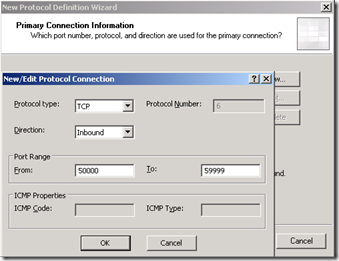
    On the next page, select “New” and then complete the protocol information as shown:
    image

    Click on OK, Next, Next again, and then Finish to complete the first user-defined protocol.  In your toolbox, under user-defined protocols, you should see your new protocol.  Double-click it and verify that the protocol definition looks like our example here.

    image

    Now create the remaining two user-defined protocols using this information:

    Protocol name

    AV TCP In

    Protocol type

    TCP

    Direction

    Inbound

    Port Range

    50000-59999

    Protocol name

    Sip-In

    Protocol type

    TCP

    Direction

    Inbound

    Port Range

    5061

    Protocol name

    AV UDP in

    Protocol type

    UDP

    Direction

    Receive/Send

    Port Range

    3478, 50000-59999

    With the protocols done, we can now create the access rules.  Here are the rules we need:
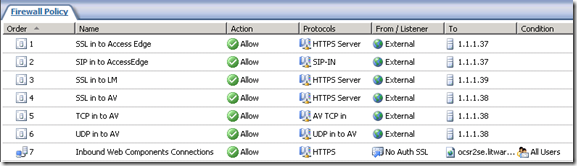
    image

    Rule #7 is for the OCS Reverse Proxy to the Web Components.  We will not be changing that rule in any way.

    Rules 1-6 all are constructed in the same manner.  These are actually created with the “Publish Non-Web Server Protocols” wizard. After looking at the first rule, I will present the remainder in table form.

    Start by selecting the new task wizard:

    image 

    Give your new rule a name:

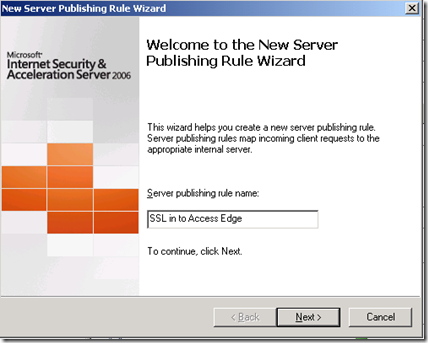
    image

    Enter in the IP address of the appropriate Edge role external interface.  In our case, 1.1.1.37 is the Access Edge external interface.

    image

    Choose the appropriate protocol for this rule. This is an SSL rule, so HTTPS Server is selected.

    image

    Select the Network Listener IP Addresses.  For this example, “External”

    image

    Click on Address and select your specific External address for this service.  In this example, 10.10.10.37.

    image

    Click on finish and we are done with the first rule.
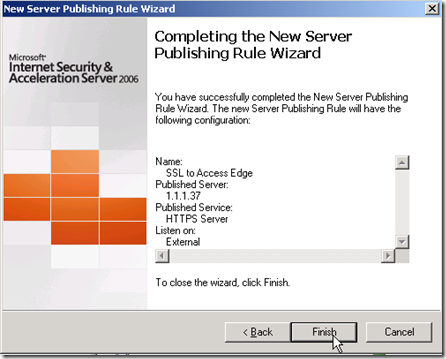
    image

    Now, create the remaining rules using the “Publish Non-Web Server Protocols” task wizard and the following information.

    Rule Name

    SSL in to Access Edge

    Select Server

    IP Address for outside edge of OCS Access Edge Role

    Selected Protocol

    HTTPS Server

    Network Listener IP Addresses

    External, and modify to specific External IP for Access Edge

    Rule Name

    SIP in to Access Edge

    Select Server

    IP Address for outside edge of OCS Access Edge Role

    Selected Protocol

    SIP-In

    Network Listener IP Addresses

    External, and modify to specific External IP for Access Edge

    Rule Name

    SSL in to LM

    Select Server

    IP Address for outside edge of OCS Web Conferencing Edge Role

    Selected Protocol

    HTTPS Server

    Network Listener IP Addresses

    External, and modify to specific External IP for Web Conferencing Edge

    Rule Name

    SSL in to AV

    Select Server

    IP Address for outside edge of OCS AV Edge Role

    Selected Protocol

    HTTPS Server

    Network Listener IP Addresses

    External, and modify to specific External IP for AV Edge

    Rule Name

    TCP in to AV

    Select Server

    IP Address for outside edge of OCS AV Edge Role

    Selected Protocol

    AV TCP in

    Network Listener IP Addresses

    External, and modify to specific External IP for AV Edge

    Rule Name

    UDP in to AV

    Select Server

    IP Address for outside edge of OCS AV Edge Role

    Selected Protocol

    AV UDP in

    Network Listener IP Addresses

    External, and modify to specific External IP for AV Edge

    Remember to apply all your changes!  We have now configured our TMG/ISA to allow for full edge traffic across a single NAT’d public IP subnet.  We did not discuss the Reverse Proxy rule for the Web Components, nor did we affect any changes to the base documentation for that service.  Make sure that your Edge Server can resolve the EXTERNAL IP of the AV edge service.  In this example, this would be 10.10.10.38.  I use a host file for this. 

    I hope that this has been helpful in getting you going with a NAT’d TMG/ISA and OCS 2007 R2 environment.

    test 02 Feb

    this is a test it’s only a test this should be a picture