About Me

My photo
This is a blog for John Weber. One of my joys in life is helping others get ahead in life. Content here will be focused on that from this date forward. John was a Skype for Business MVP (2015-2018) - before that, a Lync Server MVP (2010-2014). I used to write a variety of articles (https://tsoorad.blogspot.com) on technical issues with a smattering of other interests. I have a variety of certifications dating back to Novell CNE and working up through the Microsoft MCP stack to MCITP multiple times. FWIW, I am on my third career - ex-USMC, retired US Army. I have a fancy MBA. The opinions expressed on this blog are mine and mine alone.
Showing posts with label network. Show all posts

2018/03/03

FastTrack Network Checking

You may not know but Microsoft is providing a fairly nice tool to check your network for SfB performance.  Free.  Free is a very good price, eh?

I am not going to extol the virtues and services offered by fastrack.microsoft.com, I just want to delve a little into the network checking tool.  And, this tool has been around for a bit.  So, I wanted to get a little updated review.

First off, I cannot even find this thing anywhere on the https://fasttrack.microsoft.com site.  Sorry.  Maybe I am blind,  but I am not seeing it anywhere.  There is probably some zippy button marked “tools” but I am just not groking.  Having said that, I know of

http://ap1-fasttrack.cloudapp.net/o365nwtest

http://em1-fasttrack.cloudapp.net/o365nwtest

http://na1-fasttrack.cloudapp.net/o365nwtest

Here I am checking my lab tenant against the ap1 site.

image

Note the two addresses given by the tool…

image

The 76 address is my laptop, currently operating from a hotel out in the middle of the Oregon Cascade mountain range.  So, this connection is going to be testing from my laptop to the AP1 site to see how things stack up. 

With a little imagination, you could bury a workstation in some remote spot on your network, and pretty much map out the entire path to the world – giving a glimpse into how things line up.  This could be useful, yes?

You can see that the lag from here to there is running about 170 ms, which might be so great in some circumstances. 

image

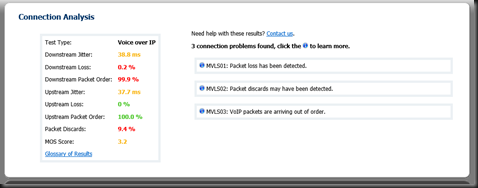
Overall, the tool produces a raft of great info… here is the summary tab.  Note that something is not quite right as the tool cannot simulate VOIP traffic.  Could be something you need to look into here?

Here is the same test run against the NA1 site.  Note the differences.  We also now have a MOS score.  3.2 is not as good as we want, but doable.  Not too bad for out of a hotel where I am sharing bandwidth with 200 other rooms.

image

image 

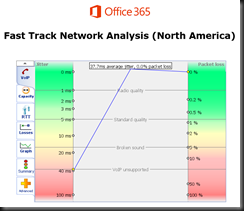
We also got some nice jitter measurements on this run…

image

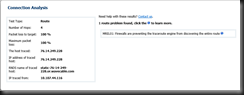
And finally, if you drive into the route tab, you will get more data points.

image

What do you think you could do with information such as this?

image

If you have questions about any attribute/factor measured in these tests, there is also a handy glossary. 


If you or your organization is considering moving to Office 365 in any capacity, this is one of the first tools you should be working. I have been telling customers for a long time that if we do our job right, then any problems will be network, firewall, or load balancers.  This tool can help you prove that.  In a more complex internal net, you might even be able to tell the network team right where to look!


YMMV

2018/02/01

AudioCodes HRS 458 Firmware 3.04.1192

Dropped off an HRS 458 at a customer yesterday, OOBE.  Setup took about 5 minutes (have to hook up cables and whatnot), created an account for it, and powered it up.

A little access to the web interface, and I have a unit up and running, logged into on-premises Skype for Business pool, and dang! 

The HRS starts barfing on finding the calendar for the account.  This is not good.  Some quick checking shows that the environment has no Autodiscover.domain.com record internal, but it does have an SRV.  I know, but don’t ask me.  Not my slice of life at this customer.

However, this does show that an OOBE for the HRS, firmware 3.0.2.xxxx needs to have something other than just an SRV record.

A little judicious communication revealed a new firmware being available for the HRS.  My contact inside AC indicated that his notes showed that the “problem” was resolved with 3.04.1192 release.  What the heck, I tried it. 

image

Voila!  Problem solved.

Of course, now we have to ask why no A record (or CNAME), and why put in the SRV record, not know why it was done, and then never question the mechanics of it, or actually solve the original issue that resulted in the SRV record.  Well, I get to ask at any rate, not sure I will ever get the answers.

YMMV


2017/11/01

AudioCodes 400HD firmware v3.04

Those fine folks (and apparently busy beavers) at AudioCodes have popped a new IP Phone firmware release out into the wild. Brings a nice new set of features/abilities to the 450HD in particular.

Please note that the official GA is still 3.0.1. Version 3.0.4 will be used as a candidate GA in the next several weeks. Admin and User’s manual will be ready in several weeks. Version 3.0.4 for all other 400HD models will be available within several weeks.

Here is a partial list of version 3.0 new features. For the full list of features, please refer to the Release Notes document:

· Boss-Admin (Delegated Line).

o Allows a relationship to be established between a boss' phone and an administrative secretary's phone, to streamline office workflow and enhance efficiency.

o Each phone can support up to five Bosses or Admins. One Boss can have up to five Admins. One Admin can have up to five Bosses. A many-to-many configuration is also supported.

clip_image001

o Call Pick-up

o Admin can forward to Boss' voicemail without picking up Boss' line

· HotDesk feature for enterprises that operate according to the 'touch-down desk' concept. Employees in these enterprises typically travel frequently to remote branches, or work in shifts. They can now sign in to a phone that is already signed in by another (CAP or regular) user without signing out the original user to whom the phone was assigned for primary use.

clip_image002

· AudioCodes' IP phones support Lync AutoDiscover Web Service Protocol [MS-OCDISCWS]. This feature improves discovery of the phone's SIP home server after signing in. Using the AutoDiscover procedure the phone is capable of finding its home server URL for a specific Skype for Business account, based on user credentials. It is specially efficient for Skype for Business online and hybrid environments, when phones must sign in to a different Skype for Business server according to the user’s account. Previously, the home server was found using DNS SRV records based only on a SIP account domain [MS-CONMGMT]. If AutoDiscover is unsuccessful, the phone falls back to SRV DNS.

· The phone's Call Log is synchronized with Microsoft's Exchange server. All devices that a user signs into are fully synchronized with the server. Each device reports every call from | to that user to the server. Each device then pulls the last 20 reported calls and performs synchronization. All lists in each device's Call Log except the Missed Calls list are synchronized.

· New screen theme reflects Skype for Business 2016 client look & feel | New softkeys match the de facto Skype for Business standard. This new feature ensures uniformity across all devices used by the same user, for Unified Communications. The following figure shows the new-theme idle screen:

clip_image003

· Dial Plan Normalization. Network administrators can enable and configure dial plans on the Microsoft Skype for Business server. Normalization rules can be downloaded from the server via in-band provisioning. The feature was fully certified and tested with Microsoft in this version. It was supported in previous versions, but without Microsoft certification.

· Multiple Emergency Numbers. A caller can select an emergency number from a list of emergency destinations. A dedicated number for the police, ambulance service, fire fighting service, etc., can be selected from a list of options. If the phone locks, emergency numbers will still be available and dialable via a new Emergency softkey that is displayed after the lock takes effect.

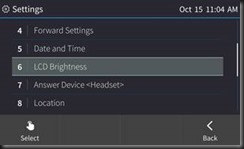
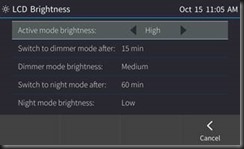
· Power Saving mode. When a phone enters Power Saving mode, the screen's brightness is reduced, lowering power consumption. The phone enters the mode after being inactive for a configured period (timeout). Any user activity returns the phone to regular Active mode.

clip_image004

clip_image005

· Malicious call tracing. Users can report a malicious call. If a user gets a call and wants to report it as malicious, the phone allows them to send a report to the Skype for Business server. To allow malicious call reporting by the phone, the feature must be enabled by the network administrator on the Skype for Business server (the option 'Enable malicious call tracing' must be selected).

· Sign-in can be cancelled during the signing in procedure. Users can cancel signing in after starting the sign-in process.

· Voice Quality Check. A new option to check IP phone voice quality has been added to the phone's Device Status menu.

clip_image006

clip_image007

Things seem to be moving forward very nicely at AudioCodes.

YMMV

2017/10/06

AC firmware v3.0.1.x BToE button greyed out

Scenario

BToE is pretty nice.  But let’s face it.  Not always easy to work with.  Especially when a service provider insists that a buried setting be configured so as to disable the manual concepts and default to automatic.

So, let’s figure out how to get an AudioCodes 450HD with the latest firmware (3.0.1.9.367) to play BToE with us like WE want, not how somebody else wants. 

OOBE for a phone that is going to be qualified for SfBO is with the BToE pairing forced to “automatic.”  This results in the button being greyed out when you go to MENU on the phone.  In this mode, BToE pass-though mode works just fine.  Web login to SfBO works as expected.

But what if you want to do something like, pair a wireless laptop with the handset device always CAT5 so you can just grab the laptop and go?  Like a laptop is designed to work? 

The Fix

What we need to do is light up the BToE button so we can get a pairing code (essentially a representation of the device IP).  Not exactly easy to find for those who don’t typically read 200+ pages of setup. Like me.

Hmmm… (page 113 of LTRT-14820 450HD IP Phone for Microsoft Skype for Business User’s manual ver.3.0.1.pdf) says

clip_image002

Going to the admin manual…. ( page 157 of LTRT-09943 400HD Series IP Phone for Microsoft Skype for Business Administrator's Manual Ver. 3.0.1)

clip_image004

And that does work to enable the BToE button.

The cfg file is available here – there is the semi-standard “download the file, modify the file with text editor, upload the file to phone routine.”

image

Here is how the phone cfg file looks by default…

image

And here is how it needs to look.  After uploading the cfg file, the phone will restart and you can then manually pair.  Remember that the manual pair code is case sensitive.

image

SfBO policy

Make sure that your Office 365 admins, if that role is not you, changes your online policy for ip phones to enable BToE, and further more to not change the pairing setting.  For more information see this.

https://webcache.googleusercontent.com/search?q=cache:hYptjYU9T9AJ:https://technet.microsoft.com/en-us/library/mt629497.aspx+&cd=1&hl=en&ct=clnk&gl=us

clip_image002[7]

Summary

BToE button greyed out, but automatic pass-through BToE works.  You want control of that button so manual pairing is possible for wireless connections.  Modification of the cfg file is required.

As always,


YMMV

2017/07/28

SfB Default AD Containers

Scenario

You know how those tin-foil-hat types are…

image

If it can be changed to “enhance” security, then by golly!  Let’s do it!  The problem, of course, is the rule of unintended consequences.  You know, what happens to something else because of action A, that is totally unplanned, and no one knows about it.

And, while I am mentioning it… have you ever noticed that the same team YOU have to run everything through for approval never asks your team if it is OK if they make a change?  They just do it?  Odd how that works out, eh?

Adelante.

The Oops!

It turns out that about 6 weeks ago, the aforementioned team instituted a change to the default AD containers.  To whit, they changed the default computer container to be something other than the OOBE.

Turns out that breaks SfB big time.  As in no more publishing the topology.  A Get-CsAdDomain fails.  But that is the clue to the fix.

The Fix

Simply run the SfB Domain prep again.


YMMV

2017/03/16

Skype Edge Server and 2:1 NAT

This morning, we resolved an issue that I have never seen before, and hope that I never do.

The Background

I tell customers during design sessions that if there are existing network issues, Skype (or Lync) is going to find them.  If there is something a bit wonky, we are going to discover the wonkiness.  And here we go.

Skype edge with 1:1 Nat.  Public IP is 71.16.x.x.  Edge server is doing the classic 3 IP thing.  Remote logins are fine.  Everything seems to be ducky.  Except we cannot talk outbound. 

Go check all the network again.  Looks good. Check the topology, servers, IP assignments, paths.  All good.  Certificates, the common culprit behind one-way federation and presence look good.  We are now scratching our heads.  We know now we are looking at something wonky, but what?

The Fix

I was under the impression that 1:1 NAT is 1:1.  But it turns out that a Watchguard Firebox is capable to doing 2:1 NAT.  Inbound to the Edge server worked because the firewall had 1:1 NAT from public to DMZ VLAN.  Edge trace logs showed subscriptions and connections timing out on the far side.  The connections were being made, just no return traffic.  No SYN.  Telnet client testing outbound from the edge server on 5061 ad 443 worked.  Clearly inbound connections were working or there would be no remote logins.

As long as the traffic originated from outside the organization, things worked fine and the Edge server, via the 1:1 NAT was responding as expected to the source IP.  But traffic originating from INSIDE the organization was failing.  One way presence, presence unknown, cannot send to user, etc.  Apparently…

…according to www.ipchicken, the Watchguard was sending all traffic from the DMZ external VLAN out via a completely separate set of addresses!  HUH?  Whaaaaat?  So inbound would work, but outbound went out on a separate address?

So their firewall guy fixed that, we are back to 1:1 NAT and all is good. Something to be aware of, eh? Go figure.

YMMV

2016/08/15

AudioCodes SBC 7.2 firmware

Most of my customers use AudioCodes appliances in their Skype deployments in one form or another; SBC, analog gateways, recording, management, phone devices.  So, when AudioCodes announced that SBC 7.2 firmware is now GA, I had to go get it.  I won’t bore my gentle readers with the exhaustive listing of the 30+ enhancement and session capacity updates – the document that outlines that stuff is 70 some pages – and I had to buckle down to get the entire thing digested.  Suffice it to say that this is a big update.  What I am really interested in is the promised GUI changes and the “click the GUI to configure” claims.

Having downloaded it the other day, I  upgraded the firmware on my Mediant 800 SBC and started kicking the new tires a bit.

image

OK, file loaded.  28.8MB of spotless CMP file.  I guess I will click on the “reset” button and hope I don’t have to figure out the “reset to factory” option I think might exist.  Well, I clicked the “reset” at 1309 PST…and waited.

image

The Results are In

After picking my teeth and looking at some Olympic Games results, at 1317 PST I am able to login to the upgraded SBC.  I think the watchword here is PATIENCE.  This is a total update for your firmware.  8 minutes of patience is not too much to ask for, right?  And, we have the new goodness that was advertised:

image

Let’s open a few pages to see if the advertised goodness actually is goodness and not pure market-speak.

A few minutes pass – did you sit here reading this same sentence in a loop or did you check those Olympic results for yourself?  Alright, I have poked around a little.  Things in general are the same…but some things have moved.  Not a huge issue, but it will take a bit of adjustment/learning.  The overall look and feel is certainly AudioCodes, yet refreshingly updated.  Like the header CSS?? layout…

image

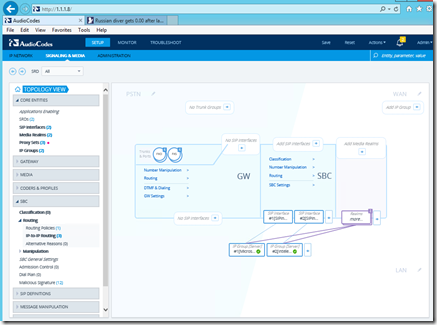
And the promised GUI view of the relationships is certainly there also – very helpful for those of us with limited brain capacity.

image

And as further advertised, clicking an element in the Topology GUI view as shown, does indeed dump you into the tree to configure the element you selected.  Maybe now even *I* can figure this thing out, eh?  And while I am saying nice things, the linking between configuration elements along with “EDIT” right next to the element you want to change is….very welcome.

1.5 “not so nices”

While I am at it, there is a sorta not so great thing.  The old GUI used to have the type of device shown at the top of the page – that seems to have gone away.  I forget what I am doing very easily, and it was nice to have the reminder of what device I was accessing.  And no analog gateway version (boo hiss).

Two more “nices”

One nice thing, well, actually two – is that when you change something, the “SAVE” selection on the top row gets a red box around it.  And (genuflecting towards Tel Aviv) when you resize your browser window, the contents shuffle and resize.  Finally.

image

Conclusion

A big update for the AudioCodes SBC – it took a bit of time for the “burn and reset” but my SBC came back to life without losing a single iota of configuration.  The topology click to configure part is really nice.  I sure wish they had a version for my MP118FXS gateway.  Overall, I think this update is a winner.  Login to your AudioCodes account and get it today!

YMMV

2016/07/14

AudioCodes IP Phone Manager Express

Yes, Matilda, another supporting software piece to examine and run through the Tsoorad Lab Experience.  This time AudioCodes released a FREE tool to help you manage your AudioCodes phones.  Previous to this, the AudioCodes EMS required some cabbage up front; this tool is FREE.  Up to 500 managed devices.  No SBC, SBA, or MPxxx management, but hey…

The EMS package allows you to manage all of the AudioCodes family, SBC, analog gateways, 4xx phones, and SBA’s too.  The IP Phone Manager Express does just the phones.  But, this may be very attractive to you.  Let’s take a look.

You can download right here. The basic documentation is included in the download.  The installer, once you have a suitable host SERVER, runs with zero issues.  I would think that something like this tool would be perfect for running on a workstation, but that is not what the documentation calls for.  To whit, the IP Phone Manager Express calls for a clean install of Server 2012R2.  Hmmm.  I suppose you could run this on a virtualized instance on your workstation…I, of course, am running it in virtual in my lab.  I also ignored the resource allocations called for in the documentation.  I used a single core and 2GB, and things appear to be hunky-dory. I imagine if you need to manage more than a few devices your resources might need to increase just a tad.

Here is the official market-speak on the features:

image

Also note that AudioCodes thinks that you can step up to the “Pro” version (part of the EMS) with one button click.

You can download the applicable documentation here.

For a quickie comparison of the different flavors offered, take a look at this.

image

The Install

</Rant> I would like to see this tool run on something other than a brand new server.  I see SQL Express and IIS getting installed…isn’t there anyway to get this running on something other than a new build? Not everyone has an environment leveraging Datacenter where you can load up as many servers as the hardware will handle Using an existing server would make this tool really free instead of incurring the server license. Or work out a way to get this into an admin workstation?</rant off>

I built on a clean 2012R2 server, patched (250+ of them – yikes!) it up to snuff, and then simply executed the installer.  I think I may have clicked on a few license boxes or “yes” selections, but I did nothing other than defaults.  It wanted a reboot.

After reboot, you can go to http://serverIP/IPP and you are in.  Install done.  Even I got it right the first time through.  That will change in the next section.

The Configuration

Note:  some manual editing of cfg files is needed.  For some weird reason, notepad on my server presented the cfg files as one long line.  Yucko.  I installed Notepad ++ and it worked as expected.  Don’t know what the issue is, but I know how to get around it!

Following along with page 13 of the aforementioned admin guide, I modified my DHCP server to present option 160 as follows:

image

If you are modifying a previous entry for your AudioCodes deployment, be aware that the previous entry was most likely FTP, not HTTP.  Ergo, my comment from above.  Using FTP (like I did) results in things not working as expected.  OOOPS.  This time I even read the documentation first, and yet I still managed to screw it up.  Just a heads up.  I know that my gentle (genteel?) readers would never make such a sophomoric mistake.  I also took the liberty of restarting the DHCP service to make sure things were right.

Back to the voluminous instructions on page 13, plug in your phones.  In my case, being POE, I just pulled the Cat5 and replugged it effectively restarting the phones.  After you get this tool setup, you will be able to perform that magic trick remotely to every phone in the org.  You can send messages to the individual phones - the practical joke prospects are endless.

Look and Feel

Pretty slick.  I might suggest changes to some of the GUI, but in the overall scheme of things, the entire tool works really well.  The navigation tree on the upper left gives access to everything, but you can do the clickety thing on various elements on the center and right sections and that works equally well.  Being able to do mass actions is an enormous plus.

Here is my new tool.  Use the secret squirrel code from page 13.  And then change it to suit your security policy.  You do have a security policy, right?

image

At any rate, here is our interface in all its glory.

image

I think the buttons in the middle could be a different size… but the automatic refresh makes up for it.  Note that I have the one 420HD phone registered.  Interestingly,  the IPP Manager ships with firmware files… and apparently the 420HD.img that came with was newer than what was on my phone.

image

I noticed this because as the phone was booting, it flipped into upgrading its firmware.  Nice, in some cases.  Maybe not so nice in others.  Just something to be aware of, I guess, if you start doing magic tricks in the middle of the day.

I downloaded the newest 405 IMG available, changed it’s name and pushed it up there for my 405 to discover when it restarts.  I have cleverly avoided that moment until now, because I want to use it as the demo for this article.  Here is the 405 before restarting it to pick up the new DHCP Option 160:

image

Note the firmware version.  And the incorrect Option 160 information.  You can’t see it, but rebooting the phone at this point resulted in the phone snaking the new firmware and working through the process to update itself.  And now we have this:

image

And in the IPP Manager we now have two devices – the unregistered part means that no user is logged into the phone.

image

If you get the dhcpoption160.cfg file correct (and use HTTP not FTP) rebooting phones will result in them showing up in the interface – its as easy as that.

Now What?

Log in to the phone silly!  IPP Manager handles the device…SfB/Lync handles the users.  Using the phones’ web interface (which, btw, you can access right from the IPP Manager), I did an extension+PIN login, and now we have this:

image

Update Firmware

One of the nice things here is that system-wide firmware updates can be done centrally.  Upload the new firmware file..

image

and tell the phone to update…

image

There might be a better way to accomplish this task, but, gee, it worked for me.  You could have a boatload of one model, upload one file, select the appropriate checkboxes, and tell them all to reset at once. At any rate, we now have two devices, both operating the same firmware whereas before we had two different firmware versions.

image

Configuration Files

You can work with configuration files en masse, or individually…If you need to see what a configuration (cfg) file can do, take a read of this document, or go searching for LTRT-11950 which will probably require a visit to www.audiocodes.com.

image


Conclusions

If you have more than a few Audiocodes phones, or even if you do have only a few phones, the new Audiocodes IP Phone Manager Express is a great piece of kit.  It does, however, require a server platform – but you can get around that with some virtualization.  Offering one-stop device management and visibility into the devices without having to go to a user’s desk, the IPP Manager can streamline bulk operations or allow you to get as granular as you want.  Just the firmware tracking and updating makes it worth looking closely at this tool. I would like to see it run direct on an existing server and not require its own server; ideally it would be nice to have it run on a desktop.  But, even with the implications of needing a server, free is a very good price.

I guess to be fair to all the other systems out there, I should mention that this tool manages Audiocodes IP phones, and is not restricted to just SfB/Lync environments – but why would you want to use another VOIP solution other than Skype for Business?

YMMV

2016/06/17

Array Networks vAPV Review

Have you looked at the Lync Server/Skype for Business Server Open Interoperability Program (OIP)  and wondered who some of the qualified providers are?  I know I have.  And then with the advent of virtualization a few years back, I started to ponder whether or not a vendor who is qualified on the hardware list but not on the VM list would function the same.

For the last two months I have been putting the Array Networks vAPV through it’s paces.  For the above reason, I have the virtual edition rather than the physical appliance.  Just so we are on a level playing field, I have been working with this right here. Array has been on the OIP since the Lync 2010 days, and the qualified firmware version for the appliance is 8.x.  The vAPV with which I have been working is 8.5.1.6. I also have a running version of APV.8.6.0.14.  Gee, lots of periods there!

image

One of the things I have discovered is that Array is aimed a tad higher up the food chain than the SMB market.  This is not a bad thing, it just is.  In fact, I can easily make a case for this being a great thing. Price-wise, I would say that they are very competitive even for the SMB customer. Picture a company that is a bit above the SMB space, but below the “enterprise” space.  The needs are the same -  in fact even an SMB can have enterprise needs.  Array Networks has feature set in spades.  Very comprehensive – including some I had not thought were useful until I played with them.

Feature Set

Market-speak

:

The vAPV runs as an entry, small, medium or large virtual application delivery controller on Array’s AVX virtualized appliance to flexibly enable on-demand, full-featured load balancing and application delivery with guaranteed performance.

More Array Networks market speak: 

Local server load balancing, as well as both global server load balancing (GSLB)and link load balancing (LLB) ensure application uptime in the event that servers, ISP links, network segments or data centers become overburdened or unresponsive.

Upfront, this is the list of features that are available:

image

Specifications may be important to you also.  The capacity ramps up quickly – and you can see where I say that the APV is aimed at a higher market segment than the SMB (however, my previous comments still hold).

image

If you don’t like virtual load balancers, then guess what?  There is a range of physicals as indicated.  Bon appetit!  Bottom line, you need to read through this Array Networks information to get the full list of things the vAPV (or APV) can do for you.

What about me?

Well, what about me?  You’ve read the marketing material, I have presented some opinions, but what did I experience during the install and configuration and operation of the vAPV?

Installation

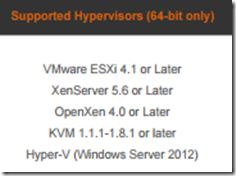
Because I am using VMWare workstation for my lab, I had to convert the OVA download into vmdx format.  No biggie once you have done it.  Here is the list of supported hypervisors.
image

Once that was done, there is a defined install guide that walks through the initial base configuration and then it is on to the good stuff.  Simple.  Worked first time through. What could be better?

In my time with this exercise I screwed up the entire mess.  So the support engineer had me check a box and restart.  The end result is that the box recovered with the previous known good.  So nice.

image

Speed

Speed is not an issue here.  The web UI is very snappy. Content delivery was noticeably faster than competing products.  I like that – I have zero patience for slow stuff when the resources are not being overtaxed and something is slow just because.  Array does not seem to have that problem.  Fast fast fast.  Did I mention content delivery was zippy?  And it got better with compression enabled.  I like it.  “nuff said.

Configuration

One of the issues administrators run into is configuration.  Sometimes just reading the documentation is enough, sometimes formal classroom training is almost a prerequisite to success.  The vAPV fits somewhere in between the two extremes.  Getting into the GUI and poking around was easy enough, and seeing the basic administrative function was clear also.  At that point, neither of my brain cells could figure out what was needed.  Maybe I am just a bit dense.

Luckily, there is this built-in “quick start” feature where there is an outline of the steps needed to do tasks.

image

But still, Array has so much to offer that the granularity gets in the way of the KISS method I like.  Even when using the list shown above, I was at a loss to divine the steps to get things working.  See below for “SUPPORT.”  Configuration will be much like using an AlphabetNumber product.

For you CLI types, Array also supports a full CLI that will allow you to script your configuration and work that way.

VS and Reals and Groups

Here is what we need Mr. vAPV to do for us:

image

Granular is the word of the day here.  Think of each service you need for your system.  You will need by IP by port.  So, 1.1.1.71:443 is NOT the same as 1.1.1.71:8080 – each of those needs to be separate.  And the common name is going to need to be unique also.  <sigh>  Each of these services, just for a DNSLB setup in SfB required the following.  Yes, I have my SE web services going through here also as I wanted to play with the content redirects.  Figure out your naming convention per layer before you start.

image

After you make the real servers up, you then need to lump them into groups.  Reals into groups; groups into virtual services.  Think ahead.  Maybe some UML work might be in order before you start?  Oh yes, you cannot put TCP reals into an HTTP group and hence an HTTP service.  Or, at least I could not figure out a way to do so.

image

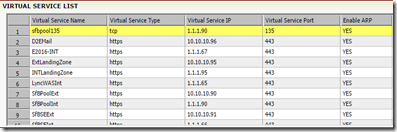
Once you get past the real server and group setup, then you need to worry about the virtual services.  For my environment, here is what I came up with.
image

Logs

The APV has logs everywhere.  Which is right handy at times. For instance, you can drill into a group, and down at the bottom there are some basic stats listed for that group.

image

Included in the unusual plethora of admin tools is a copy of the running configuration for you CLI afficianados. And to get you really into it, the display is separated into startup config and running config.  So nice.

Monitoring of the entire mess gets granular as well.  Statistics exist for every layer of the construction.

image

Graphs?

Are you visually oriented?  You want pretty pictures to show that your virtually shiny appliance is in fact doing something?  Well, APV has you covered.

imageimage

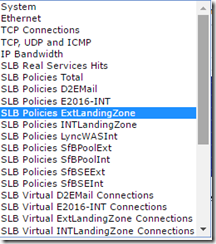
And you can choose from the following pre-defined graphs…notice how the pre-defined collection has our configured real, virtual, and policy connections listed.  *I* did not do that – the system saved me my lunch break.
imageimage

You can also make your own definitions.  I put this beauty together in about 30 seconds. Such an artist am I.

image

Content Redirects

Near and dear to my heart is content redirects.  Not every customer of mine has entire class B subnets to work with in their public space – so we try to conserve IPV4 space as much as possible. If you read the link there, you will note that there was syntax involved, and you had to know what you wanted before you started.  Not a problem for ME…might be for an un-initiated hard-charging techie.  APV has you covered here also.  The content re-direct policy stuff in the vAPV was done on the fly, with no syntax needed other than knowing the called URL from the client perspective.  Sa-WEEET!  What you see here took about 10 minutes from start to finish.

image

Routing

Would you like to route stuff around your network?  Would you like some content to go via certain routes?  APV has you covered

(I just realized I have been using that phrase a lot.  But, in truth, APV does have all the bases covered, and then some.  Every time I look at it, there is more to appreciate.  Simply a very well done product that is continuing to evolve and get better.)

Adelante!

There is more in that networking section (basic and advanced) than my little pea-brain comprehends, but I showed this to a few networky-techy-nerd buddies, and then had to clean up drool from the monitor.  Their excitement over the possibilities was palpable.

image

Compression

Would you like some of your content delivery to get compressed and some not?  FWIW, this makes OWA 2016 pop on screen rather than ooze up there. As in a LOT faster.  I did not measure as I have no facility to do accurate measurements – Array claims 500% improvement over non-compressed.  I don’t know about that, but I know OWA flies up on screen.  OOS and OWAS scream into being rather than just oozing.  According to my setup, there has been an “87% compression ratio of compressible data” – whatever that works out into improvement percentage I do not know.  But seat-of-the-pants – mucho mejor.

IPv6 support – NAT64

When enabled, the APV can translate ipv6 to ipv4.  Or ipv4 to ipv6. You can’t mix the two in a group, but you can have both inside and both outside – you just can’t mix the group. I can think where this will come in handy down the road just a bit as (supposedly) the IPV4 pool is now exhausted.

SSL

Yes Matilda, the vAPV does SSL.  My configuration is decrypting and inspecting, then re-encrypting and sending to the real servers.  All faster than you can type about it.  The certificate import process was easy as it took .cer format directly.  I had some moments with the configuration, but read below in “support”  - we got through it.  After having it explained to me in kindergarten terms, even I grasped the simplicity (when you think about it) of how the SSL is handled.

image

image

image


Support

Take a look at the wealth of deployment guides here.  The only problem I see on the deployment guide page is that the Lync 2013 guide is for the full load balance solution, whereas I only deploy in that fashion when I am pushed into a corner for some business or technical reason – otherwise I am going to advocate and deploy DNSLB.  In working with Array support engineers, I am told that the SfB documentation will include both methods.

I had some difficulties due to the extreme levels of granularity of the APV. My friendly (he never cursed at me – not even once!)(and I gave him plenty of reasons – there are times I am just stupid beyond belief…) support engineer showed me how to get multiple ports into the virtual service so that you could theoretically define a real service with port 0 and then create virtual services with any ports you want.  so if you had some generic needs, like RPC Endpoint mapper and port 80, you could handle that with one assembly.  Not the most obvious solution set, but when you look at the granularity model, it makes sense.

So they get a frowny, a smiley, AND a straighty.

Sad smileSmileDisappointed smile

I will reiterate, even in the midst of my personal issues, my assigned Array Networks support engineer was extremely helpful and patient. I am not the easiest person to coexist with; whoever that guy is deserves a medal.  If the rest of the folks at Array are anywhere close to this guy, it speaks well for them as a company/staff.

The SfB / Lync Connection

I would not be doing this homework if it was not for wanting to make my customer’s Skype deployments better.  That’s the bottom line.  After configuring the APV as shown above to match the environment shown below, SfB was happy as can be.  Internal and external web services were flawless. No issues.  OWAS as mentioned popped up on screen.  LWA worked perfectly.  Mobile clients went tearing through. I saw no issues whatsoever – let alone anything that could be attributed to the compression.  Web services with the compression were “seat of the pants” faster.

lab

The Array Networks installation/deployment guide does a fine job of laying out the requirements and the “how to” part of the vAPV deployment to support Lync/SfB.  I have not yet had the chance to convert to a full load balance solution (nor do I really want to), but I would imagine that the results would be the same.

Conclusion

Let’s face it.  If you have an organization that is big enough, or perhaps small but needing the services of a load balancer – be it application delivery or just simple reverse proxy, then almost anything will work.  However; should you want to control the beast, and use your deployment for something other than just a one off, you need something more sophisticated.  As your traffic load grows and expands to cover more than just one workload, the underlying network devices become more and more important.  Enter Array Networks. The Array vAPV (and the physical APV for that matter) presents some very interesting feature sets for discussion.  Do you want simple or do you want granular control?  Are you willing to accept some sluggish performance or do you want screen-popping speed? Local load balancing is needed and you want global load balancing options for the future? If you went the caviar route on those questions, then Array Networks needs examination.

For a load balancer/application controller that offers a great feature set, is granular (seriously granular!), along with being wicked fast, then Array networks vAPV should be on your short list. 

You can get your very own vAPV here.

YMMV

test 02 Feb

this is a test it’s only a test this should be a picture