About Me

My photo
This is a blog for John Weber. One of my joys in life is helping others get ahead in life. Content here will be focused on that from this date forward. John was a Skype for Business MVP (2015-2018) - before that, a Lync Server MVP (2010-2014). I used to write a variety of articles (https://tsoorad.blogspot.com) on technical issues with a smattering of other interests. I have a variety of certifications dating back to Novell CNE and working up through the Microsoft MCP stack to MCITP multiple times. FWIW, I am on my third career - ex-USMC, retired US Army. I have a fancy MBA. The opinions expressed on this blog are mine and mine alone.
Showing posts with label Skype. Show all posts

2019/02/15

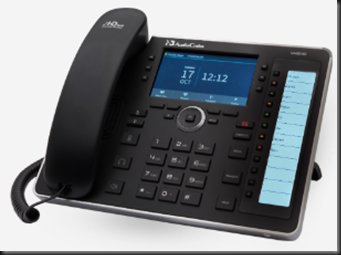
Audiocodes Teams Phone C450HD

I feel like cueing up Steve Martin in “The Jerk” but I have already done that once, and I hate to repeat.   So, you think about that scene where the phone book arrives….

I got a squeaky new Audiocodes C450HD.  A long time coming.  But, now I have a Teams phone.  And based on the goodness that is an Audiocodes handset.

So, we should have a pretty nice piece of gear here.  Let’s kick the virtual tires and see how this thing works.

Taking it out of the box, connected to PoE, and here we go…


Tapping the 'Sign in' gets you to the Company Portal page, and a further tap in address entry cell pops up a handy qwerty keyboard.


Edited Note:  I contacted Audiodcodes about the placement of the virtual keyboard and was told that anything UI is Microsoft-dictated.  So, if you get chapped off at poor design (like I did), your complaint needs to go to Microsoft, who we all know is NOT E.F. Hutton when it comes to this kind of thing.
Once you figure out how to spell your UPN correctly, and the verification code is received, you get two options for data entry…keyboard on screen or you can simply use the big square things on the phone itself.


There are a few cartoon screens of “how to” and “what can you do…”

But in the end, you get this – and you say to yourself – “…this is different…”


Let’s do a little reading to figure this out. And we discover that on this page here:  https://www.audiocodes.com/library/technical-documents?productFamilyGroup=1672&productGroup=16127 there does not appear to be any user guide for the TEAMS version of this phone…. odd.  

A quick call to my Audiocodes contact (who I am sure  will never answer my call again) revealed that the code is not GA yet (Microsoft supplied code) so therefore the TEAMS documentation is not published yet.  Bummer.

But, to answer my own question, a few quick (or not) logins later and we have the information that “Shared” pretty much presents the phone as a CAP (nee SfBS CAP).  I can see how to make this have a semi-generic account and get invited to meetings and such… and then the room could have this phone in it and we’d be able to join the meeting, but not see contacts, history of personal calls, et cetera.

Shared:  Nothing but join a meeting.


Personal: here I am presented with calls,. meetings, my voicemail.


After all  the button clicking and MFA entering, we now have a phone that works with Microsoft TEAMS natively.  Not a 3PIP phone that sort of works, but a handset set that is actually a full login.  Minus video, screen sharing, and access to my full Teams account content.

You can make the C450HD into an SfB phone if you wish.  From the login screen, before you login to the Teams phone, switching the c450HD to SfB is three clicks.

Menu | Debug | Switch to Skype for Business


I have been using this device now for the better part of this week to make and take my business calls and participate in meetings.  The build quality, technical execution of the device, audio quality, fit, finish and feel are all what you would expect from Audiocodes. 


YMMV

2019/01/23

Surface, SfBS 2019, PKI

Thanks to Yomi for helping out. Hopefully you have been nice to him. Apparently today I was worthy.

Do you have:

  • SfB 2019/2015 on-premises?
  • Empty root domain with child domain that has the user accounts?
    • Domain.com and ad.domain.com?
  • Internal PKI for internal functions; public PKI for public-facing functions?
  • Multiple SIP domains?
    • Domain.com, aa.domain.com, someotherdomain.com, someotherdomain2.com, (I had 15 of these)
  • Surface hubs that appear to be V1 devices?
    • Mine reported themselves as 10 (built 15063) with all current updates. This will be a bit tricky as all the guidance from google-fu shows different screens that what I had. But you can probably read between the lines a bit and still be successful.
  • Setup the user account as normal – full Exchange mailbox, setup same to handle calendar auto enroll, etc.
    • Non-expiring passwords highly desired but not required (you have to change the PW on the device each time the user account changes PW)
  • Enable that email account as SfB user. EV not required, but they need to be account as described in various guides… full mbx, full calendaring, etc.

The issue at hand:

  • Surface logs in as device admin, finds Exchange account and logs in. Any attempt to login as SfB account results in either a refusal to do anything (you got the SIP domain wrong) or it just spins.
    • For the first one, check your spelling.
    • For the second, it turns out to be two issues:
  • First, the cert being presented by the SfB internal services is PRIVATE, so therefore a non-domain device/user (like a Surface)(Windows Team – the core O/S on a Surface cannot join domain) does not have the Trusted Root Cert from the internal PKI CA, so it refused to connect.
    • In my case, ZERO additional information – no error message, no nothing… just the spin. Bummer.

Fix:

  • You need to tell the Surface to like/trust both the SIP domain name AND the domain the server itself resides within.
    • Ex: sip domain of domain.com, server domain of ad.domain.com
  • And you need the trusted root loaded onto the Surface.
    • Easier said than done.

To fix the first one:

  • Get into the settings (requires device admin)
  • All Settings| Calling and Audio|configure domain name
    • You can enter multiple names comma separated
  • Restart to have it take effect
  • Download via Windows Store the “Windows Imaging and Configuration Designer.
    • With my squeaky new Zbook, the our corp store barfed on delivering what it said we owned. But, there is another source also:

https://docs.microsoft.com/en-us/windows/configuration/provisioning-packages/provisioning-packages

https://docs.microsoft.com/en-us/windows-hardware/get-started/adk-install

  • I did choice #2/3, and then installed JUST the one tool needed as noted in the link.
  • From there, get a copy of the Trusted Root Cert, and then follow these instructions:

https://docs.microsoft.com/en-us/windows/configuration/provisioning-packages/provisioning-create-package

https://docs.microsoft.com/en-us/windows/configuration/provisioning-packages/provisioning-apply-package

  • Next, restart the Surface.

Finally. Enjoy the goodness.

YMMV

2018/09/24

Logitech Meetup ConferenceCam

In the past, I have used a Logitech cs3000, I had a furious love affair with a bc950, and then I settled down to just using my laptop camera when needed.  Except that did not give me some speaker phone features, no zoom, no pan, no “see the whole room” stuff.

For the last month or so, I have been wringing out a Logitech Meetup.

image

I threw the box away today, because the Meetup now has a permanent spot in the Tsoorad Test Lab.  I find myself using it as a speaker phone AND a video provider on a regular basis.

Here is the Logitech market-speak.

MEETUP

All-in-One ConferenceCam with 120° field of view and integrated audio, perfect for small conference and huddle rooms

  • See everyone, even those close to the camera
  • Works with your video conferencing applications
  • Compact design minimizes cabling and clutter

Furthermore, Logitech claims that:

MeetUp is Logitech’s premier ConferenceCam designed for small conference rooms and huddle rooms. Stop crowding around laptops. With a super-wide 120-degree field of view plus a pan/tilt lens, MeetUp makes every seat at the table clearly visible. With integrated audio optimized for huddle room acoustics, everyone can be heard as well as seen.

The question, of course, is how well are these claims delivered?  Let’s find out.

OOBE

You also get a 16-foot USB cable, power supply, wall mount hardware, and user documentation. The system is certified for use with Skype for Business and Cisco Jabber and offers enhanced integration with BlueJeans, Broadsoft, LifeSize Cloud, Vidyo, and Zoom. That support includes the ability for remote participants to control the camera.

How long are cables?  Dang.  Break out the zip ties if you don’t need all that cable length.  Still, very nice to have.  Sit it on a windows sill, table, shelf, or other flat surface.  Or, mount it to the wall or something like that.  The mount will do both.

I had to put the batteries in the remote control module.  Oh! The horror of it all!

image

But, let’s be somewhat careful and do some reading.  At which point I discover that the included cables won’t do 4k.  You will need an aftermarket cable to get the full bazillion square foot display that some folks want.  Good luck finding a USB 3.x A to USB C cable longer than 1 meter.  I just did 1/2 hour of google-fu and did not come up with anything longer than 10 feet.  And that was $92.  Be that as it may, my myopic senses probably cannot tell you the difference in 1080p and 4K coming out of this camera into a web-based video room.

image

SfB/Teams

Here is the bottom line.  My use of the Meetup device in both SfB and Teams was totally seamless (I also have used the Meetup with Webex Teams, and meetings on Bluejeans and Zoom.  Seamless).  The Meetup is an extension of your local host – a Lenovo T530 running Windows 10 in my case.  Operated perfectly.

image

Zoom/Pan/Tilt

Here’s a problem!  I spent too much time playing with the controls.  Addicting.  In and out. Left, right, up, down.  Fun!  And works well.  There is also a button smack-dab in the middle of the control module that returns the camera to dead center. And there is software for download that works pretty much as advertised.  You can also pair this thing with your BYOD to get access to the speaker phone and control the entire unit if wanted.

No zoom:

image

Zoom

image

Audio Quality

*I* thought the audio quality was quite good.  Volume, minimal distortion (if any) even at high volume levels; good timbre, overall, a solid 9.5 on the Tsoorad Goodness Scale.

Video Quality

I wish it had optical zoom instead of digital.  I mean, it sure looks like digital zoom.  Having said that, it did everything I wanted it to do in video terms.  I am a not possessing the requisite USB 3 cable to enable the 4K, but the 1080p sure looked pretty good to me…zooming in did result in some blurry stuff – I bet the 4K would fix that.  Impressive it is.  9.0 on the Goodness Scale.

Conclusions

Do you have a 6-10 person room?  Are you wanting to park something in there that participants can just walk up to and plug in and voila! they are in a meeting or can start hosting one?  Are you tired of the laptop camera restrictions on that scenario?  Don’t want to spend a large amount of cheddar on a dedicated wall unit like a Surface or other expe$ive system?  Then this Logitech Meetup is probably just right for you!  Typical great build quality, nice feature set, good controls, integration with just about everything, and with great audio/video quality.  What are you waiting for?

You can get one right here.

YMMV

2018/08/07

Audiocodes 445HD

A while back, I bricked a 450HD. Ooopseyo!

When I contacted Audiocodes to whine for a new one they sent me a 445HD also.  Why?  Beats me, maybe they think I will review it?

Here is the official marketing fluff. Assuming you take the time to read all that, does it all add up to “An advanced high-end business phone with a color screen and integrated sidecar for speed dial contacts and presence monitoring.”

Yes, I think it does.  If you are in the market for a higher-end low-end phone, this is it.  Need some color in your users life or they can’t keep up with the Jones?  This is it.  Need something to connect to Office 365 SfbO?  This is it.

image

Here is the 445HD feature list:

Certified for Skype for Business
Graphic 4.3" color multi-lingual LCD screen (480x272)
6 programmable multi-function keys
4 soft keys
12 programmable speed dial keys with presence monitoring on a dedicated LCD (376 X 60)
GbE Support
USB headset support

In case you have not done any professional reading here is the overall Audiocodes IP Phone “highlights.”

High voice quality
Support for SILK codec
Full duplex speaker phone
Robust security mechanisms
PoE or external power supply
Out of the box global redirection server support
Multi-language user interface
Centralized management with AudioCodes IP Phone Manager (available for download free of charge)

Build Quality

The only complaint I can gin up on this subject is the stand portion – I always think I want more adjustability.  Other than that (and that is extremely minor), the materials and construction are top-notch.

Does it work with Skype (Online or on-premises – better known now as SfBO and SfBS)?

Duh!  Why else would I be writing this?  Yes, near seamlessly.  Not totally seamless because to do web login I have to jump through some O365 hoops.  But, in the end, I will paraphrase a popular Norte Americano beer spot: “…works great, less hassle…”

I have full status for system users… if they are on SfB, then I see their presence.  The side car can be programmed with an extension on the system, and I get presence from that minimal information.  So nice.

Audio

Audiocodes provides great audio.  Maybe even excellent audio.  IMHO, much better than the competition.

But how is this thing to use?

I use it as a calendar minder, a phone call maker, a redial source because I am lazy, and a speaker phone because I don’t want a headset clamped on my noggin all day.  Did I say it has a color screen?  Visually, the 445HD works really well.

Buttons are large, with excellent tactile feedback. Programming the phone can be done via IP Manager, configuration files stored on an FTP or TFTP, or the device has a web interface.  All of this thought out for maximum ease of use, which is mostly delivered upon.  An example would be the attached sidecar buttons. Although, can it really be a sidecar if there is not a detachable piece?  It’s all one unit. 

So how about the “side buttons” which are referred to as “function keys.”  No matter.  Find a “function” key that has a blank display and press it.  The phone immediately pops to that menu and allows you to enter in your favorite bodega for delivery. 

image


and a few judicious key presses later we have lunch on the hook.

image

It won’t take an advanced degree in psychodynamics to figure out the rest of the phone either.  The controls are very clear and solid feeling.

Support

Depending on to whom you address the question, Audiocodes has great-to-excellent support for the HD IP Phones.  You can count on the dev’s there to be looking at their firmware and they are ever-improving things.  Mainstream, forward looking, and easy to contact.

Summary

I like this phone device.  Great price point, great feature set.  The only thing missing is touch, but the target for this device is not the touch crowd.  I can see this device as that “in-between” model where you need something more, but just not all that more (see 450HD).  Typical Audiocodes quality means you cannot go wrong.

You can get your very own 445HD right here.

YMMV

2018/07/12

Landis Contact Center

Now, this is significant.  MVP Matt Landis and his merry band of mavens is getting their contact center out to the world. This is a happy event for those of us looking for just a bit more than nested RGS.

Hot off the email press:

https://www.landistechnologies.com/office365contactcenter/


We Plan to Announce Office 365 Contact Center is Publicly Available as Preview at Microsoft Inspire 2018

We wanted to you to be the first to know what we will be announcing at Microsoft Inspire 2018:
Las Vegas, Nevada 7/16/2018 - At Microsoft Inspire 2018, Landis Technologies LLC is announcing that Office 365 Contact Center is now publicly available as a Preview. The Landis Technologies Office 365 Contact Center provides Microsoft Partners with a call center solution that can be provisioned and running in minutes. To read more: https://www.landistechnologies.com/office365contactcenter/ .... read more


Copyright © 2018 Landis Technologies, All rights reserved.
Landis Technologies Office 365 Contact Center


YMMV


2018/07/09

Sennheiser SfB headset review (July 2018)

This review is going to cover the “Sennheiser SC 75 USB MS Binaural UC Headset USB 3.5mm” (there is a serious product title) and the Sennheiser SD Pro 2 ML DECT Wireless Binaural Headset (a shorter title but still a mouthful).

The 75 is a wired (USB via an inline module adapter thingy).  The SD Pro2 is a DECT wireless.  Both have a place, and both are very nice units.  Both are Binaural.  I tend to run to binaural when at all possible due to my hearing loss.  And music sounds way better.  Two ears are better than one.  Trust me.

But, wired v wireless is a big differentiator.  For the center mass of your office workers, a wired headset will work just fine.  But some people (like me) like the flexibility of the BT or DECT modality so they can walk and talk.  I know several customers who routinely go to the server room and you would never know they are not at their desk.  DECT has a range (projected/published) of 300 feet.  Whether or not you get all of its range is problematical and depends on perfect conditions.

The SC 75:

image

SC 75

Coming out of the box the SC 75 is in two pieces – the cable that plugs into the inline module, and the overall headset.   Pretty basic.  However, that basic stuff is good. Plug it in and it works.  Simple as that.  SfB picked it right up and I was operational.  Teams required that I tell Teams to use it.  After that, seamless. 

The SC 75 audio quality that is a solid 9.5 on the Tsoorad Goodness Scale.  Build quality seems very nice.  Materials are typical Sennheiser.  No ANC, but that is a personal preference.

The SD Pro 2


image


Now this is my type of device.  Wireless.  DECT.  Comfort.  Great quality, both build and audio. ANC. A superior piece of gear.  My SfB client loved it…it did not have to do anything but tell it to be the preferred device one time, and after that, all was golden.  I suspect that the “one time” thing has to do with me having like 12 headsets currently going through testing.

image

Of the two, I spend most of my testing time with the SD Pro 2.  It meets my personal needs better than the wired headset.  Having said that, I need a travel headset also, and the SC 75 does meet that need.  So, the bottom line is, you can’t go wrong with either!

You can get the SC 75 right here, and the SD Pro 2 ML right here – and both worked equally as well with Microsoft Teams as they did with SfB.

YMMV

2018/06/26

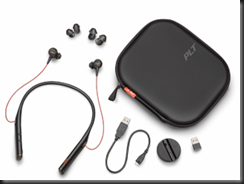
Plantronics Voyager 6200 UC/B6200

A Plantronics BT device came into my hands the other day.  I have been thinking about this device style for a while – I see folks with them, and always thought my existing BT device was good enough.  But, I keep seeing them, so…what’s the story. What’s the draw?

Here is the official market speak on the Plantronics Voyager 6200 UC. 

Here is a pretty picture, just so we know what we are talking about.

image

Isn’t that just the world’s best cell phone photograph?  I was going to use the PLT graphics, but that would be just sucking up, because… I am fixing on saying how great the 6200 UC is – maybe only for me, but these things are bordering on being the greatest thing since sliced bread.

As I pondered what to say, I realized that after testing with Skype, SfBO, Teams, and my cell, all to great success; (great audio, pretty good background noise suppression (ANC), and typical excellent Plantronics build quality) that I wanted to continue with Magic Slim and The Teardrops.  That in itself is telling.

Usually I test a device, make some quality comments, observe if it does what my use case scenarios dictate, and determine comfort and audio quality – and then, fair or not, compare to my existing device stable.  In the case of the 6200,  I just kept using them and knowing that I had 9+ hours of battery, I kept testing.  At some point, I stopped testing and just was “using” because this device moved into the “actively used” category.

So, let’s dive in:  According to the aforementioned market-speak:

Features

image

You can get a fancy market-speak sheet to impress your budget approval process.

Fit and Function

The Tsoorad Test Labs says that this 6200 is a 9.9.  I had to adjust to the ear thingies.  Small was too small.  Medium was too medium.  Who uses the large?  The device around the neck thing pretty much was a non-issue.  I like the idea of ripping the earphones out and dropping them, and they go nowhere.  Nice if you are like me and wonder where the earbuds went to.

Laptop, SfBS, SfBO, Teams

All my laptop functions worked as you would expect from Plantronics.  Already paired to my cell phone, inserting the BT600 dongle resulted in a few binks and bonks and wala! working as expected.  I typically do not operate my headset on two at once, I find that the ever-changing volume settings bothersome, and if you are a music at work person, the constant interruptions in the music flow are bothersome as well.  I am sure there is some esoteric setting buried in Windows somewhere to stop that, but I have never found it.  SfB 2016 client picked up immediately.  Teams picked up immediately. 

Audio in/out

Audio quality for voice is very nice.  Good volume control in terms of range of adjustment.  Bass response is at least as good as any other earbuds I have tried.  Microphone pickup sensitivity seems most excellent as well. 

Musically, the 6200 suffers from lack of driver size just like any other set of earbuds – I don’t care who makes them, bass is achieved by moving air, and those little cones in an earbud simply are taxed by bass.  Having said that, the 6200 cranks along right well.

There’s even an APP for that.  Yes Matilda, in the space of just a few minutes I was controlling my 6200 with my phone.  Gosh, how exciting!  Firmware updates, turning things on and off.  I felt empowered.

What’s in the box?

A carry case (actually pretty nice), a short USB cable that connects to either the 6200 or the included charging dock/stand.  And, for you double-up-the-device types, a BT600 dongle so as to enhance the laptop media experience. Oh, and three sizes of ear cushion thingies.

image

Cost

There are various views on this subject.  Personally, I think to a large extent you get what you pay for.  If you want to pay $29.99 for a set of wireless earbuds that are BT, have ANC, and that deliver some serious music reproduction chops, while allowing you to make and take calls on your cell and your laptop, then get ready to be disappointed.  But, if you want something that rocks functional, is durable, with features you can use, and then proceeds to wallop music, then this is the price point for that excellence.  You can get yours right here.

Summary

Usually, in testing I include all the stuff above. The Tsoorad Test Lab Score is limited to the 9.9 (ear bud fitment) so the 10’s I was going to give it in all the other categories got trumped.  I could have said that.  OR…

In this case, I could have just made this statement: “These things are firmly in my “keeper” category.”  Seriously excellent stuff here.

2018/06/14

audiocodes IPP firmware 3.1

A bit ago, I was the recipient of some new Audiocodes firmware for the 405, 440, 445, and 450.  There is an HRS version as well. 420 is not in this cycle.

Happy to report that based on rigorous Tsoorad Lab testing, all seems to be pretty good with this update.  Numerous new features (especially on the 445)  that bear looking at.  In my testing, I did not discover anything wrong – no devices bricked, they all came back working as expected, new features were there, everything worked as before (always a plus).

You can get yours right here. After 3.1 reaches GA, AC will  (I am somewhat convinced as they have in the past)  create and publish the necessary CAB files to enable pushing this update via SfB/Lync webserver methodology.  If you use the IPP Manager (either express or full) the IMG files work for updating – in my environment, it just works.


IPP Manager view of the new goodness:

image

SfB CSCP view of the old goodness – but you get the idea, right?  Just noticed that the HRS image cab is not showing.  I have asked my AC contacts about that.  Time will tell.

image

Either way, YMMV

2018/05/14

IPP Manager Express Redux

A while back, I did a little write-up of Audiocodes IP Phone Manager Express.  You can read that right here.  A few days ago I installed a newer version and there is enough difference to warrant a redux.  Specifically, I would like to record for my own purposes a configuration that works (so I don’t forget) and maybe you can use it also.

Pre-Conclusion Statement

If you read no further, know this, I like the IPP Manager, I really do.

What are we doing here?

What we need to do is support a number of Audiocodes IP phones – a bunch of 405HD and 450HD models. We want some very basic changes made to the default OOBE configuration, nothing major, but we do want to be able to hand the phone to the user and have it just work.  Audiocodes calls this “Zero Touch” – which was enough of an attraction to get me to try it.  But, I ran into some “difficulties” when I attempted to interpret what somebody thinks is really outstanding documentation into a workable configuration.  After several emails, and several configuration sessions, I managed to achieve parity with the configuration genie. 

Diving In

Installation went as easily as before.  I did not understand the need for a clean server before and I don’t now.  Fuzzy logic on that one.  But, OK, I am in a freebie lab situation.  While the install is happening, let’s verify DHCP Option 160.  And right there we started having issues.  Which option to choose seems to be an ambiguous question as both seem to to work equally well, with ONE of them being preferred, but not required, and no clear (to me) guidance of which is which for my needs.  What I thought would work did not.  I had to use plan B.

Plan A: http://1.1.1.76/firmwarefiles;ipp/dhcpoption160.cfg

Plan B: http://1.1.1.76/firmwarefiles;ipp/tenant/Default

This did not jive with MY reading of the docs.  However, I am sure that I was doing something wrong, so I tried plan B.  At that point I was in Tshooting mode, and I don’t really know if the DHCP Option 160 choice fixed it or if it was the other part I did.  Either way, I found the documentation a smidge confusing.

At any rate

The install churns along, and before too long, we have this lovely “modern” “more visually attractive” “metro” site open on our local machine. You will note the devices already registered – so nice.

image

One of the things I neglected on my first pass through on the config of the tool, was the tenant.  Because the documentation said there was already one there… and so there was!  But it needed a touch of configuring itself, and that was a bit fuzzy as well. This version of the IPP Manager Express requires a “tenant” which is loosely equated to subnets, but could be a separate fiscal entity.  Clearly this line of management tool is meant for something much larger than my little slice of life.  OK, I can work with that.  A few more emails and a few guesses worked out the kinks in that one.

image

If you are doing the “see if the picture matches” thing, here is where you will find the mismatch.  My default tenant picture there is of my lab, where only have one subnet in my lab.  It is just me and my 8 favorite cartoon characters.  254 addresses is more than enough.  But, I have this customer.  You know those pesky customers.  They always seem to expect some sort of defined success.  And don’t you know these folks expected this tool to provision their phones when they have at least 12-15 subnets in the 172.xx.xx.xx/16 range, and the potential for having  SfB clients or a SfB-hosted phone on any of those segments to include the VPN segment.  Yes, Jimmy, I told them not to run the audio/video across the VPN.  You may sit now.

Defining the “tenant” with the proper subnet mask is REQUIRED.  Now, I suppose you could do something dogmatic and create a tenant for each subnet.  You could.  But I did not have a business requirement (see above) for that.  And notice that the subnet in the pic is a MASK not an actual IPv4 address.  We will wait while that runs through a digest cycle.

What we did was define the client subnet as 255.0.0.0 or, /8 which is actually a huge supernet.  But works for the simplicity angle we were also looking for.  We know it is not technically correct to address it that way; but what it did was allow the one IPP Manager to handle ANY address needed.  According to the default tenant in this configuration of  IPP Phone Manager Express, any address that can talk to the server is on a valid subnet.

Moving On

The next thing was the need for a blank template per IPP model (the 405HD and 450HD) and then each needed a customization file.  Included in the install distribution is firmware from about April 2018, and the phones will make use of those firmware files that are newer than the phone. The point here is that I needed to create my own templates before things worked.  I may have (almost certainly) done something wrong in my initial setup.  I know I expected it to be more like my old version – so there is no telling what I did wrong.  I just know that what I have now works. 

Templates

image

I am not going to go through the tenant template file – yours won’t be like mine, but you can clearly see where I have a default tenant configuration template for each phone type and they are tagged (the green/white check mark) as the default.

Once you get this far, you still have a dead stock phone.  Let’s take a look at the edit from here out.  Navigate through the various options and see what is what.   Then click on the button indicated.

That gets you to this:  Fill things out to suit your needs:

image

Make sure that you select the “default” button or not depending on your needs.  You can always go back and make a new one if needed. I know that was needed in my case. Now, you would think that would do it, right?  Well, unless I was making a lot of bad choices, no, now you need to EDIT the entire thing. 

“Ah saved it.”  Huh?  Did I not already do that?  I guess not.

Let’s select “Edit” on our new template.

image

And you get this:

image

Scroll your badself down to the bottom – and there are multiple panes here – confusing as all get out when you work remote…. get to here:

image

Generate your Global Configuration Template for this ONE PHONE MODEL.

image

Woot!

Now, not done yet, we want to edit the template:

Select this “Features” button:

image

In my case I needed the Daylight Savings Time and the Pin Lock.

Here is one, you can figure out the other I think.  But know that when you “SAVE” at the bottom, it will write a secondary config file that the global template will read and enforce.  And that file IS created when you click save.  Don’t ask me, the inconsistency killed me too.

image

Save it…this file is actually located on the ACPhoneMgr drive.

image 

Why the different file saving scheme I have no idea.  But you need both for this to work.  At this point, power cycling a phone does the trick. Phone installs new firmware; reboots, then changes configuration as we want.  So nice.

Conclusion

There is some disconnect between the versions, perhaps due to my lack of mental agility.  This version seems to have some fuzzy documentation – again it could be me.  This is nice piece of kit once you get it cranked. 

PS

I bricked a 450HD while testing this. Phone recovery did not go so well.  Have you ever wondered why a phone with a USB port doesn’t read that port for firmware and as part of the phone bootstrap routine install whatever it finds there?

As always, YMMV


2018/04/19

SfB Disabling TLS 1.0/1.1 Guidance

Update 20181107
Microsoft waffles yet again.
https://support.microsoft.com/en-us/help/4057306/preparing-for-tls-1-2-in-office-365


On October 31, 2018, Microsoft Office 365 will be disabling support for TLS 1.0 and 1.1. This means that, starting on October 31, 2018, all client-server and browser-server combinations must use TLS 1.2 or later protocol versions to be able to connect without issues to Office 365 services. This may require certain client-server and browser-server combinations to be updated.
https://support.microsoft.com/en-us/help/4057306/preparing-for-tls-1-2-in-office-365

SfB impact?

At a high level, this requires installing Skype for Business Server 2015 CU6 HF2, applying pre-requisite updates to .Net and SQL, and finally another, separate round of OS configuration updates, i.e. disabling TLS 1.0 and 1.1 via registry file import. It is critically important that you complete installation of all prerequisites, including Skype for Business Server 2015 CU6 HF2, prior to disabling TLS 1.0 and 1.1 on any server in your environment. Every Skype for Business Server, including Edge role and SQL Backends, require the updates. Also ensure that all supported (in-scope) clients have been updated to the required minimum versions. Don’t forget to update management workstations as well.

Background reading:

https://blogs.technet.microsoft.com/cloudyhappypeople/2017/12/22/the-end-of-support-for-older-tls-versions-in-office-365/
And then read part 1 here for more background specific to SfB/Lync and the supportability statements
https://blogs.technet.microsoft.com/nexthop/2018/04/18/disabling-tls-1-01-1-in-skype-for-business-server-2015-part-1/
Part 2 here gets into the weeds a bit on “How To Achieve”.https://blogs.technet.microsoft.com/nexthop/2018/04/18/disabling-tls-1-01-1-in-skype-for-business-server-2015-part-2/Part 3 will be published at a later date.  Woot!

Here is guidance for Lync Phone Edition (LPE):

https://techcommunity.microsoft.com/t5/Skype-for-Business-Blog/Certified-Skype-for-Business-Online-Phones-and-what-this-means/ba-p/120035 

General TLS1.2 whitepaper:

https://cloudblogs.microsoft.com/microsoftsecure/2017/06/20/tls-1-2-support-at-microsoft/

Here is the Microsoft Exchange equivalent:

Part 1https://blogs.technet.microsoft.com/exchange/2018/01/26/exchange-server-tls-guidance-part-1-getting-ready-for-tls-1-2/Part 2https://blogs.technet.microsoft.com/exchange/2018/04/02/exchange-server-tls-guidance-part-2-enabling-tls-1-2-and-identifying-clients-not-using-it/And big surprise, part 3 to be published later.

Summary

If you or your customer is doing anything with Office 365 hybrid, then you need to be reading all of this and figuring out your next steps.


2018/03/03

FastTrack Network Checking

You may not know but Microsoft is providing a fairly nice tool to check your network for SfB performance.  Free.  Free is a very good price, eh?

I am not going to extol the virtues and services offered by fastrack.microsoft.com, I just want to delve a little into the network checking tool.  And, this tool has been around for a bit.  So, I wanted to get a little updated review.

First off, I cannot even find this thing anywhere on the https://fasttrack.microsoft.com site.  Sorry.  Maybe I am blind,  but I am not seeing it anywhere.  There is probably some zippy button marked “tools” but I am just not groking.  Having said that, I know of

http://ap1-fasttrack.cloudapp.net/o365nwtest

http://em1-fasttrack.cloudapp.net/o365nwtest

http://na1-fasttrack.cloudapp.net/o365nwtest

Here I am checking my lab tenant against the ap1 site.

image

Note the two addresses given by the tool…

image

The 76 address is my laptop, currently operating from a hotel out in the middle of the Oregon Cascade mountain range.  So, this connection is going to be testing from my laptop to the AP1 site to see how things stack up. 

With a little imagination, you could bury a workstation in some remote spot on your network, and pretty much map out the entire path to the world – giving a glimpse into how things line up.  This could be useful, yes?

You can see that the lag from here to there is running about 170 ms, which might be so great in some circumstances. 

image

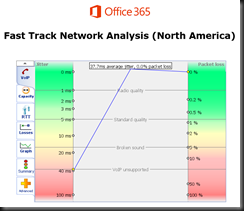
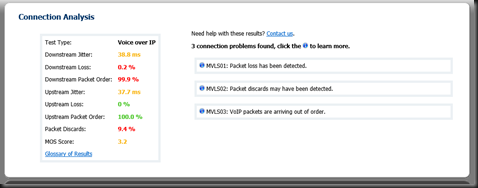
Overall, the tool produces a raft of great info… here is the summary tab.  Note that something is not quite right as the tool cannot simulate VOIP traffic.  Could be something you need to look into here?

Here is the same test run against the NA1 site.  Note the differences.  We also now have a MOS score.  3.2 is not as good as we want, but doable.  Not too bad for out of a hotel where I am sharing bandwidth with 200 other rooms.

image

image 

We also got some nice jitter measurements on this run…

image

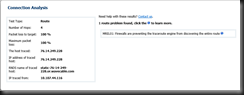
And finally, if you drive into the route tab, you will get more data points.

image

What do you think you could do with information such as this?

image

If you have questions about any attribute/factor measured in these tests, there is also a handy glossary. 


If you or your organization is considering moving to Office 365 in any capacity, this is one of the first tools you should be working. I have been telling customers for a long time that if we do our job right, then any problems will be network, firewall, or load balancers.  This tool can help you prove that.  In a more complex internal net, you might even be able to tell the network team right where to look!


YMMV

2018/02/01

AudioCodes HRS 458 Firmware 3.04.1192

Dropped off an HRS 458 at a customer yesterday, OOBE.  Setup took about 5 minutes (have to hook up cables and whatnot), created an account for it, and powered it up.

A little access to the web interface, and I have a unit up and running, logged into on-premises Skype for Business pool, and dang! 

The HRS starts barfing on finding the calendar for the account.  This is not good.  Some quick checking shows that the environment has no Autodiscover.domain.com record internal, but it does have an SRV.  I know, but don’t ask me.  Not my slice of life at this customer.

However, this does show that an OOBE for the HRS, firmware 3.0.2.xxxx needs to have something other than just an SRV record.

A little judicious communication revealed a new firmware being available for the HRS.  My contact inside AC indicated that his notes showed that the “problem” was resolved with 3.04.1192 release.  What the heck, I tried it. 

image

Voila!  Problem solved.

Of course, now we have to ask why no A record (or CNAME), and why put in the SRV record, not know why it was done, and then never question the mechanics of it, or actually solve the original issue that resulted in the SRV record.  Well, I get to ask at any rate, not sure I will ever get the answers.

YMMV

2018/01/24

IP Phones in the Teams Road Maps

Hello all,

I got some good stuff from my friend Daryl over at AudioCodes the other day.  Daryl Hunter is a voice architect over there; he just knows stuff.  Good source.

At any rate, the important tidbit for our purposes is that Daryl/AudioCodes thinks that Microsoft has a solid chance of making good on it's 2Q2018 target for IP phones to be used in Microsoft Teams.

Note the "Calling Road Map"


This means that your existing SfB/Lync IP phones can be re-used with Teams.  Nice.  Hate to buy that stuff more than once.

FYI, here is the two road maps.  Note that they conflict to a small degree, but generally say the same thing. 

The “static roadmap” PDF is here: https://aka.ms/skype2teamsroadmap and using phones is road mapped for 2Q2018.  The “interactive roadmap” is here: https://products.office.com/en-US/business/office-365-roadmap?filters=%26freeformsearch=teams%20calling#abc and shows the same info (CY2018) but doesn’t specific 2Q.  It was refreshed last Friday.  


I also think that the casual reader could benefit from reading the FAQ - it gives some quasi-good answers to the "why" questions that are bound to come up.

YMMV

2018/01/22

SfB SE CMS Master failover success process

Background

You can start by reading this.  This is a tested path forward if you find yourself in the CMS split-brain scenario as described in that article.  After noodling through that process yesterday, and knowing that I have customers who need this to work so as to ETHICALLY meet their SLA/RTO/RTP type stuff, I got to thinking.  And then Josh Walters, a co-worker of mine, made the fateful comment “the server that gets failed over to is happy and functioning, why can’t we just leave it alone?”
In relative age terms, from the mouth of babes…I got to thinking – can I create a process that is repeatable, that comes before the Vale 19-step method, and allow me to confidently tell customers that “this works.”

Scenario

We are ignoring the RGS and the Edge changes necessary for the full site failovoer in this article.  We are totally focused on just the CMS, why it happens (theory on my part), and what to do to recover gracefully in a predictable manner (empirical on my part).
There is actually the option to not perform a CMS failover…I have had environments where the CMS was offline for extended periods of time with no ill effects.  Just don’t change anything.
Our environment is two SfB SE servers, pool paired.  Sfbse.tsoorad.net is the “old” master, sfbse2.tsoorad.net is the “new” master.
After making up the pool pair, we have simulated the datacenter outage by turning off sfbse.tsoorad.net, thereby making the surviving system components think that the CMS master is gone.  Power off is a state that pretty much assures that no-one is talking to that server anytime soon.


The initial CMS server failover goes just fine.  The problem comes up when the “old” master comes back online and thinks that IT is the master.  But the sfbse2 server, the “new” master is in charge, and suddenly, you cannot make changes.  Classic split-brain.  Replication is borked.  Attribute pointers don’t point.  See the blank in this example where the ActiveMasterFQDN might just be something we need to know about.


What is causing this

If my surmise/theory is correct, the split-brain starts when the second node assumes control of the CMS.  No problem.  As a domain member running with the proper authority/credentials, the AD gets changed, the topology gets changed, and the surviving servers in the environment start replicating from what they are told is the CMS.  At this point everything is fine; the split-brain has started, just not affecting us quite yet.
The split-brain posture really gets wound up when the failed server comes back online and it thinks that it is the CMS master.  Understandable.  Before whatever happened happened, that server was indeed the CMS master.  But another server is now designated, and the newly revived server never got re-written, and things are now just a tad stuck.  Again, see this article here, as well as the Mark Vale article here.

What to do about it

The obvious answer, of course, is the easiest.  We will wait right here as you locate your copy of last nights backup script and the ensuing copy of the export-csconfiguration and export-cslisconfiguration and carefully resolve NOT to use them. (they point to the OLD master, and the NEW master is up and running – and in the immortal words of  Josh Walters, “can’t we just leave it alone?)”.  Keep in mind that you don’t HAVE to move the CMS back.  To dovetail with the Savant Walters, we can further notice that the CMS has a failover cmdlet, but no failback cmdlet.
You will make new ones here in the next section and they will be better as they will not reference the original CMS master (pre failure) as the master or being “active”.

Fix me!

From the new master run:
  • export-csconfiguration (we are just being thorough, you should not need this file for this exercise)
  • export-csLISconfiguration (ditto)
  • Place your new exports where you can use them in case you don’t already have them, and then throw them away after the next time your backup captures that data.  If you get the end of all this, and invoke a failback to the “old” master, you can throw the exports away in that case also.  You do have a plan, right? 
  • stop services on “new” master:  FTA, LyncBackup, Master, Replica
Bring the “old” master back online.
  • From the “old” master, stop services:  FTA, LyncBackup, Master, Replica
From the “new” master:
    • install-csdatabase –centralmanagementdatabase –sqlserverfqdn sfbse.tsoorad.net –sqlinstancename RTC –clean –verbose
From the “old” master,
    • start the SfB deployment wizard
    • Run Step 1 (install Local Configuration Store)
    • Run Step 2 (Setup or Remove
    • Start the services stopped earlier BUT DO NOT START MASTER
From the “new” master:
  • invoke-csbackupservicesync –poolfqdn sfbse2.tsoorad.net
Wait a bit, then run through:
Get-CsManagementConnection (should show “new” master)
Get-CsService –CentralManagement
Get-CsManagementStoreReplicationStatus –CentralManagementStoreStatus
Here we are, fixed.  Note that the “new” master is still the master, but now the “old” master thinks it is no longer the master, but subordinate to the “new” master.  All this is just fine.  We don’t care WHERE or WHO holds CMS master, as long as we have a posture where we can read/write topology.


At this point, you could do another Invoke-CsmMnagementServerFailover and get the CMS back over to the “old” master…if you are into consistency like me, then that is what you will do.  If you are like others, you can leave the CMS on the “new” master, and everything will be fine.

Summary

Seeing as how there is no failback cmdlet, could it possibly be that this is all by design, and was never properly documented on the way out of Microsoft-land?
Empirically, as long as both SE pool pair members are up, the CMS failover process is just fine.  If the “old” master is down, things go bad quick and the prudent admin will be prepared to handle that scenario – however remote the possibility may be.
If your CMS fails, then you could be failing also.  Invoke-CsManagementServerFailover is wonderful, provided all the players are still running.  Not so hot when the the existing master is no longer available.  This process will get you in a posture of success; is repeatable, and is not too onerous.  Ergo, we have something i can feel somewhat good about taking to the customer.
YMMV
test 02 Feb

this is a test it’s only a test this should be a picture