About Me

My photo
This is a blog for John Weber. One of my joys in life is helping others get ahead in life. Content here will be focused on that from this date forward. John was a Skype for Business MVP (2015-2018) - before that, a Lync Server MVP (2010-2014). I used to write a variety of articles (https://tsoorad.blogspot.com) on technical issues with a smattering of other interests. I have a variety of certifications dating back to Novell CNE and working up through the Microsoft MCP stack to MCITP multiple times. FWIW, I am on my third career - ex-USMC, retired US Army. I have a fancy MBA. The opinions expressed on this blog are mine and mine alone.
Showing posts with label Win10. Show all posts

2018/06/26

Plantronics Voyager 6200 UC/B6200

A Plantronics BT device came into my hands the other day.  I have been thinking about this device style for a while – I see folks with them, and always thought my existing BT device was good enough.  But, I keep seeing them, so…what’s the story. What’s the draw?

Here is the official market speak on the Plantronics Voyager 6200 UC. 

Here is a pretty picture, just so we know what we are talking about.

image

Isn’t that just the world’s best cell phone photograph?  I was going to use the PLT graphics, but that would be just sucking up, because… I am fixing on saying how great the 6200 UC is – maybe only for me, but these things are bordering on being the greatest thing since sliced bread.

As I pondered what to say, I realized that after testing with Skype, SfBO, Teams, and my cell, all to great success; (great audio, pretty good background noise suppression (ANC), and typical excellent Plantronics build quality) that I wanted to continue with Magic Slim and The Teardrops.  That in itself is telling.

Usually I test a device, make some quality comments, observe if it does what my use case scenarios dictate, and determine comfort and audio quality – and then, fair or not, compare to my existing device stable.  In the case of the 6200,  I just kept using them and knowing that I had 9+ hours of battery, I kept testing.  At some point, I stopped testing and just was “using” because this device moved into the “actively used” category.

So, let’s dive in:  According to the aforementioned market-speak:

Features

image

You can get a fancy market-speak sheet to impress your budget approval process.

Fit and Function

The Tsoorad Test Labs says that this 6200 is a 9.9.  I had to adjust to the ear thingies.  Small was too small.  Medium was too medium.  Who uses the large?  The device around the neck thing pretty much was a non-issue.  I like the idea of ripping the earphones out and dropping them, and they go nowhere.  Nice if you are like me and wonder where the earbuds went to.

Laptop, SfBS, SfBO, Teams

All my laptop functions worked as you would expect from Plantronics.  Already paired to my cell phone, inserting the BT600 dongle resulted in a few binks and bonks and wala! working as expected.  I typically do not operate my headset on two at once, I find that the ever-changing volume settings bothersome, and if you are a music at work person, the constant interruptions in the music flow are bothersome as well.  I am sure there is some esoteric setting buried in Windows somewhere to stop that, but I have never found it.  SfB 2016 client picked up immediately.  Teams picked up immediately. 

Audio in/out

Audio quality for voice is very nice.  Good volume control in terms of range of adjustment.  Bass response is at least as good as any other earbuds I have tried.  Microphone pickup sensitivity seems most excellent as well. 

Musically, the 6200 suffers from lack of driver size just like any other set of earbuds – I don’t care who makes them, bass is achieved by moving air, and those little cones in an earbud simply are taxed by bass.  Having said that, the 6200 cranks along right well.

There’s even an APP for that.  Yes Matilda, in the space of just a few minutes I was controlling my 6200 with my phone.  Gosh, how exciting!  Firmware updates, turning things on and off.  I felt empowered.

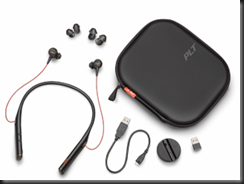
What’s in the box?

A carry case (actually pretty nice), a short USB cable that connects to either the 6200 or the included charging dock/stand.  And, for you double-up-the-device types, a BT600 dongle so as to enhance the laptop media experience. Oh, and three sizes of ear cushion thingies.
image

Cost

There are various views on this subject.  Personally, I think to a large extent you get what you pay for.  If you want to pay $29.99 for a set of wireless earbuds that are BT, have ANC, and that deliver some serious music reproduction chops, while allowing you to make and take calls on your cell and your laptop, then get ready to be disappointed.  But, if you want something that rocks functional, is durable, with features you can use, and then proceeds to wallop music, then this is the price point for that excellence.  You can get yours right here.

Summary

Usually, in testing I include all the stuff above. The Tsoorad Test Lab Score is limited to the 9.9 (ear bud fitment) so the 10’s I was going to give it in all the other categories got trumped.  I could have said that.  OR…

In this case, I could have just made this statement: “These things are firmly in my “keeper” category.”  Seriously excellent stuff here.

2017/05/31

SQL Change Ports

The Port Change Issue

On a project where the SQL team has a policy of changing the SQL port away from the default of 1433? 

This does not pose a huge problem for your intrepid Skype (or Lync) deployment engineer.  If you are needing to know what to do, and maybe you have, oh, 30 or so front ends to modify, then maybe I can help you out a tad.

The issue is modifying the registry to tell your host server where to go to access the requisite port on the target SQL server.  As it turns out, I had to remember this, as it has been a bit since I had to last do this task. 

The Simple Fix to the Simple Issue

Luckily for you and me, it seems that every copy of a Windows operating system I looked at for this post (Win7, Win8, Win10, Server 2008+) have a utility in \windows\system32 called cliconfg.exe.  You can read up on that utility here.

A wonderful tool.  Here is it in Windows 10 form.  Which looks the same as Win7, so I think they will all pretty much appear to be the same. Actually, the Win7 version has a different set of window frames, so the appearance is more rounded instead of the ugly-ass Win10 metro crap.  But I digress.

image

What we need to do is select the Alias tab…the select Add.

image

For the purposes of this exercise, I need my system to talk to my SQL server (FQDN = sqlalwayson-a.tsoorad.net) on port 49001.  So, you set it up like this and then say OK.

image

image

Follow up that OK with an APPLY and your newly modified operating system will for thereafter talk to SQL server sqlalwayson-A.tsoorad.net on port 49001 vice 1433.  Simple.  Easy.  Works well.  Less filling.  Man, I am thirsty!

But Wait!  What if…

…you have like four user pools, and they all need to talk to the same monitoring server, but different archive targets per pool?  And what if there are like 30 front ends that need this modification, and every time you type this stuff in there is the possibility of spelling errors that mean system failure.  Now, I am sure there is some folks out there in techie land that are starting to chant “PowerShell!  PowerShell” -  but in this case, I am going to ignore them, and simply export a registry key, and then incorporate that into my server build process – which can be PowerShell-ized if you wish.

Here is the registry key to export.  HKLM\software\microsoft\mssqlserver\client\connectto

In my project, we had four SQL AG clusters, each with two nodes, a cluster name, and the AG name; all that needed to resolve by DNS.  So, our registry key looked somewhat like this: 16 entries with AG, cluster, node1, and node2 per supporting SQL cluster.  We then simply imported that into each server at build time.

image


Summary

The SQL mavens might well change ports on you.  If they do, there is an answer in form of cliconfg.exe.  If the scale is a tad larger than manual typing will cover, you can regedit your way to success.

YMMV


2017/05/20

Windows 10 Battery Life

The Issue

I use a Lenovo Yoga 14 for my personal stuff.  A few weeks ago I ran updates.  I noticed that battery life dropped from nearly 10 hours to less than 3.  Closing the lid puts the Yoga to sleep, so opening it is a breeze and I have a working desktop in about 20 seconds or less.  After the updates, closing the lid still did the sleep thing, but on opening the lid the Yoga was dead.

The Problem

So, I started poking.  I discovered the latest rounds of updates had installed a Lenovo Screen Updater.  Holy Battery Drain.  The CPU was grinding away at 50%+ constantly.

The Fix

Remove it.  Now I get this here:

image

Seeing as how this was associated with the touch screen concepts, I imagine that this might help Win7, Win8, Win 8.1, et cetera – anything else that runs a touch screen with Lenovo and Windows.

YMMV

2015/10/14

Win 10 Quick Access Blew up!

I used my favorites in Win7 and Win8 because it gave me one click access to commonly used items.

Well, here comes Win10, and the Quick Access concept.  Nice enough, but not the same.  But it contained my migrated favorites, so I was not too unhappy.  But, the other day, “something” happened, I am sure I did it, but I will be damned if I can figure out what.  Bottom line was that my single-click links were no longer there.

Sadness.

Today I had a little time to dig in and figure it out.  After reading a ton of blog-o-sphere stuff, and some useless Technet and equally useless forum postings, I found something that I figured couldn’t hurt to try:

Run command prompt as admin and type the following command:


del %appdata%\microsoft\windows\recent\automaticdestinations\*

Happiness.  Now my stuff is back.  All I need to do know is figure out what, why, when, and how. 

image

YMMV

2015/10/07

Microsoft Surface Pro 4


Surface Pro 4 and Surface Book.  Ooooh.  Aaaaaah.  Cannot choose.  But I will have to.  The horror of it all!

The Surface Pro 4 appears to need a separate keyboard, while the Surface Book appears to come with.  I value screen size over almost everything else.  And I use my 16GB RAM on a regular basis for virtuals.

Christmas is coming.  Just sayin’

YMMV

2015/08/11

Skype / Lync 2013 and DeviceLock ® DLP

This handy bit of software advertises the following benefits:

http://www.devicelock.com/products/

The Problem

The environment was seeing SfB and Lync 2013 clients unable to make PSTN calls, forward to voice mail, operate from a VPN with any consistency, and multiple other instances of random badness.

Identifying the Cause

As it turns out, the organization had deployed a small number of laptops with the aforementioned DLP product, apparently in the default configuration.

The Fix

Using a laptop without the DLP software deployed resulted in zero issues.  Ergo, this DeviceLock DLP product, in its’ default configuration, breaks SfB/Lync 2013 client software. If your organization wants to deploy this, ensure that the configuration is customized to leave SfB/Lync 2013 clients alone!

YMMV

test 02 Feb

this is a test it’s only a test this should be a picture