About Me

My photo
This is a blog for John Weber. One of my joys in life is helping others get ahead in life. Content here will be focused on that from this date forward. John was a Skype for Business MVP (2015-2018) - before that, a Lync Server MVP (2010-2014). I used to write a variety of articles (https://tsoorad.blogspot.com) on technical issues with a smattering of other interests. I have a variety of certifications dating back to Novell CNE and working up through the Microsoft MCP stack to MCITP multiple times. FWIW, I am on my third career - ex-USMC, retired US Army. I have a fancy MBA. The opinions expressed on this blog are mine and mine alone.
Showing posts with label Microsoft Teams. Show all posts

2019/02/15

Audiocodes Teams Phone C450HD

I feel like cueing up Steve Martin in “The Jerk” but I have already done that once, and I hate to repeat.   So, you think about that scene where the phone book arrives….

I got a squeaky new Audiocodes C450HD.  A long time coming.  But, now I have a Teams phone.  And based on the goodness that is an Audiocodes handset.

So, we should have a pretty nice piece of gear here.  Let’s kick the virtual tires and see how this thing works.

Taking it out of the box, connected to PoE, and here we go…


Tapping the 'Sign in' gets you to the Company Portal page, and a further tap in address entry cell pops up a handy qwerty keyboard.


Edited Note:  I contacted Audiodcodes about the placement of the virtual keyboard and was told that anything UI is Microsoft-dictated.  So, if you get chapped off at poor design (like I did), your complaint needs to go to Microsoft, who we all know is NOT E.F. Hutton when it comes to this kind of thing.
Once you figure out how to spell your UPN correctly, and the verification code is received, you get two options for data entry…keyboard on screen or you can simply use the big square things on the phone itself.


There are a few cartoon screens of “how to” and “what can you do…”

But in the end, you get this – and you say to yourself – “…this is different…”


Let’s do a little reading to figure this out. And we discover that on this page here:  https://www.audiocodes.com/library/technical-documents?productFamilyGroup=1672&productGroup=16127 there does not appear to be any user guide for the TEAMS version of this phone…. odd.  

A quick call to my Audiocodes contact (who I am sure  will never answer my call again) revealed that the code is not GA yet (Microsoft supplied code) so therefore the TEAMS documentation is not published yet.  Bummer.

But, to answer my own question, a few quick (or not) logins later and we have the information that “Shared” pretty much presents the phone as a CAP (nee SfBS CAP).  I can see how to make this have a semi-generic account and get invited to meetings and such… and then the room could have this phone in it and we’d be able to join the meeting, but not see contacts, history of personal calls, et cetera.

Shared:  Nothing but join a meeting.


Personal: here I am presented with calls,. meetings, my voicemail.


After all  the button clicking and MFA entering, we now have a phone that works with Microsoft TEAMS natively.  Not a 3PIP phone that sort of works, but a handset set that is actually a full login.  Minus video, screen sharing, and access to my full Teams account content.

You can make the C450HD into an SfB phone if you wish.  From the login screen, before you login to the Teams phone, switching the c450HD to SfB is three clicks.

Menu | Debug | Switch to Skype for Business


I have been using this device now for the better part of this week to make and take my business calls and participate in meetings.  The build quality, technical execution of the device, audio quality, fit, finish and feel are all what you would expect from Audiocodes. 


YMMV

2019/01/16

How to completely leave a Team that you are a guest

I am blatantly stealing this for publishing as I don’t want to forget this.  Why this is not part of the Teams client itself is beyond me.  But here you go;

https://docs.microsoft.com/en-us/azure/active-directory/b2b/leave-the-organization

What is obviously different in my case was the need to actually sign in to the org I wanted to leave.  But OK, it worked, and THEN I could go back through the instruction and choose “leave organization”. So while the guidance has changed a bit, the job still got done.


YMMV

2018/09/24

Logitech Meetup ConferenceCam

In the past, I have used a Logitech cs3000, I had a furious love affair with a bc950, and then I settled down to just using my laptop camera when needed.  Except that did not give me some speaker phone features, no zoom, no pan, no “see the whole room” stuff.

For the last month or so, I have been wringing out a Logitech Meetup.

image

I threw the box away today, because the Meetup now has a permanent spot in the Tsoorad Test Lab.  I find myself using it as a speaker phone AND a video provider on a regular basis.

Here is the Logitech market-speak.

MEETUP

All-in-One ConferenceCam with 120° field of view and integrated audio, perfect for small conference and huddle rooms

  • See everyone, even those close to the camera
  • Works with your video conferencing applications
  • Compact design minimizes cabling and clutter

Furthermore, Logitech claims that:

MeetUp is Logitech’s premier ConferenceCam designed for small conference rooms and huddle rooms. Stop crowding around laptops. With a super-wide 120-degree field of view plus a pan/tilt lens, MeetUp makes every seat at the table clearly visible. With integrated audio optimized for huddle room acoustics, everyone can be heard as well as seen.

The question, of course, is how well are these claims delivered?  Let’s find out.

OOBE

You also get a 16-foot USB cable, power supply, wall mount hardware, and user documentation. The system is certified for use with Skype for Business and Cisco Jabber and offers enhanced integration with BlueJeans, Broadsoft, LifeSize Cloud, Vidyo, and Zoom. That support includes the ability for remote participants to control the camera.

How long are cables?  Dang.  Break out the zip ties if you don’t need all that cable length.  Still, very nice to have.  Sit it on a windows sill, table, shelf, or other flat surface.  Or, mount it to the wall or something like that.  The mount will do both.

I had to put the batteries in the remote control module.  Oh! The horror of it all!

image

But, let’s be somewhat careful and do some reading.  At which point I discover that the included cables won’t do 4k.  You will need an aftermarket cable to get the full bazillion square foot display that some folks want.  Good luck finding a USB 3.x A to USB C cable longer than 1 meter.  I just did 1/2 hour of google-fu and did not come up with anything longer than 10 feet.  And that was $92.  Be that as it may, my myopic senses probably cannot tell you the difference in 1080p and 4K coming out of this camera into a web-based video room.

image

SfB/Teams

Here is the bottom line.  My use of the Meetup device in both SfB and Teams was totally seamless (I also have used the Meetup with Webex Teams, and meetings on Bluejeans and Zoom.  Seamless).  The Meetup is an extension of your local host – a Lenovo T530 running Windows 10 in my case.  Operated perfectly.

image

Zoom/Pan/Tilt

Here’s a problem!  I spent too much time playing with the controls.  Addicting.  In and out. Left, right, up, down.  Fun!  And works well.  There is also a button smack-dab in the middle of the control module that returns the camera to dead center. And there is software for download that works pretty much as advertised.  You can also pair this thing with your BYOD to get access to the speaker phone and control the entire unit if wanted.

No zoom:

image

Zoom

image

Audio Quality

*I* thought the audio quality was quite good.  Volume, minimal distortion (if any) even at high volume levels; good timbre, overall, a solid 9.5 on the Tsoorad Goodness Scale.

Video Quality

I wish it had optical zoom instead of digital.  I mean, it sure looks like digital zoom.  Having said that, it did everything I wanted it to do in video terms.  I am a not possessing the requisite USB 3 cable to enable the 4K, but the 1080p sure looked pretty good to me…zooming in did result in some blurry stuff – I bet the 4K would fix that.  Impressive it is.  9.0 on the Goodness Scale.

Conclusions

Do you have a 6-10 person room?  Are you wanting to park something in there that participants can just walk up to and plug in and voila! they are in a meeting or can start hosting one?  Are you tired of the laptop camera restrictions on that scenario?  Don’t want to spend a large amount of cheddar on a dedicated wall unit like a Surface or other expe$ive system?  Then this Logitech Meetup is probably just right for you!  Typical great build quality, nice feature set, good controls, integration with just about everything, and with great audio/video quality.  What are you waiting for?

You can get one right here.

YMMV
2018/08/20

Polycom VoxBox

You would think that the market is fairly saturated with speaker-phone devices that plug in via USB or attach via BT and work with anything that is connected to the PC.  Right?  I mean, these things have been around for almost as long as I have been knowing what a USB connection is and the difference between an A, and a B USB.

Apparently I am wrong – Polycom has a device called VoxBox.  I have been living in a cave lately, from all appearances, and totally missed this product.  The Polycom website claims that the VoxBox is certified for Office 365 and SfB.  You’d think so seeing as how it connects to the PC or BYOD via USB/BT and is therefore abstracted from what is actually providing media.  It thinks the media is coming right from the port.  But, SfB does know what to do with it.  Teams O365 doesn’t like the on-device controls, but Teams O365 doesn’t like any on-device controls (yet).  So, I think it is safe to say that subject is a wash in terms of function.

Marketing blather straight from Polycom’s website:

Polycom VoxBox sets a new standard in ultra-compact USB / Bluetooth speakerphone performance and packs it with HD Voice and patented NoiseBlock noise reduction technology. Give your mind and ears the quality they deserve—in offices, in huddle spaces, and wherever your travels may take you.

Better Sound. Hear Everyone.

  • Hear everyone – Designed and built for group conversations, so discussions are interactive and everyone is clearly heard
  • Easy to connect – Simply pair using Bluetooth, or plug in via USB — no software driver required
  • Sounds better – you will hear the difference with 4 microphones and our high quality, low-distortion speaker
  • Stay focused – eliminate meeting disruptors like echo, noise, and insufficient microphone range

Let’s see if that is true in testing.

OOBE

2 cables (USB and USB+security cable), a little wrench (for the anti-theft cable) and the unit itself.

image

Square, solid, brushed aluminum-like finish.  Looks good; feels good; and the bottom has whateveritis that stops it from sliding around.  So, pretty good from that angle.

Function

Here is the official data sheet. 

As you might guess, I did not test the VoxBox with just anything, I used SfBS and Teams Office 365.  Surprised?  Ha!  Don’t be.  I plugged it in, my laptop went dink-donk, and I had a functional speaker phone.  It doesn’t get any easier.

My ONLY niggle with this unit is that the mute button is bit too sensitive. I swear that several times just thinking about the mute button caused it to activate. 

Lights are easily visible, even in office lighting levels of brightness, and the lights themselves are understandable as to what they are indicating.  As long as you don’t expect the + and – to provide video zoom you are good to go.

imageimage

Audio was clear and presented with good volume out to a 12x12 room size.

Conclusions

This is a high quality speaker phone device.  I had zero issues working this device with both Teams O365 and SfBx.  I set up about two feet from the device and normal operations were crisp, clear, and all the device features were indeed as advertised.  With the exception of achieving world peace, I would say the marketing mavens had accurate VoxBox blather.

You can get one right here.


YMMV

2018/08/14

Logitech Brio & C925E

A pair of nice cameras recently went through the wringer here at the Tsoorad Test Lab.  It has been a long time since I last looked at camera add-ins/add-ons.  I am a laptop user by day, and a lurker when not running a meeting where I need to show some slight sign of being an adult.  Ergo, I have no need for an camera. 

Until that is, I go into an environment where desktops still exist, and those desktops are no longer the large box that used to be, but they still have the normal limitations… like camera’s that don’t exist.  Therefore, last month the camera issue came up again.

Enter the Logitech Brio 4K PRO WEBCAM. According to the Logitech material, the Brio provides:

image

image

OK… what else might this thing offer?

  • Video resolutions up to 4K (ultra-high definition) at 30 fps
  • 5X digital zoom (with digital pan / tilt)
  • Automatic exposure and contrast adjustment with Logitech RightLight 3 and HDR technology
  • Software-selectable field of view (90, 78, or 65 degrees)
  • Dual integrated omni-directional microphones with noise cancellation

The Logitech C925E webcam is offering a reduced feature set (no 4k) but also a reduced price point.

image

image

Software

The available-for-download software is useful for adjusting all of this. Pan and zoom to boot.  Not a large amount of adjustment range, but enough.  Useful rather than over the top.

image image

Zoom and Pan…starting with this:

image

Still good image resolution….

image

OOBE

Oddness – why does the C925 webcam come with an internal privacy shutter when the Brio does not?  The Brio has a clippy-thing that is the privacy shutter – but you have to put it on yourself. Huh?  You would think that the privacy shutter would be built-in on all add-on cameras…but apparently I am in the minority opinion on this subject.

Moving past that, both cameras have a good solid feel.  Materials are very nice, the hinges and other parts were not falling off nor did they appear to want to do so anytime soon.  Always a plus when I cannot break something.

The Brio needs a USB3 port to do 4K.  I have it hanging off a USB3 hub, and it seems to be happy. Both have a threaded boss on the bottom of the mount so you can setup on a tripod or other such device.  The Brio has a separate cable, the 925 has an attached cable.

The Brio documentation included with the units was the now de rigueur one page cartoon.  Surprisingly effective in this case.  What does that say about me?  The 925 had booklets of languages…and cartoons. There was more safety documentation than instructions.  I know that there is always someone, but do we really need to warn the dainbread about using this product in the bath/shower?

And, a final discriminator…the Brio has a velvety carry pouch.

Picture Quality

Brio on the left

image image

Different default field of view, and the Brio is doing some automatic light show stuff.

SfBx/Teams

What Tsoorad review would be worth its electrons if it did not have some hook into SfB/Teams?  Well, this review is no different…

The Skype client loves these things.  You just have to plug them into an appropriate port and then go choose.

image

Teams wants to be different, yet the same.  Bipolar city.  But still, here the cameras are for the choosing.  Hey Microsoft! I sure wish you could do it before deciding to call. 

image

Summary

As expected, Logitech has nice solid devices here; for my purposes the video quality was much better than my onboard laptop camera and was past what I see people typically using in my day-to-day experience.  If you have a need to go up on the big screen, the 4K looks really good – so good you might want to check your makeup before hand. 

I wanted these units to work with SfB/Teams without me having to do anything past choose it.  They both functioned as expected and the output looked great doing it. If you are needing it, the Brio + software can potentially enhance your security and the 4K video is really nice.

You can get a Brio here and a C925E here.

YMMV

2018/07/12

Landis Contact Center

Now, this is significant.  MVP Matt Landis and his merry band of mavens is getting their contact center out to the world. This is a happy event for those of us looking for just a bit more than nested RGS.

Hot off the email press:

https://www.landistechnologies.com/office365contactcenter/


We Plan to Announce Office 365 Contact Center is Publicly Available as Preview at Microsoft Inspire 2018

We wanted to you to be the first to know what we will be announcing at Microsoft Inspire 2018:
Las Vegas, Nevada 7/16/2018 - At Microsoft Inspire 2018, Landis Technologies LLC is announcing that Office 365 Contact Center is now publicly available as a Preview. The Landis Technologies Office 365 Contact Center provides Microsoft Partners with a call center solution that can be provisioned and running in minutes. To read more: https://www.landistechnologies.com/office365contactcenter/ .... read more


Copyright © 2018 Landis Technologies, All rights reserved.
Landis Technologies Office 365 Contact Center


YMMV


2018/07/09

Sennheiser SfB headset review (July 2018)

This review is going to cover the “Sennheiser SC 75 USB MS Binaural UC Headset USB 3.5mm” (there is a serious product title) and the Sennheiser SD Pro 2 ML DECT Wireless Binaural Headset (a shorter title but still a mouthful).

The 75 is a wired (USB via an inline module adapter thingy).  The SD Pro2 is a DECT wireless.  Both have a place, and both are very nice units.  Both are Binaural.  I tend to run to binaural when at all possible due to my hearing loss.  And music sounds way better.  Two ears are better than one.  Trust me.

But, wired v wireless is a big differentiator.  For the center mass of your office workers, a wired headset will work just fine.  But some people (like me) like the flexibility of the BT or DECT modality so they can walk and talk.  I know several customers who routinely go to the server room and you would never know they are not at their desk.  DECT has a range (projected/published) of 300 feet.  Whether or not you get all of its range is problematical and depends on perfect conditions.

The SC 75:

image

SC 75

Coming out of the box the SC 75 is in two pieces – the cable that plugs into the inline module, and the overall headset.   Pretty basic.  However, that basic stuff is good. Plug it in and it works.  Simple as that.  SfB picked it right up and I was operational.  Teams required that I tell Teams to use it.  After that, seamless. 

The SC 75 audio quality that is a solid 9.5 on the Tsoorad Goodness Scale.  Build quality seems very nice.  Materials are typical Sennheiser.  No ANC, but that is a personal preference.

The SD Pro 2


image


Now this is my type of device.  Wireless.  DECT.  Comfort.  Great quality, both build and audio. ANC. A superior piece of gear.  My SfB client loved it…it did not have to do anything but tell it to be the preferred device one time, and after that, all was golden.  I suspect that the “one time” thing has to do with me having like 12 headsets currently going through testing.

image

Of the two, I spend most of my testing time with the SD Pro 2.  It meets my personal needs better than the wired headset.  Having said that, I need a travel headset also, and the SC 75 does meet that need.  So, the bottom line is, you can’t go wrong with either!

You can get the SC 75 right here, and the SD Pro 2 ML right here – and both worked equally as well with Microsoft Teams as they did with SfB.

YMMV

Yamaha YVC-1000MS-NA Review

Unbeknownst to me, Yamaha, a firm who I thought made great motorcycles and my mother’s piano, is also making a very nice, Skype certified, medium/large conference room audio solution.  Comes OOBE ready to be a speakerphone for the SfB client.  The nice folks at Yamaha let me play with one for a few days. 

Here is what the Yamaha marketing mavens have to say:

“Ideal for medium and large spaces, this intuitive communications system features separate microphone and speaker units for flexibility during audio, web, and video conferencing. Designed to support 2 external speakers and 5 daisy-chained microphones, it’s the perfect scalable solution for accommodating larger meeting rooms and additional participants. Adaptive echo cancellation and human voice activity detection (HVAD) minimize background noise, facilitating natural, stress-free conversation during every call.”

If you poke around their website, Yamaha also has the obligatory case studies.

Ya…. well, OK, it’s good for them to say it, quite another for us lowly consumer types to actually realize it.  Let’s break open the box and see what is what.

The Box

Out of the box, you get a main unit, wires/cables to match, and an external microphone.  There is also a small pamphlet of instructions which I did not read until afterwards.  Does anyone read those things first?

image

Build

One of the first things I noticed was the build quality.  We got good stuff here.  Solid.  Construction on par with what I expected from a musical instrument manufacture (based on mommy’s piano).  And that theme carried through acoustically also.

Controls are easy to see and use.  The connections are clear and sturdy – no cheap shortcuts here.

image 

image

Audio

Quality sonic delivery – at least according to the Tsoorad Test Lab Standard Ear Device.  Great volume as the timbre of the delivery carries the audio track farther than some rinky-dink speaker system does.  Or at least it sure seems that way to me.  At any rate, audio quality in this unit is now my measuring stick.

Skype

The YVC-1000MS is essentially treated as a speaker phone device. This is the comparison between the two versions, with the right side being the SfB certified.  I connected to it with USB and BT.  Both modalities were treated as you would expect SfB to treat them.  Seamless.

image

Yamaha provides a zippy tear sheet.

You can get your very own YVC-1000MS right here.

Conclusion

A great piece of kit.  I am not sure that this is a center-mass market thing.  But, for a mid-to-high-end conference room need, and in a place that does not need/want/use video (there is a ton of that BTW), this is where I will look first.  There might be other solutions out there, but this one clearly sounds the best, is seamless with a variety of platforms, and has the build quality to outlast the competition.

YMMV

2018/06/26

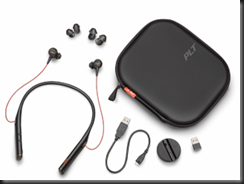
Plantronics Voyager 6200 UC/B6200

A Plantronics BT device came into my hands the other day.  I have been thinking about this device style for a while – I see folks with them, and always thought my existing BT device was good enough.  But, I keep seeing them, so…what’s the story. What’s the draw?

Here is the official market speak on the Plantronics Voyager 6200 UC. 

Here is a pretty picture, just so we know what we are talking about.

image

Isn’t that just the world’s best cell phone photograph?  I was going to use the PLT graphics, but that would be just sucking up, because… I am fixing on saying how great the 6200 UC is – maybe only for me, but these things are bordering on being the greatest thing since sliced bread.

As I pondered what to say, I realized that after testing with Skype, SfBO, Teams, and my cell, all to great success; (great audio, pretty good background noise suppression (ANC), and typical excellent Plantronics build quality) that I wanted to continue with Magic Slim and The Teardrops.  That in itself is telling.

Usually I test a device, make some quality comments, observe if it does what my use case scenarios dictate, and determine comfort and audio quality – and then, fair or not, compare to my existing device stable.  In the case of the 6200,  I just kept using them and knowing that I had 9+ hours of battery, I kept testing.  At some point, I stopped testing and just was “using” because this device moved into the “actively used” category.

So, let’s dive in:  According to the aforementioned market-speak:

Features

image

You can get a fancy market-speak sheet to impress your budget approval process.

Fit and Function

The Tsoorad Test Labs says that this 6200 is a 9.9.  I had to adjust to the ear thingies.  Small was too small.  Medium was too medium.  Who uses the large?  The device around the neck thing pretty much was a non-issue.  I like the idea of ripping the earphones out and dropping them, and they go nowhere.  Nice if you are like me and wonder where the earbuds went to.

Laptop, SfBS, SfBO, Teams

All my laptop functions worked as you would expect from Plantronics.  Already paired to my cell phone, inserting the BT600 dongle resulted in a few binks and bonks and wala! working as expected.  I typically do not operate my headset on two at once, I find that the ever-changing volume settings bothersome, and if you are a music at work person, the constant interruptions in the music flow are bothersome as well.  I am sure there is some esoteric setting buried in Windows somewhere to stop that, but I have never found it.  SfB 2016 client picked up immediately.  Teams picked up immediately. 

Audio in/out

Audio quality for voice is very nice.  Good volume control in terms of range of adjustment.  Bass response is at least as good as any other earbuds I have tried.  Microphone pickup sensitivity seems most excellent as well. 

Musically, the 6200 suffers from lack of driver size just like any other set of earbuds – I don’t care who makes them, bass is achieved by moving air, and those little cones in an earbud simply are taxed by bass.  Having said that, the 6200 cranks along right well.

There’s even an APP for that.  Yes Matilda, in the space of just a few minutes I was controlling my 6200 with my phone.  Gosh, how exciting!  Firmware updates, turning things on and off.  I felt empowered.

What’s in the box?

A carry case (actually pretty nice), a short USB cable that connects to either the 6200 or the included charging dock/stand.  And, for you double-up-the-device types, a BT600 dongle so as to enhance the laptop media experience. Oh, and three sizes of ear cushion thingies.

image

Cost

There are various views on this subject.  Personally, I think to a large extent you get what you pay for.  If you want to pay $29.99 for a set of wireless earbuds that are BT, have ANC, and that deliver some serious music reproduction chops, while allowing you to make and take calls on your cell and your laptop, then get ready to be disappointed.  But, if you want something that rocks functional, is durable, with features you can use, and then proceeds to wallop music, then this is the price point for that excellence.  You can get yours right here.

Summary

Usually, in testing I include all the stuff above. The Tsoorad Test Lab Score is limited to the 9.9 (ear bud fitment) so the 10’s I was going to give it in all the other categories got trumped.  I could have said that.  OR…

In this case, I could have just made this statement: “These things are firmly in my “keeper” category.”  Seriously excellent stuff here.

2018/06/14

audiocodes IPP firmware 3.1

A bit ago, I was the recipient of some new Audiocodes firmware for the 405, 440, 445, and 450.  There is an HRS version as well. 420 is not in this cycle.

Happy to report that based on rigorous Tsoorad Lab testing, all seems to be pretty good with this update.  Numerous new features (especially on the 445)  that bear looking at.  In my testing, I did not discover anything wrong – no devices bricked, they all came back working as expected, new features were there, everything worked as before (always a plus).

You can get yours right here. After 3.1 reaches GA, AC will  (I am somewhat convinced as they have in the past)  create and publish the necessary CAB files to enable pushing this update via SfB/Lync webserver methodology.  If you use the IPP Manager (either express or full) the IMG files work for updating – in my environment, it just works.


IPP Manager view of the new goodness:

image

SfB CSCP view of the old goodness – but you get the idea, right?  Just noticed that the HRS image cab is not showing.  I have asked my AC contacts about that.  Time will tell.

image

Either way, YMMV

2018/03/03

FastTrack Network Checking

You may not know but Microsoft is providing a fairly nice tool to check your network for SfB performance.  Free.  Free is a very good price, eh?

I am not going to extol the virtues and services offered by fastrack.microsoft.com, I just want to delve a little into the network checking tool.  And, this tool has been around for a bit.  So, I wanted to get a little updated review.

First off, I cannot even find this thing anywhere on the https://fasttrack.microsoft.com site.  Sorry.  Maybe I am blind,  but I am not seeing it anywhere.  There is probably some zippy button marked “tools” but I am just not groking.  Having said that, I know of

http://ap1-fasttrack.cloudapp.net/o365nwtest

http://em1-fasttrack.cloudapp.net/o365nwtest

http://na1-fasttrack.cloudapp.net/o365nwtest

Here I am checking my lab tenant against the ap1 site.

image

Note the two addresses given by the tool…

image

The 76 address is my laptop, currently operating from a hotel out in the middle of the Oregon Cascade mountain range.  So, this connection is going to be testing from my laptop to the AP1 site to see how things stack up. 

With a little imagination, you could bury a workstation in some remote spot on your network, and pretty much map out the entire path to the world – giving a glimpse into how things line up.  This could be useful, yes?

You can see that the lag from here to there is running about 170 ms, which might be so great in some circumstances. 

image

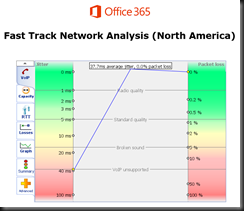
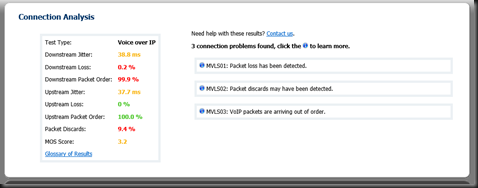
Overall, the tool produces a raft of great info… here is the summary tab.  Note that something is not quite right as the tool cannot simulate VOIP traffic.  Could be something you need to look into here?

Here is the same test run against the NA1 site.  Note the differences.  We also now have a MOS score.  3.2 is not as good as we want, but doable.  Not too bad for out of a hotel where I am sharing bandwidth with 200 other rooms.

image

image 

We also got some nice jitter measurements on this run…

image

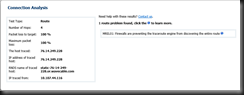
And finally, if you drive into the route tab, you will get more data points.

image

What do you think you could do with information such as this?

image

If you have questions about any attribute/factor measured in these tests, there is also a handy glossary. 


If you or your organization is considering moving to Office 365 in any capacity, this is one of the first tools you should be working. I have been telling customers for a long time that if we do our job right, then any problems will be network, firewall, or load balancers.  This tool can help you prove that.  In a more complex internal net, you might even be able to tell the network team right where to look!


YMMV

test 02 Feb

this is a test it’s only a test this should be a picture