About Me

My photo
This is a blog for John Weber. One of my joys in life is helping others get ahead in life. Content here will be focused on that from this date forward. John was a Skype for Business MVP (2015-2018) - before that, a Lync Server MVP (2010-2014). I used to write a variety of articles (https://tsoorad.blogspot.com) on technical issues with a smattering of other interests. I have a variety of certifications dating back to Novell CNE and working up through the Microsoft MCP stack to MCITP multiple times. FWIW, I am on my third career - ex-USMC, retired US Army. I have a fancy MBA. The opinions expressed on this blog are mine and mine alone.
Showing posts with label Lync 2013. Show all posts

2019/05/02

CMS install fails SfB 2015 Jan 2019 CU

Details:

We are upgrading/migrating from Lync 2010 to SfB 2015 (not 2019)( cannot do three levels at once).

New host servers are 2016 Standard.

SQL BE is 2016 SP2.

EE 2015 pool installed, patched to Jan 2019.

Updated databases on BE SQL.

Prepare for CMS move to new EE pool failed on install-csdatabase -centralmanagementdatabase ---- specifically it fails to find the SQL instance.

After much tshooting, we determined that any management workstation or SfB 2015 server with the Jan 2019 CU refused to take this action.

Process ran just fine with SfB2015 July 2018 CU, or from a management workstation running RTM bits.

This error appears on screen to be a SQL issue, but it’s not. There is something “different” with the install-csdatabase server when invoked as -centralmanagementdatabase that is preventing this action. While this error was present, a normal install-csdatabase -update -configureddatabases -excludecollocatedstores (which is needed for the jump from RTM to any CU past CU5) ran perfectly as did test-csdatabase -configureddatabases

YMMV

2018/08/07

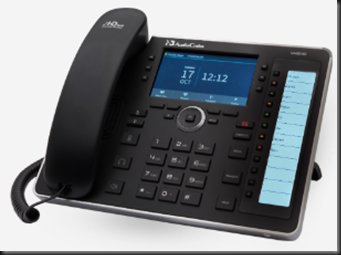
Audiocodes 445HD

A while back, I bricked a 450HD. Ooopseyo!

When I contacted Audiocodes to whine for a new one they sent me a 445HD also.  Why?  Beats me, maybe they think I will review it?

Here is the official marketing fluff. Assuming you take the time to read all that, does it all add up to “An advanced high-end business phone with a color screen and integrated sidecar for speed dial contacts and presence monitoring.”

Yes, I think it does.  If you are in the market for a higher-end low-end phone, this is it.  Need some color in your users life or they can’t keep up with the Jones?  This is it.  Need something to connect to Office 365 SfbO?  This is it.

image

Here is the 445HD feature list:

Certified for Skype for Business
Graphic 4.3" color multi-lingual LCD screen (480x272)
6 programmable multi-function keys
4 soft keys
12 programmable speed dial keys with presence monitoring on a dedicated LCD (376 X 60)
GbE Support
USB headset support

In case you have not done any professional reading here is the overall Audiocodes IP Phone “highlights.”

High voice quality
Support for SILK codec
Full duplex speaker phone
Robust security mechanisms
PoE or external power supply
Out of the box global redirection server support
Multi-language user interface
Centralized management with AudioCodes IP Phone Manager (available for download free of charge)

Build Quality

The only complaint I can gin up on this subject is the stand portion – I always think I want more adjustability.  Other than that (and that is extremely minor), the materials and construction are top-notch.

Does it work with Skype (Online or on-premises – better known now as SfBO and SfBS)?

Duh!  Why else would I be writing this?  Yes, near seamlessly.  Not totally seamless because to do web login I have to jump through some O365 hoops.  But, in the end, I will paraphrase a popular Norte Americano beer spot: “…works great, less hassle…”

I have full status for system users… if they are on SfB, then I see their presence.  The side car can be programmed with an extension on the system, and I get presence from that minimal information.  So nice.

Audio

Audiocodes provides great audio.  Maybe even excellent audio.  IMHO, much better than the competition.

But how is this thing to use?

I use it as a calendar minder, a phone call maker, a redial source because I am lazy, and a speaker phone because I don’t want a headset clamped on my noggin all day.  Did I say it has a color screen?  Visually, the 445HD works really well.

Buttons are large, with excellent tactile feedback. Programming the phone can be done via IP Manager, configuration files stored on an FTP or TFTP, or the device has a web interface.  All of this thought out for maximum ease of use, which is mostly delivered upon.  An example would be the attached sidecar buttons. Although, can it really be a sidecar if there is not a detachable piece?  It’s all one unit. 

So how about the “side buttons” which are referred to as “function keys.”  No matter.  Find a “function” key that has a blank display and press it.  The phone immediately pops to that menu and allows you to enter in your favorite bodega for delivery. 

image


and a few judicious key presses later we have lunch on the hook.

image

It won’t take an advanced degree in psychodynamics to figure out the rest of the phone either.  The controls are very clear and solid feeling.

Support

Depending on to whom you address the question, Audiocodes has great-to-excellent support for the HD IP Phones.  You can count on the dev’s there to be looking at their firmware and they are ever-improving things.  Mainstream, forward looking, and easy to contact.

Summary

I like this phone device.  Great price point, great feature set.  The only thing missing is touch, but the target for this device is not the touch crowd.  I can see this device as that “in-between” model where you need something more, but just not all that more (see 450HD).  Typical Audiocodes quality means you cannot go wrong.

You can get your very own 445HD right here.

YMMV

2018/07/12

Landis Contact Center

Now, this is significant.  MVP Matt Landis and his merry band of mavens is getting their contact center out to the world. This is a happy event for those of us looking for just a bit more than nested RGS.

Hot off the email press:

https://www.landistechnologies.com/office365contactcenter/


We Plan to Announce Office 365 Contact Center is Publicly Available as Preview at Microsoft Inspire 2018

We wanted to you to be the first to know what we will be announcing at Microsoft Inspire 2018:
Las Vegas, Nevada 7/16/2018 - At Microsoft Inspire 2018, Landis Technologies LLC is announcing that Office 365 Contact Center is now publicly available as a Preview. The Landis Technologies Office 365 Contact Center provides Microsoft Partners with a call center solution that can be provisioned and running in minutes. To read more: https://www.landistechnologies.com/office365contactcenter/ .... read more


Copyright © 2018 Landis Technologies, All rights reserved.
Landis Technologies Office 365 Contact Center


YMMV


2018/05/21

Official SfB 2015 Server Disable TLS 1.0 and 1.1 part 3 guidance

updated 20181107


Microsoft update to what they think they are doing, how they are going to do it, and basically, another waffle episode on their part.


https://support.microsoft.com/en-us/help/4057306/preparing-for-tls-1-2-in-office-365


As you may be aware, we have covered the upcoming 31 October 2018 TLS 1.0/1.1 support being removed from O365.  You can find that guidance here.  As promised, Microsoft has finally published the last pieces of the series.
You can find part 3 here.
As usual, I strongly recommend that you start looking at this now – some of this might take a bit of planning and coordination on your part to accomplish in a clean fashion.

Now is the time to get your sales types contacting existing customers and offering to help.  This will not be a clean thing; rest assured that there will be “issues” and IMHO there is significant potential for unintended consequences.

YMMV

2018/04/19

SfB Disabling TLS 1.0/1.1 Guidance

Update 20181107
Microsoft waffles yet again.
https://support.microsoft.com/en-us/help/4057306/preparing-for-tls-1-2-in-office-365


On October 31, 2018, Microsoft Office 365 will be disabling support for TLS 1.0 and 1.1. This means that, starting on October 31, 2018, all client-server and browser-server combinations must use TLS 1.2 or later protocol versions to be able to connect without issues to Office 365 services. This may require certain client-server and browser-server combinations to be updated.
https://support.microsoft.com/en-us/help/4057306/preparing-for-tls-1-2-in-office-365

SfB impact?

At a high level, this requires installing Skype for Business Server 2015 CU6 HF2, applying pre-requisite updates to .Net and SQL, and finally another, separate round of OS configuration updates, i.e. disabling TLS 1.0 and 1.1 via registry file import. It is critically important that you complete installation of all prerequisites, including Skype for Business Server 2015 CU6 HF2, prior to disabling TLS 1.0 and 1.1 on any server in your environment. Every Skype for Business Server, including Edge role and SQL Backends, require the updates. Also ensure that all supported (in-scope) clients have been updated to the required minimum versions. Don’t forget to update management workstations as well.

Background reading:

https://blogs.technet.microsoft.com/cloudyhappypeople/2017/12/22/the-end-of-support-for-older-tls-versions-in-office-365/
And then read part 1 here for more background specific to SfB/Lync and the supportability statements
https://blogs.technet.microsoft.com/nexthop/2018/04/18/disabling-tls-1-01-1-in-skype-for-business-server-2015-part-1/
Part 2 here gets into the weeds a bit on “How To Achieve”.https://blogs.technet.microsoft.com/nexthop/2018/04/18/disabling-tls-1-01-1-in-skype-for-business-server-2015-part-2/Part 3 will be published at a later date.  Woot!

Here is guidance for Lync Phone Edition (LPE):

https://techcommunity.microsoft.com/t5/Skype-for-Business-Blog/Certified-Skype-for-Business-Online-Phones-and-what-this-means/ba-p/120035 

General TLS1.2 whitepaper:

https://cloudblogs.microsoft.com/microsoftsecure/2017/06/20/tls-1-2-support-at-microsoft/

Here is the Microsoft Exchange equivalent:

Part 1https://blogs.technet.microsoft.com/exchange/2018/01/26/exchange-server-tls-guidance-part-1-getting-ready-for-tls-1-2/Part 2https://blogs.technet.microsoft.com/exchange/2018/04/02/exchange-server-tls-guidance-part-2-enabling-tls-1-2-and-identifying-clients-not-using-it/And big surprise, part 3 to be published later.

Summary

If you or your customer is doing anything with Office 365 hybrid, then you need to be reading all of this and figuring out your next steps.


2018/03/03

FastTrack Network Checking

You may not know but Microsoft is providing a fairly nice tool to check your network for SfB performance.  Free.  Free is a very good price, eh?

I am not going to extol the virtues and services offered by fastrack.microsoft.com, I just want to delve a little into the network checking tool.  And, this tool has been around for a bit.  So, I wanted to get a little updated review.

First off, I cannot even find this thing anywhere on the https://fasttrack.microsoft.com site.  Sorry.  Maybe I am blind,  but I am not seeing it anywhere.  There is probably some zippy button marked “tools” but I am just not groking.  Having said that, I know of

http://ap1-fasttrack.cloudapp.net/o365nwtest

http://em1-fasttrack.cloudapp.net/o365nwtest

http://na1-fasttrack.cloudapp.net/o365nwtest

Here I am checking my lab tenant against the ap1 site.

image

Note the two addresses given by the tool…

image

The 76 address is my laptop, currently operating from a hotel out in the middle of the Oregon Cascade mountain range.  So, this connection is going to be testing from my laptop to the AP1 site to see how things stack up. 

With a little imagination, you could bury a workstation in some remote spot on your network, and pretty much map out the entire path to the world – giving a glimpse into how things line up.  This could be useful, yes?

You can see that the lag from here to there is running about 170 ms, which might be so great in some circumstances. 

image

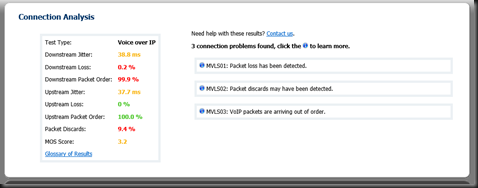
Overall, the tool produces a raft of great info… here is the summary tab.  Note that something is not quite right as the tool cannot simulate VOIP traffic.  Could be something you need to look into here?

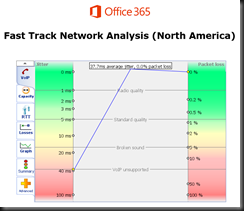
Here is the same test run against the NA1 site.  Note the differences.  We also now have a MOS score.  3.2 is not as good as we want, but doable.  Not too bad for out of a hotel where I am sharing bandwidth with 200 other rooms.

image

image 

We also got some nice jitter measurements on this run…

image

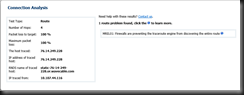
And finally, if you drive into the route tab, you will get more data points.

image

What do you think you could do with information such as this?

image

If you have questions about any attribute/factor measured in these tests, there is also a handy glossary. 


If you or your organization is considering moving to Office 365 in any capacity, this is one of the first tools you should be working. I have been telling customers for a long time that if we do our job right, then any problems will be network, firewall, or load balancers.  This tool can help you prove that.  In a more complex internal net, you might even be able to tell the network team right where to look!


YMMV

2018/02/01

AudioCodes HRS 458 Firmware 3.04.1192

Dropped off an HRS 458 at a customer yesterday, OOBE.  Setup took about 5 minutes (have to hook up cables and whatnot), created an account for it, and powered it up.

A little access to the web interface, and I have a unit up and running, logged into on-premises Skype for Business pool, and dang! 

The HRS starts barfing on finding the calendar for the account.  This is not good.  Some quick checking shows that the environment has no Autodiscover.domain.com record internal, but it does have an SRV.  I know, but don’t ask me.  Not my slice of life at this customer.

However, this does show that an OOBE for the HRS, firmware 3.0.2.xxxx needs to have something other than just an SRV record.

A little judicious communication revealed a new firmware being available for the HRS.  My contact inside AC indicated that his notes showed that the “problem” was resolved with 3.04.1192 release.  What the heck, I tried it. 

image

Voila!  Problem solved.

Of course, now we have to ask why no A record (or CNAME), and why put in the SRV record, not know why it was done, and then never question the mechanics of it, or actually solve the original issue that resulted in the SRV record.  Well, I get to ask at any rate, not sure I will ever get the answers.

YMMV


2018/01/19

SE Pool Pair w/CMS still borked

Background

SfB pool pair is a method by which SfB attains either local (inside the DC), or potentially globally, but at least to a second DC, disaster recovery.  I say a “measure” because the end result is not totally automatic, there is an established procedure to complete the failover process.  Overall, considering the vagaries of networks and host environments, pool pair is a very viable option.

The problem that surfaced for me is that I have been heads down on two projects since 4Q 2016.  Outside of some side trips for pre-sales, and minor involvement with long-term customers, two Enterprise Pool projects have held my attention for the last 12 months or so.  And during that time frame, I swear I saw traffic that indicated the following issue/bug/problem/glaring oversight was fixed in a CU.  Apparently, my myopic world of EE servers and pool pair worked just fine while the SE world floundered on.

Scenario

Brand new set of SE servers, one per DC.  2012R2 patched up to current, SfB from RTM followed by May 2017 CU (on a tangential note – has anyone else noticed that there have been no on-premises updates for 9 months?).  Change topology to create an SE-SE pool pair.  CMS was on the DC1 SE.  This of course, is now present on both SE’s.  All of the pool pair setup seemed to go normally.

At this point, we need to test things for failover/failback. Document that procedure for our specific environment and we have  accomplished a set of deliverables.  Except that it don’t work.  At this point we will wait while everyone brushes up on Invoke-CsManagementServerFailover and Invoke-CsPoolFailOver.

What we did and observed

First, we failed the sfbse.tsoorad.net server so as to simulate the DC failure.  No datacenter, no CMS host. We need to come live in the second data center on the pool pair partner (sfbse2.tsoorad.net!.  Note that the invoke-csmanagementserverfailover command line has gotten a bit longer than just the cmdlet.  You can use just the cmdlet from the new target, and it will work… but with the existing CMS master down, the cmdlet needs to have some other parameters.

We start the entire thing by doing a CMS failover.  Everything goes as advertised.  Replication occurs after the move as expected.  “Get-CsManagementStoreReplicationStatus –CentralManagementStoreStatus” contains the anticipated values in the anticipated attributes.  So far, so good.

image

image

image

Screeching halt on trying to move the CMS back.  Uh oh.  Not having CMS is a bad thing.  Lucky me, I ALWAYS  have a copy of the CMS handy.  You should have some knowledge about export-csonfiguration and export-cslisconfiguration and what those files are good for.  Here is an example of what they are good for!  (while you are at it, you may want to refresh yourself on export-csrgsconfiguration and import-csrgsconfiguration (seeing as how we are talking about doing pool failover)).

Having resolved the outage that caused us to failover, we need/want to failback to the original CMS holder…

image

While we have a good starting point, that is where the goodness stops.

image


This is scenario #3 as shown here. Not good.  Especially as how the stated cause for scenario 3 is #1 or #2, and we match neither.  Oh joy.

Fast forward through a lot of verifying and google-fu. Rather than write up what fellow MVP Mark Vale has already done so well… Let’s just wait while you read all of his write up.  You can access that right here. 

Recovery

It is entirely correct to observe that I did not have the exact SAME symptoms, but enough matched up that I tried his 19 (!) step fix.  While my errors did not match the KB article, my symptoms and outcomes come close to matching the Mark Vale article.  And his fix worked for me.

As a follow-up test, once I recovered, I stupidly was Mr. Clever and redid the entire test.  Guess what?  Different results.  Nice and consistent inconsistency.  And then, in a fit of sheer madness, I did it again.  And got yet a different set of outcomes.  However, I will note that in each case, Mr. Vale’s 19 step program worked.  Sometimes I had to work through the steps more than once to resolve things. 

Conclusion

As Mr. Vale opines, make sure you have a good copy of the CMS via the export-csconfiguration method.  Saves your bacon, less filling, and works.  If all else fails, you can go full DR mode and just restore the CMS from scratch (albeit with a CMS that has details :) ).  If you read the Vale process, what is being done there is a manual recovery of the CMS.

Also, note that doing the CMS failover with the existing master still available is no issue.  Things work as expected.  The problem starts when you try an actual failure scenario and the original master never gets updated and the environment ends up in a quasi-split-brain posture.  You may get lucky and have the new master be intact.  At least one of my tests ended up with the new master being orphaned also.  At which point you need to be ready for serious surgery.

I think the next test will be inserting portions of the 19 steps into the failover scenario BEFORE trying to get back to the original master. And remember, your backup/recovery process is only as good as the last time you tested successfully.

I think this whole thing falls squarely into the “you must be kidding me” category; Alas!  I am not.

YMMV

2017/10/06

AC firmware v3.0.1.x BToE button greyed out

Scenario

BToE is pretty nice.  But let’s face it.  Not always easy to work with.  Especially when a service provider insists that a buried setting be configured so as to disable the manual concepts and default to automatic.

So, let’s figure out how to get an AudioCodes 450HD with the latest firmware (3.0.1.9.367) to play BToE with us like WE want, not how somebody else wants. 

OOBE for a phone that is going to be qualified for SfBO is with the BToE pairing forced to “automatic.”  This results in the button being greyed out when you go to MENU on the phone.  In this mode, BToE pass-though mode works just fine.  Web login to SfBO works as expected.

But what if you want to do something like, pair a wireless laptop with the handset device always CAT5 so you can just grab the laptop and go?  Like a laptop is designed to work? 

The Fix

What we need to do is light up the BToE button so we can get a pairing code (essentially a representation of the device IP).  Not exactly easy to find for those who don’t typically read 200+ pages of setup. Like me.

Hmmm… (page 113 of LTRT-14820 450HD IP Phone for Microsoft Skype for Business User’s manual ver.3.0.1.pdf) says

clip_image002

Going to the admin manual…. ( page 157 of LTRT-09943 400HD Series IP Phone for Microsoft Skype for Business Administrator's Manual Ver. 3.0.1)

clip_image004

And that does work to enable the BToE button.

The cfg file is available here – there is the semi-standard “download the file, modify the file with text editor, upload the file to phone routine.”

image

Here is how the phone cfg file looks by default…

image

And here is how it needs to look.  After uploading the cfg file, the phone will restart and you can then manually pair.  Remember that the manual pair code is case sensitive.

image

SfBO policy

Make sure that your Office 365 admins, if that role is not you, changes your online policy for ip phones to enable BToE, and further more to not change the pairing setting.  For more information see this.

https://webcache.googleusercontent.com/search?q=cache:hYptjYU9T9AJ:https://technet.microsoft.com/en-us/library/mt629497.aspx+&cd=1&hl=en&ct=clnk&gl=us

clip_image002[7]

Summary

BToE button greyed out, but automatic pass-through BToE works.  You want control of that button so manual pairing is possible for wireless connections.  Modification of the cfg file is required.

As always,


YMMV

2017/10/05

Restricted Office 365 OWA–Skype on-premises Integration

Scenario

Office 365 tenant established.  Exchange Online (EOL) for the user mailbox.  Skype for Business on-premises for IM/P.  Users are mixed – some have full Office suite, others are just a browser.  Security is tight.  No federation is desired or allowed with partners, vendors, spammers, or public (consumer) Skype. In addition, the requirement also stipulates that no authorized user can use the system remotely without going through a VPN. 

This last requirement means that remote users via the Edge server must be disallowed – but….won’t the Office 365 users be remote?  Great question.  We will cover that down below.

Because of the user software mix, we need the pure browser user to have OWA (EOL) integrate with the SfB on-premises.  Not the most attractive (visually and functionally) solution from the user perspective, but it does work.  Specifically, the function requirement was for OWA users to have presence information and be able to IM.

This article will not attempt to show the end user how to muddle through using SfB with EOL OWA.  The focus is just providing the service.

So, here is a visual of what we want… presence going both directions between the on-premises SfB users, and at least one of the users is using EOL OWA.

OWA User

clip_image002

On-premises user

image

How to

Obviously, we need an on-premise pool of some sort, and an edge server.  And then get your hybrid working.  In this case, the tenant (and the EOL work) was up and running before the SfB project started, so all we had to do was make sure that the Azure AD Connect was done right. 

  Danger Will Robinson!  

Because the AAD Connect was done prior to to SfB schema extension, the AAD connect will need to be FORCED to reread schema and synchronize.  You can read about this in a somewhat related post here. 

Moving on…

Having taken care of the obvious install and configuration items, the next thing is to establish hybrid posture.  If you have not already done so, you can read up on it here, here, and here.  Pay particular attention to this last reference.  Failure to do this will result in a no-go..  If you want all the fancy-schmancy integration, then you will need to do this here also. 

Now that you have all that done, we are done.  Right?

Well, no.  Remember that we needed to have no federation with anyone other than an Office 365 user, and no remote user access?  That seems to be a bit conflicting, yes?  But no.  A remote user is someone using a full client.  A bit of testing showed that Office 365 connecting to the on-premises SfB was a federation user not a remote user.

As a final bit of constraint, we did not want to be changing the external firewall.  So what to do?  Maybe we need to do a little something with Edge configuration and policy, eh?

Here is our Access Edge Configuration:

image

From the top down, we need to federate – Office 365 is a federation.  Per security requirement, no partner domain discovery, which closes out contacting anyone other than our own domain.  No need to send an archiving disclaimer to people we cannot talk to.  Per security, no remote user access.  Lastly, no outside access to web conferencing, so no need for those pesky anonymous attendees.  Just to confirm your deepest doubts, here is the SIP Federated Domains list:

image

Here is the External Access Policy:

image

Again, from the top, and note that we only have one thing checked…federated users is the requirement.  Nothing else needed… XMPP is pretty much dead nowadays anyhow; no remote users, ergo, no need for that, and without public user federation, no need for that either.

Conclusion

We had a set of requirements:  OWA integration between EOL and on-premises SfB.  Security concerns were that no other domains be contacted, and none of our domain users can be remote.  EOL users were not using Outlook, just OWA and we needed presence and IM.  We did not do the full OAuth as those features were not part of the specification.

YMMV

2017/09/06

AudioCodes X-UM

By now, I hope you already know that as of July 2018, Office 365 will no longer work with SBC connections linking your off-brand PBX to Exchange Online UM services (read voice mail).  For an actual read of the announcement, see this.

Here are the solutions offered by Microsoft:

  • Option 1: Complete migration from 3rd party on-premises PBX to Office 365 Cloud PBX.
  • Option 2: Complete migration from 3rd party on-premises PBX to Skype for Business Server Enterprise Voice on-premises.
  • Option 3: For customers with a mixed deployment of 3rd party PBX and Skype for Business, connect the PBX to Skype for Business Server using a connector from a Microsoft partner, and continue using Exchange Online UM through that connector. For example, TE-SYSTEMS’ anynode UM connector can be used for that purpose. (sic)
  • Option 4: For customers with no Skype for Business Server deployment or for whom the solutions above are not appropriate, implement a 3rd party voicemail system.

Personally, I would change Option 1 and Option 2.  Especially if you have any combination of complexity, multiple locations, and user count.  Couple that risk scale item with sheer lack of calendar, and I think it would be easier to get on-premises fired up and connected.  And, IMHO, doing 2 would make getting to 1 easier with a better user experience.

Option 4 is not really an option is it?  Everyone should want, need, and implement SfB.  Life is better with SfB.  Trust me.

About this time, the alert reader will notice that I skipped Option 3.  That’s because those nice folks at AudioCodes have somewhat solidified their plans for stepping into the breach.  How nice of them! 

AudioCodes has put together a very nice, comprehensive, suite of solutions based on their outstanding hardware and CCE experience. 

image

As the X-UM solution set, there are three of them:

image

Here is a bit different look at it…being a visual kinda guy, this is the view that helped me the most:

image

And then we have these further details for each scenario:

image

image

Microsoft licensing for the X-UM solution you choose is not covered, which makes sense, there are too many variations.  Here is the official blurb:

 image

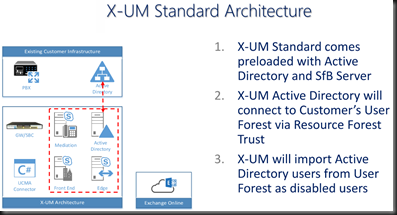
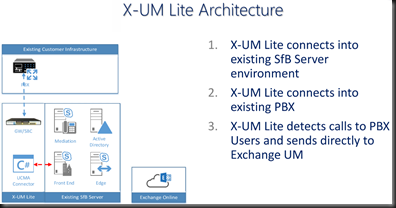
How about some architecture oulines?  I like pictures that show me things.  Here is the X-UM Standard and Lite.  Note that the “Lite” version relies on existing on-premises SfB resources.

image

image

Now, based on my current project, I know that there is going to be someone out there in reader-land who needs a visual of the call flows.  I know I do.

image

image

Summary

About now you are most likely wondering which of these will work for you. AudioCodes X-UM is based on proven hardware and proven solution approaches (CloudBond, CCE). If your environment is more complex, needs that existing PBX to coexist with Office 365 for your VoiceMail needs, then choose the flavor that answers your needs.  AudioCodes has you covered for any of the option 3 scenarios and could possibly help you (in the Lite version) with Option 1 and 2 also.

I know that somewhere above 75% of my customers all have some sort of “mixed deployment” usually due to call centers, business process, and culture.  Notice that none of those are easily changed before July 2018.  Ergo, we need to do something else in the short time we have available.  I submit that AudioCodes X-UM might well be that something.


As always, YMMV


2017/07/28

SfB Default AD Containers

Scenario

You know how those tin-foil-hat types are…

image

If it can be changed to “enhance” security, then by golly!  Let’s do it!  The problem, of course, is the rule of unintended consequences.  You know, what happens to something else because of action A, that is totally unplanned, and no one knows about it.

And, while I am mentioning it… have you ever noticed that the same team YOU have to run everything through for approval never asks your team if it is OK if they make a change?  They just do it?  Odd how that works out, eh?

Adelante.

The Oops!

It turns out that about 6 weeks ago, the aforementioned team instituted a change to the default AD containers.  To whit, they changed the default computer container to be something other than the OOBE.

Turns out that breaks SfB big time.  As in no more publishing the topology.  A Get-CsAdDomain fails.  But that is the clue to the fix.

The Fix

Simply run the SfB Domain prep again.


YMMV

2017/05/31

SQL Change Ports

The Port Change Issue

On a project where the SQL team has a policy of changing the SQL port away from the default of 1433? 

This does not pose a huge problem for your intrepid Skype (or Lync) deployment engineer.  If you are needing to know what to do, and maybe you have, oh, 30 or so front ends to modify, then maybe I can help you out a tad.

The issue is modifying the registry to tell your host server where to go to access the requisite port on the target SQL server.  As it turns out, I had to remember this, as it has been a bit since I had to last do this task. 

The Simple Fix to the Simple Issue

Luckily for you and me, it seems that every copy of a Windows operating system I looked at for this post (Win7, Win8, Win10, Server 2008+) have a utility in \windows\system32 called cliconfg.exe.  You can read up on that utility here.

A wonderful tool.  Here is it in Windows 10 form.  Which looks the same as Win7, so I think they will all pretty much appear to be the same. Actually, the Win7 version has a different set of window frames, so the appearance is more rounded instead of the ugly-ass Win10 metro crap.  But I digress.

image

What we need to do is select the Alias tab…the select Add.

image

For the purposes of this exercise, I need my system to talk to my SQL server (FQDN = sqlalwayson-a.tsoorad.net) on port 49001.  So, you set it up like this and then say OK.

image

image

Follow up that OK with an APPLY and your newly modified operating system will for thereafter talk to SQL server sqlalwayson-A.tsoorad.net on port 49001 vice 1433.  Simple.  Easy.  Works well.  Less filling.  Man, I am thirsty!

But Wait!  What if…

…you have like four user pools, and they all need to talk to the same monitoring server, but different archive targets per pool?  And what if there are like 30 front ends that need this modification, and every time you type this stuff in there is the possibility of spelling errors that mean system failure.  Now, I am sure there is some folks out there in techie land that are starting to chant “PowerShell!  PowerShell” -  but in this case, I am going to ignore them, and simply export a registry key, and then incorporate that into my server build process – which can be PowerShell-ized if you wish.

Here is the registry key to export.  HKLM\software\microsoft\mssqlserver\client\connectto

In my project, we had four SQL AG clusters, each with two nodes, a cluster name, and the AG name; all that needed to resolve by DNS.  So, our registry key looked somewhat like this: 16 entries with AG, cluster, node1, and node2 per supporting SQL cluster.  We then simply imported that into each server at build time.

image


Summary

The SQL mavens might well change ports on you.  If they do, there is an answer in form of cliconfg.exe.  If the scale is a tad larger than manual typing will cover, you can regedit your way to success.

YMMV


2017/04/19

New SfB SE won’t start

Usually I see this problem with EE pools, but in this case I have now seen it with two different SE installs.

The Problem

RTCSRV won’t start.  It just sits there for a bit, like 10 minutes and claims it is “Starting”.  Then the service status goes to “Stopped”.

Nothing in the event log, nothing shows in Powershell.  If you try to start from services.msc, it just sits there.  Nothing.

How did we get here?

A fairly locked down environment.  OK.  A severely locked down environment.  The tin-foil hat types have found a home in this place.  New install – new as in greenfield deployment.  Standard Edition installs, and before starting services for the first time, we ran the February 2017 CU into place.  All of that seemed fairly normal.

But the service wont’ start.

The Fix

Again, I usually see this with EE pools, but here is what fixed it:

Reset-CsPoolRegistrarState –PoolFqdn poolfqdn.domain.com -ResetType FullReset

YMMV

2017/03/16

Skype Test Matrix

As part of a project, Thaddeus Kurowski (CDW) and I put together a Skype test matrix to ensure that the implementation worked as designed/expected.

You may find it useful as well.

https://gallery.technet.microsoft.com/Skype-Implementation-Test-e11edf07

YMMV.

2017/02/16

SfB Persistent Chat ChannelService.exe high CPU

Twice in the last two weeks, I have seen an SfB Persistent Chat server go bonkers over a topology publish action.  Specifically, it would seem that the topology publish action caused channelservice.exe to peg the CPU at 100% with the predictable result of a very sluggish server.

Tangential input and possibly related data points:

The fix was easy enough, in one case I did a stop-cswindowsservice followed by start-cswindowsservice.  In the other case I had to boot the box because PowerShell opened but never responded to any input.

Such is life.

YMMV

2016/10/19

Call Flow Manager

I think that RGS is a wonderful thing, and something that every SfB deployment should evaluate for applicability.  Do you detest the SfB Response Group Service?  Then you might not want to read any further.  However, should you recognize the utility of said service, then this review might be just the thing you need to read.

SfB Response Groups allow the creation of simple hunt group or IVR-type grouping of agents to handle calls to a common DID.  They can work to the outside world, or be simply internal; but either way, the RGS is a great tool for those situations to which the RGS talents are applied.  I won’t go into what those talents are, or how to put the entire thing together in this article; rather this is a review of a spiffy tool from New Zealand Skype (well, Office Server and Services) MVP Andrew Morpeth.  What he and his team have done is create a nice GUI interface to the entire RGS management problem.  Let’s take a look at Call Flow Manager (CFM), shall we?

Before we start, you may wish to review the official documentation for RGS.

Install

If you have issues un-zipping a distribution and placing it a server that has met the prerequisites then you have larger issues than I can help with.  Dirt simple.  Just leave things in one folder, and put that folder on the drive.  Execute CallFlowManager.UI.exe and away you go.  You might want to make sure you know the license information before you start, as that will be the first question asked when the tool starts up. And oh yes, run this tool as administrator.

What are those prerequisites you might ask?  Simple: 

  • Supported for Lync 2013 or Skype for Business 2015
  • Microsoft .Net Framework 4.5
  • Lync/SfB Administrative Tools
  • Install the “Local Configuration Store” – this is step 1 of the Lync/SfB deployment wizard. Querying Response Group information requires this component to be installed
  • Outbound internet access on port 443 to https://theucguys.com
  • Minimum screen resolution of 1024×768
  • You may need to Run as administrator to ensure all feature work as expected

As you might ascertain, you will have best results doing CFM on an SfB Front End server.  I put mine on the Tsoorad.Net Test Lab SE.  Truly an awesome piece of gear; used and abused on a regular basis.

Integration

OOBE RGS requires three separate interfaces – an admin headache at the very least.  CFM puts all of that into one GUI.  I had a little challenge getting my head around the interface, but that was me – in the end, I like it quite a bit.  Especially the creation and assignment of business and holiday hours – a PowerShell goat rope for OOBE RGS management.

CFM also offers 10 IVR options rather than four.  And you can flip an RGS workflow between hunt and IVR.   Phone number visibility rounds out the technical offering. 

Functionality

I had zero issues using CFM on my SfB SE.  In fact, one of the nicer things that I always forget is to run things as admin.  C’mon Microsoft.  I am logged in as an administrator, why make me right-click and runas?  CFM checks for you, and rather than barfing in your face, flips up this nice little notice and offers to fix it for you.

image

If like me, you forget your brain at times, CFM has a nice search feature.  Here I have searched for RGS1 and discovered those elements that pertain to anything in my SfB that hints at RGS1…
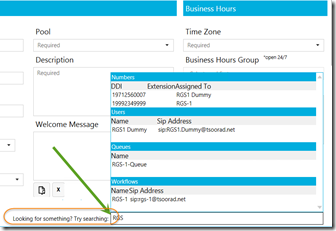
image

Very nice.  You might also notice that I carefully name my RGS components to include the workflow name…makes things stick out later when you discover that your documentation is not as up-to-date as you claim in your work reviews. You can search on almost anything.  You have no idea how stupid I can get while creating RGS workflows – I forget what I called what, and who belongs to what all the time. This feature alone is worth giving CFM a test drive.  Here I have quick search for TWO letters…

image

Interface Walkthrough

Let’s take a look at the overall GUI. CFM opens to this screen.  I have exercised the upper-left pull down to select an RGS workflow.  Here you can see pretty much the basics of the workflow.  You can change/edit anything on the display, and then save it before moving to something else.  I like this much better than the native tool.

image

Across the top, Call Flow Designer, Queues, Groups, Business Hours (oh yes), Holidays (oh yes #2), Numbers (oh yes #3, and Logs.

Queues allows you to create and manage RGS Queues.  About the same as the CSCP, but with CFM, you get everything you need in one interface.  IMHO, clearly much better.

image

Groups does the same as Queues, and my comment above holds true here also.

image

And now to the “good stuff” – Business Hours (and Holidays).  In the CSCP, webpage, PowerShell combination of native tools, business hours and holidays are, again IMHO, a royal PITA.  El Yucko to paraphrase my second child.  In CFM, you are given a nice GUI to create, edit, and play with both of these options that allow the final customization of the RGS in terms of open hours and closed hours.  The business hours selection comes with pre-worked up day selections, so that you don’t even have to think too much.  Pretty nice for those of use with both brain cells that are already full.

image

The Holiday hours works pretty much the same.

image

The Numbers page will show you all the DIDs that available so that you don’t do the John thing and try to assign a number to an RGS that is already assigned.

image

…and finally, Logs.  This little nifty detail will show you all the PowerShell that is going on under the hood as you create or modify various elements of the RGS structure.  I think it would be even nicer if the entire PowerShell command string was shown rather than a brief “hey, we did this general command.”

image

Nit Picks

I have always disliked the CSCP view of the RGS with the workflow, queue, and group arrangement.  My brain operates on the group, then queue, then create workflow concept, and the tool could be rearranged to reflect that.  However, having observed that, there is nothing WRONG with what is here.  I will reiterate my comment about the logs, and then that is that.  For something like this to have only TWO nitpicks is remarkable all by itself.

Praises

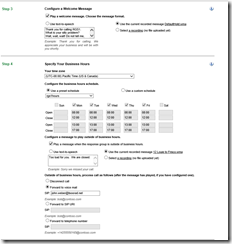
Without reworking all the screen caps already shown, here is the same workflow as above, but seen from the native web tool.

imageimageimage

Note that the queues and groups are not here, and to put together the business and holiday sets, you will need PowerShell. Clearly, CFM does a much better job of presenting options, creating answers, working up the solution, etc. 

And the final Bit of Goodness

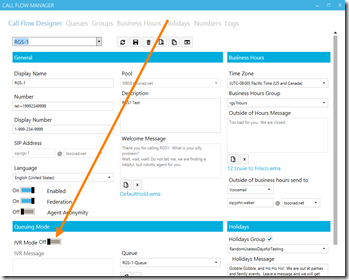
CFM can take a workflow that is “hunt group” and transform it to an “IVR” – something that the native tools cannot do (to the best of my knowledge).  If you choose to take this action, be warned that it appears to be a one-way street.  Once an IVR, always an IVR.
image

And when you get to the IVR slice of life, the native tools only gives you four levels, CFM blows past that as mentioned above.  So nice.

Where to get this piece of greatness

Simple.  Just go to TheUCGuys.com

Conclusion

I like it. A lot. I won’t say more.

YMMV

test 02 Feb

this is a test it’s only a test this should be a picture