About Me

My photo
This is a blog for John Weber. One of my joys in life is helping others get ahead in life. Content here will be focused on that from this date forward. John was a Skype for Business MVP (2015-2018) - before that, a Lync Server MVP (2010-2014). I used to write a variety of articles (https://tsoorad.blogspot.com) on technical issues with a smattering of other interests. I have a variety of certifications dating back to Novell CNE and working up through the Microsoft MCP stack to MCITP multiple times. FWIW, I am on my third career - ex-USMC, retired US Army. I have a fancy MBA. The opinions expressed on this blog are mine and mine alone.
Showing posts with label e2010. Show all posts

2015/07/15

Windows PKI SHA-1 to SHA-2

(How do you hear me now?)

Thanks go to fellow CDW co-workers Dean Sesko, Russell Despain, and Keith Crosby


What is the issue here?

Basically, the issue is that SHA-1 for PKI is going away in favor of SHA-2, and you WILL have customers that need help with this.


Reference:


AND…?

Any Microsoft supported operating system, properly patched/upgraded, and any Microsoft supported application, again properly patched/upgraded, will support SHA-2 PKI certificates.


Reference:

…there are some caveats: notably around XP and Server 2003, and oddly, Server 2008.

Reference:

So, there is not an issue with Microsoft supported products; the issue is with BYOD and Microsoft making a HUGE effort to support alternative browsers and operating systems. And those browsers and operating systems are fixing on deprecating their support of SHA-1.


Reference:

However, there are going to be numerous AD internal CA’s out there that are issuing SHA-1 certificates, and depending on how the environment is configured, the customer will need to renew their application certificates for internal use. Logically, it makes sense that the desirable outcome of renewing the application certificates is that the issuing PKI be SHA-2.

CDW AD resident experts advise instantiating a new Root CA, and if needed, a new subordinate CA for issuing SHA-2 certificates. But, you know those pesky customers, they may not want to do this. Which would call for modifying the existing structure to hand out SHA-2 vice SHA-1.


Reference:

Experimentation over the last several hours has revealed the following:

  • Migrating the existing SHA-1 CA went just fine.
  • The new SHA-2 Root Certificates updated almost immediately into the Trusted Root

clip_image001

  • I was able to request new SfB certificates and they were issued by the CA based on the new 3DES/SHA-2 root
    • However, the host server was not able to chain them up into the Trusted Root.
    • I rebooted.
    • I ran GPUpdate –force
    • I rebooted.
  • After waiting overnight, THEN the new certs chained up properly. Why this delay in chaining to the new Root I have no idea. I suggest that if you do this for real, that you do the work on one day and then plan on waiting for at least 8 hours before attempting to get new certificates and expecting them to chain up to the new root.

clip_image002

Testing:

After updating the internal certificates on my SfBSE to a new SHA-2 I successfully tested

  • using Win8.1 and Win7sp1
    • IE 11
    • Chrome Version 43.0.2357.134
  • Surface Pro 2 (8.1) IE
  • iPad (iOS 8.0.2) Safari

Firefox 39 fails – due to it not liking the root cert – why is FF so blinking difficult? Why does it have to have its’ own key chain? The O/S has the root cert! It does this same shit when installed on *nix. After manually importing my new root cert, it worked just fine.

clip_image004

clip_image005

  • SIP Phones.  I had to restart services (stop-cswindowsservice start-cswindowsservice) AFTER I changed the certificate to the new SHA-2 certificate before my AudioCodes 420HD and Polycom VVX-600 would log in.  Why, I do not know.


The SfB/Lync Connection!

You may have been wondering why *I* am worried about this.  Well, on literally every project with which I have been involved over the last few years, they all had *nix and Mac workstations, along with loads of iPhones, iPads, *nix tablets, droids, surface tablets, and here and there the odd Windows phone.  And, you have to know that, in most cases, all of these were attached to an internal corporate wireless.  And in some cases, the internal wireless was dropping these devices into the production network, which put them in a position to being able to directly contact Lync/SfB resources on internal servers, that, for the most part, had a PKI certificate from an internal CA.  With SHA-1.  You knew it had to be simple, right?

Any input to solving/addressing the observed delay would be most welcome. I, for one, totally expected to have the new certificate chain immediately – the appropriate root cert was in place!

YMMV

2014/02/28

Kemp HLB as Reverse Proxy

Interested in using content redirects and Kemp to provide Reverse Proxy services on the minimum amount of IP addresses?

I have been using this as a reference:  http://michaelvh.wordpress.com/2014/01/03/publishing-multiple-services-to-the-internet-on-a-single-ip-address-using-a-kemp-load-balancer-and-content-switching-rules/.  Written by Exchange MVP Michael Van Horenbeeck, this article lays out what is needed to get Lync and Exchange operating on a single IP.

Up on NextHop, as of 14 February 2014, we also have this:  http://blogs.technet.com/b/nexthop/archive/2014/02/14/configuring-reverse-proxy-access-to-microsoft-lync-server-2013-using-kemp-loadmaster.aspx

Of note in the NextHop article is the little blurb at the top mentioning the certification process – nothing like having a reference to the OIP to make customers happy!  Also, the official Kemp configuration guidance for Lync 2013 is referenced in case you have a hard time finding that piece of arcana.  “If you need details steps or would like to manually create these services, you can refer to detailed instructions provided in “LoadMaster Deployment Guide for Microsoft Lync 2013” located here: http://kemptechnologies.com/files/downloads/documentation/7.0/Deployment_Guides/Deployment_Guide-Lync_2013.pdf”

YMMV

2013/12/19

Exchange 2007 mailbox users Lync EWS


Scenario

During the transition to Exchange 2013 from Exchange 2007, Exchange Web Services (EWS) integration for Lync will be unavailable for users whose mailboxes remain on Exchange 2007. 


The Bad News

Jeremy Silber has an excellent blog article on this issue.  It bears reading if you fit the above scenario.  Jeremy shows in extremely clear detail what is going on, and why. Unfortunately, he also shows that there is no fix.  Here is the article:

http://silbers.net/blog/2013/12/19/lync-ews-broken-during-exchange-20132007-transition/

YMMV

2013/09/26

Crack a 2048 bit certificate

I have no background in determining how accurate this claim is, but the video is interesting, and even if it is only 1% accurate (in terms of time needed), then I think we are good.

Crack a 2048 bit certificate

YMMV

2013/09/11

Exchange ReadTrackingEnabled

As I have said before, I work with a great bunch of folks who possess, and daily exhibit, some deep skills.  Here is a sample email that went flying by the other day.

Background:  Jim Coan (Principal Consulting Engineer) and Vitaliy Mednik (Senior Consulting Engineer) are on CDW’s Microsoft Unified Communications team out of the Detroit area.  If I need help, these are two of the people to whom I turn for assistance. 

This is what Jim said at the bottom of his email:  “Considering this the frequency I’ve been asked about this I figured I’d share with the team.  I always get gripes when migrating from GroupWise to Exchange about this.”  Personally, I have not done a GroupWise migration in several years  - Jim seems to get stuck with them sandwiched between his other work. 


I’ve been asked more than a few times if there was a way to find out if a user has read/opened an email on Exchange.  My standard answer was that we can track mail flow to delivery and also to use message tracking when sending the message itself.  This was not an acceptable answer for the client I am currently working with so I did some extra digging and with a nudge in the right direction from our good friend Vitaliy Mednik I found this little jewel inside Set-OrganizationConfig called –ReadTrackingEnabled.  What this does in essence is turn on read receipts for everything in the organization.  It doesn’t replace read receipts, so users can still have that at their disposal, it is really more of a server side read receipt that can’t be canceled like a read receipt.  This can be good or bad depending on the perspective as it’s a bit more work for the servers to process. Ilse over at MS wrote up this little article that describes it pretty well.

http://blogs.technet.com/b/ilvancri/archive/2010/04/13/question-is-it-possible-to-check-if-a-message-has-been-read-even-when-the-sender-forgot-to-check-the-box-request-a-read-receipt-for-this-message.aspx

What isn’t included on that article is how to pull the information through PowerShell as an administrator.  The following commands will take care of that for you.

$temp = Search-MessageTrackingReport -Identity quest1@co.domain.com -Recipients "username@co.domain.com"

Get-MessageTrackingReport -Identity $temp.MessageTrackingReportID -RecipientPathFilter username@co.domain.com -ReportTemplate RecipientPath

Compliments of Mike Pfeiffer for the above PowerShell snippet and the full blog post can be found here.

http://www.mikepfeiffer.net/2012/01/generating-delivery-reports-and-tracking-messages-from-powershell/

As a side note, this works on 2010 & 2013 including Office 365.

As always YMMV.


HTH

2013/06/06

Exchange 2010 EMC & EMS winrm “access is denied”

Four hours of my life gone. 

I had a customer call and say that on ONE of their Exchange 2010 servers the EMC would not open. 

The Situation

The EMS would give this error:  “Connecting to remote server failed with the following error message : Access is denied.” PowerShell would then happily connect to another server in the site. 

The EMC would simply go nowhere with a message that “kerberos authentication failed.”  How nice.

My user was in the Organization Management group, domain admins, and almost everything else needed to install, configure, and be a super-admin in Exchange 2010.  The server was a member of the Exchange Servers group.  The server, a multi-role server, was still hosting active mailboxes and delivering mail.  OWA worked just fine.  There were no user complaints of Exchange services not being rendered in any way, shape, or form.  Just that the EMC would balk at the failed Kerberos and then be useless, and the EMS would not connect locally, but would connect to another server.

We checked: IIS, PowerShell vdir, perms, auth, bindings, winrm quickconfig, net time, SPN’s, user accounts, Exchange component group membership, IIS webconfig files.  We removed registry entries, files and folders in the user profile, and spattered chicken blood on the walls.  I must have read about 100 different websites, blogs, and forums.  They all had the same information, and none of it worked.  Some of the advice was inane, recommending removing exchange, or just slapping in the next SP.  Take a gander at this forum thread; it contains a pretty good approximation of the issue and the failed resolution.

The Fix

I then found this article. Down at the bottom, there was a suggestion that this could be a certificate problem, but the solution was to put the self-signed Exchange server cert into the Trusted Root store – see below.  This just had to be wrong, right?  WTF?

image

Figuring that I had already failed for the last 225 minutes, I had nothing to lose.  Well, what do you know!  15 seconds of copy and paste, and the EMC and the EMS are functioning normally again. I then removed the self-signed cert from that store, and the EMC and EMS still work.  Having trepidations over that action of removing the cert that appears to have resolved the issue, I put the cert back into the Trusted Root store just to be safe and retested.  Still works.

I sit here, pondering on how and why this fix worked.  And I cannot come up with a good answer.  Maybe someone, someday, can explain it to me.

YMMV

2013/06/03

Veeam and Volume Mount Points & RDM

It would appear that Veeam does not play well with volume mount points.  At a recent project, we migrated into a new Exchange 2010 environment using volume mount points attached to c:\volmtpt – Veeam would see the empty folder, but never the contents.

We were providing the the raw drive space with RDM.  So we tried the same drive space, but mounted as a direct drive.  Veeam could not see that either. Veeam support forums hinted that RDM may or may not work – apparently depending on the phase of the moon.  There are some folks who claim to have it working – but not me.

In the end, we went with raw drive space vmdk.  Now it works as expected.  But what if you don’t want 24 drive letters?  Or even more than 1?  Windows Server Backup, in the same scenario had no issues with the mount point construction.

WASSUP WID DIS?

YMMV

2012/12/03

IIS AAR hotfix

With TMG on the verge of no longer being sold, we need to find some reasonable alternatives to Reverse Proxy solutions for both Exchange and Lync.

IIS Application Request Routing is one such solution that may work for you or your client’s environment. If that is the case, then you will want to be aware of this hotfix: MS KB 2785586

http://www.microsoft.com/en-us/download/details.aspx?id=35827&WT.mc_id=rss_alldownloads_all

YMMV.

2012/10/02

Private Domain Certificates

Today, you can get a public Certificate Authority  - DigiCert, Entrust, etc – to issue you a trusted certificate for your internal domain.  For instance, if you have an internal AD name such as domain.local, or domain.tld, or any other that is not registered according to the governing body, then your certificate provider will issue you a certificate for the FQDN of your internal servers and your devices will trust that certificate providing your devices trust the issuer – standard fare for most of the public CA issuers.

In an effort to tighten security on the Internet by creating more stringent standards, the CA/Browser Forum recently formulated new guidelines in their Baseline Requirements for issuing SSL certificates.

One of the new changes is the elimination of certificates using internal names. This change makes it impossible to obtain a publicly trusted certificate for any host name that cannot be externally verified as being owned by the organization that is requesting the certificate.  According to this CA/Browser  document:

Effective 1 October 2016, CAs SHALL revoke all unexpired Certificates whose subjectAlternativeName extension or Subject commonName field contains a Reserved IP Address or Internal Server Name.

In addition, it appears that internal name certificates will NOT be issued after 1 Nov 2015.  Or, at least DigiCert will not issue them after that date:

In accordance with this new standard, DigiCert will no longer issue certificates to these internal names with expiration dates after November 1, 2015.

If you fall into this category, you should begin planning now to: a) deploy internal PKI and figure out how that action will change your environment(s); or b) change your internal AD DS name (yuk!).

Interesting note:  www.digicert.com is already planning ahead to help you out!  See this nifty tool.

YMMV

2012/05/04

Exchange 2010 refuses to install

Background Information

Recently, I was faced with servers that failed to install with an esoteric error regarding being unable to find a specific GUID and the identity being null. I ended up punting this issue to CSS rather than burn hours repeatedly trying (and failing) to find a solution on my own.  I was happy to discover that it took no less than 5 premier support engineers over 17 hours to resolve this issue – at least I have the satisfaction of knowing that the root cause was bizarre.  Interesting to note that this fix also resolved another issue where autodiscover created a POP account for a non-domain machine but a regular Exchange account for domain machines.
During the failed installs, the local machine would get the Exchange Management tools, but they would not open local, but they would attach at the EMS level to another machine; the EMC would open but then error out on assigning rights for activity.  Usually when you see this type of brew-up, re-running setup /prepareAD puts things back to normal.  However, this action failed for me also.  After the org group fixes, you will note that the EMS fix was to move the IIS to “all unassigned” from a fixed IP.  I believe that I may have set the fixed IP in an effort to get the EMS winRM to work.  If so, my mistake for not moving that back.
Long story short, somebody mail-enabled the Microsoft Exchange Security Groups.  So the GUID that was being looked for by the installer was the Organization Management group.  Once that was fixed, the next group in line caused the same error.  And so on down the line.  The issue trace notes are below.  There are some interesting resolution steps there.


The Issue

An Exchange 2010 environment  needed a new CAS – we were installing a new CAS specifically to handle a high number of mobile devices because of CPU thrashing and iPhones.  What should have taken about an hour total ended up in two evenings of my time (and the internal staff time) along with over 17 hours of Microsoft CSS time. 
Exchange 2010 refused to install onto the new server no matter what I did.  Very stubborn.  The Management tools install would go just fine (but then not open properly). 
We got this error in both the GUI install and command line install, as well as the eventlog. 
Description: Exchange Server component Client Access Role failed.
Error: Error: The following error was generated when "$error.Clear();
          if ($RoleIsDatacenter -eq $false)
          {
            $delegatedRoleGroupGuid = [Microsoft.Exchange.Data.Directory.Management.RoleGroup]::DelegatedSetupWkGuid;
            $delegatedSetupRG = Get-RoleGroup $delegatedRoleGroupGuid;
            add-ExchangeAdministrator -role ServerAdmin -Identity $delegatedSetupRG.Identity -Scope $RoleNetBIOSName;
          }
        " was run: "The operation couldn't be performed because object '261928d1-f5d1-445b-866d-1d6b5bd87a09' couldn't be found on 'TACOMA.corp.domain.com'.".
The operation couldn't be performed because object '261928d1-f5d1-445b-866d-1d6b5bd87a09' couldn't be found on 'TACOMA.corp.domain.com'.
Error:  The following error was generated when "$error.Clear();
          if ($RoleIsDatacenter -eq $false)
          { 
$delegatedRoleGroupGuid = [Microsoft.Exchange.Data.Directory.Management.RoleGroup]::DelegatedSetupWkGuid;
            $delegatedSetupRG = Get-RoleGroup $delegatedRoleGroupGuid;
            add-ExchangeAdministrator -role ServerAdmin -Identity $delegatedSetupRG.Identity -Scope $RoleNetBIOSName;
          }
        " was run: "Cannot bind argument to parameter 'Identity' because it is null.".
Cannot bind argument to parameter 'Identity' because it is null.


Attempting to install the HT role resulted in a version of this error as well.  Except that this one mentioned not being able to find an SMTP connector to the internet  - which was bogus, a connector existed.
Setup cannot detect an SMTP or Send connector with an address space of '*'. Mail flow to the Internet may not work properly.
The EMC would open, and then pitch and error about a remote forest.
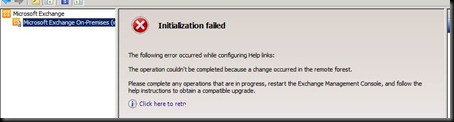
clip_image002
The EMS would open, but not connect to the local server but would attach to a remote server.
image
All of these things pointed to a permissions issue; however, adding the role (as a test) to a working mailbox server went just fine.  Really odd.  I also tried setup /prepareAD thinking that “something” went sideways.  No dice.  Setup /prepareAD failed to run.  It just dumped out.  At this point I recommended the client open a case with CSS.

The Solution

First, what happened is that someone (NOT ME!) mail-enabled all the groups in the Microsoft Exchange Security Groups container.  I have never had a reason to do this before; evidently, this is not a recommended action – serious side effects!  Also remember that it took 17 hours for CSS engineers (five of them working in shifts) to resolve this issue.  This work is not for the faint of heart and I would recommend that if you are facing this issue, or think you are, that you call CSS.
The fix (as provided by CSS) is outlined below.
YMMV

-    Setup /prepareAD is failing.
-    Error message received is as below.
[04/27/2012 02:38:43.0455] [2] Used domain controller DC.corp.Company.com to read object CN=Exchange Servers,OU=Microsoft Exchange Security Groups,DC=corp,DC=Company,DC=com.
[04/27/2012 02:38:43.0471] [2] [ERROR] Unexpected Error
[04/27/2012 02:38:43.0471] [2] [ERROR] The well-known object entry with the GUID "6c01d2a7-f083-4503-8132-789eeb127b84", which is on the "CN=Microsoft Exchange,CN=Services,CN=Configuration,DC=corp,DC=Company,DC=com" container object's otherWellKnownObjects attribute, refers to a group "CN=Exchange Servers,OU=Microsoft Exchange Security Groups,DC=corp,DC=Company,DC=com" of the wrong group type. Either delete the well-known object entry, or promote the target object to "Universal, SecurityEnabled".
[04/27/2012 02:38:43.0471] [2] Ending processing initialize-ExchangeUniversalGroups
[04/27/2012 02:38:43.0487] [1] The following 1 error(s) occurred during task execution:
[04/27/2012 02:38:43.0487] [1] 0.  ErrorRecord: The well-known object entry with the GUID "6c01d2a7-f083-4503-8132-789eeb127b84", which is on the "CN=Microsoft Exchange,CN=Services,CN=Configuration,DC=corp,DC=Company,DC=com" container object's otherWellKnownObjects attribute, refers to a group "CN=Exchange Servers,OU=Microsoft Exchange Security Groups,DC=corp,DC=Company,DC=com" of the wrong group type. Either delete the well-known object entry, or promote the target object to "Universal, SecurityEnabled".
[04/27/2012 02:38:43.0487] [1] 0.  ErrorRecord: Microsoft.Exchange.Management.Tasks.InvalidWKObjectTargetException: The well-known object entry with the GUID "6c01d2a7-f083-4503-8132-789eeb127b84", which is on the "CN=Microsoft Exchange,CN=Services,CN=Configuration,DC=corp,DC=Company,DC=com" container object's otherWellKnownObjects attribute, refers to a group "CN=Exchange Servers,OU=Microsoft Exchange Security Groups,DC=corp,DC=Company,DC=com" of the wrong group type. Either delete the well-known object entry, or promote the target object to "Universal, SecurityEnabled".
[04/27/2012 02:38:43.0487] [1] [ERROR] The following error was generated when "$error.Clear();
initialize-ExchangeUniversalGroups -DomainController $RoleDomainController -ActiveDirectorySplitPermissions $RoleActiveDirectorySplitPermissions
" was run: "The well-known object entry with the GUID "6c01d2a7-f083-4503-8132-789eeb127b84", which is on the "CN=Microsoft Exchange,CN=Services,CN=Configuration,DC=corp,DC=Company,DC=com" container object's otherWellKnownObjects attribute, refers to a group "CN=Exchange Servers,OU=Microsoft Exchange Security Groups,DC=corp,DC=Company,DC=com" of the wrong group type. Either delete the well-known object entry, or promote the target object to "Universal, SecurityEnabled".".
[04/27/2012 02:38:43.0487] [1] [ERROR] The well-known object entry with the GUID "6c01d2a7-f083-4503-8132-789eeb127b84", which is on the "CN=Microsoft Exchange,CN=Services,CN=Configuration,DC=corp,DC=Company,DC=com" container object's otherWellKnownObjects attribute, refers to a group "CN=Exchange Servers,OU=Microsoft Exchange Security Groups,DC=corp,DC=Company,DC=com" of the wrong group type. Either delete the well-known object entry, or promote the target object to "Universal, SecurityEnabled".
[04/27/2012 02:38:43.0487] [1] [ERROR-REFERENCE] Id=443949901 Component=
[04/27/2012 02:38:43.0487] [1] Setup is stopping now because of one or more critical errors.
[04/27/2012 02:38:43.0487] [1] Finished executing component tasks.
[04/27/2012 02:38:43.0502] [1] Ending processing Install-ExchangeOrganization
[04/27/2012 02:38:43.0502] [0] The Exchange Server setup operation didn't complete.  More details can be found in ExchangeSetup.log located in the <SystemDrive>:\ExchangeSetupLogs folder.
[04/27/2012 02:38:43.0502] [0] End of Setup
Troubleshooting:
-    The problem is happening because of some issue with the USGs in the Microsoft Exchange Security Groups container.
-    Opened LDP.exe
-    Accessed the Configuration partition.
-    Right clicked on Microsoft Exchange.
-    Clicked modify option.
-    Pasted the  B:32:A7D2016C83F003458132789EEB127B84:CN=Microsoft Exchange,CN=Services,CN=Configuration,DC=corp,DC=Company,DC=com in the value.
-    Clicked on Delete Radio button.
-    Clicked on Run.
-    Forced AD replication.
-    Ran Setup /prepareAD again.
-    It again failed with the same message but this time the Group is different.
-    Noticed that a new ExchangeServers1 group has been created.
-    We wanted to check why this issue happening for multiple groups.
-    So we compared the LDP dump of the old Exchange Servers and the new Exchange Servers1 group.
-    The old group was mail enabled. It had exchange attributes like legacyExchangeDN, proxyAddresses, mail, mailnickname etc...
-    Checked the GAL and Exchange Servers group is visible there.
-    We have no idea how this happened or who mail enabled these groups.
-    Same is the case with other Groups in that OU as well.
-    We removed the corresponding entries for the remaining groups from CN=Microsoft Exchange,CN=Services,CN=Configuration,DC=corp,DC=Company,DC=com.
-    Forced AD Replication and ran setup /prepareAD again.
-    This time setup succeeded.
-    We successfully installed the CAS role as well.
-    Powershell is not connecting to the local server.
-    We are getting the below error.
========
The WinRM client sent a request to an HTTP server and got a response saying the requested HTTP URL was not available. This is usually returned by a HTTP server that does not support the WS-Management protocol.
========
-    Checked the bindings on Default Web Site from IIS manager.
-    HTTP was bound to a specific IP rather than All Unassigned.
-    Changed it to All Unassigned and restarted IIS.
-    Powershell started working fine.
-    We are having issues with Management roles for admins.
-    The Server Configuration section is not visible in EMC and we are not able to see user properties from EMC.
-    Get-Mailbox returns only the logged on user's details even though the logged on user is an ORG Admin.
-    This looks like a RBAC issue.
-    Checked AD permissions
-    The admin user has Full Control on all containers.
-    Still he is not able to Administer user accounts from EMS or Shell.
-    Tested ECP access and it also failed with Access Denied.
-    Identified http://social.technet.microsoft.com/Forums/en-US/exchange2010/thread/8f9a1881-d66d-4d8a-a6ff-06729a701999
-    We followed the below steps to resolve the issue.
==============
Do the following on the Exchange 2010 server using the same account used to install Exchange 2010.
1)     Open Windows PowerShell (not the Exchange Management Shell)
a.       If you have UAC enabled, right click Windows PowerShell and click Run as administrator.
2)     Run Start-Transcript c:\RBAC.txt and press enter
a.       This will start logging all commands and output you type to a text file.
3)     Run Add-PSSnapin *setup and press enter
a.       This adds the setup snap-in which contains the setup cmdlets used by Exchange during install. You may see errors about loading a format data file. You can ignore those errors.
DO NOT run any other cmdlets in this snap-in without direction from Microsoft. Doing so could irreparably damage your Exchange installation.
4)     Run Install-CannedRbacRoleAssignments -InvocationMode Install -Verbose and press enter.
a.       This cmdlet should create the required role assignments between the role groups and roles that should have been created during setup.
b.       Be sure you run with the Verbose switch so we can capture what the cmdlet does.
5)     Run Remove-PSSnapin *setup and press enter
6)     Run $Session = New-PSSession -ConfigurationName Microsoft.Exchange -ConnectionUri http://<FQDN of Exchange 2010 server>/PowerShell/ -Authentication Kerberos and press enter
a.       Be sure to replace <FQDN of Exchange 2010 server> with the FQDN of your server.
7)     Run Import-PSSession $Session and press enter
8)     Run Get-ManagementRoleAssignment and press enter
9)     Run Stop-Transcript and press enter
=============
-    This resolved the RBAC issue as well.


2012/05/03

Lync TrustModelData

The Issue

Recently, I had a small issue with Lync 2010 clients objecting to the certificate on the autodiscover.company.com CAS server.

The internal domain in use for SIP was company.local, and the CAS had company.com, although autodiscover.company.local was also on that cert.

Interestingly, we first looked at strict DNS naming, however, that did not appear to be the root cause. A colleague pointed out to me that he thought the TrustModelData might be doing it, so we investigated that route.

The error popped up as soon as autodiscover.company.com (the SMTP domain) was added to DNS. Here is the error :

image

Lync is hardcoded to act on finding Autodiscover, and it immediately attempts to connect to the advertised EWS.  In our case, the SMTP domain does not match the SIP domain (company.com v company.local).

The Fix

As it turns out, there is a registry entry in HKLM to control this behavior – by default this key is populated with a selection of Microsoft Online entries – none of which matched our company.local. We pushed the following registry change with SCCM; GPO was not an option due to XP workstations. 

This option is NOT part of Lync in-band client provisioning, and you can put the entry in either

HKEY_LOCAL_MACHINE\Software\Policies\Microsoft\Communicator\TrustModelData 

OR

HKEY_CURRENT_USER\Software\Policies\Microsoft\Communicator TrustModelData

and APPEND your SMTP domain to the list.

SNAGHTMLf6ce697

The precedence for applying these changes is:

(1) In-band provisioning, (2) HKLM, (3) HKCU, (4) Lync option set in client. 

Because of this ordering, we decided on using HKLM for our registry change so that all users of the workstation would get the change.

YMMV.

2012/03/21

Create Mailbox Database Guide

One of the tasks common in Exchange 2010 is creating a mailbox database. If DAG is involved, then adding a second copy (or third or more) is also common. In addition, application servers such as RIM® Blackberry™ Enterprise Server and CommVault have service accounts that are typically granted permissions at the database level so that they can interact with the database mailboxes. This guide will show you how to create a database, add database copies, and change the database to support BES or similar third-party application service accounts. Powershell commands equivalent to the EMC GUI are shown – in the case of the database changes, powershell is the only method to make the necessary changes (although you could use ADSIedit if you were very brave/adventurous).

Assumptions

· You know the database and transaction log file location. If you are creating multiple database copies, the server data location is IDENTICAL between servers.

· This procedure assumes an existing Database Availability Group (DAG)

· You know the activation preference for subsequent database copies

· If the mailbox server upon which you are placing the active copy of the new database does not have a public folder (PF) database, you know which PF database you want the new mailbox database to use.

· You are using the default offline address book.

· You know the netbios\alias or username of the service accounts for applications such as BES or the Commvault backup agent.

You will need to adjust these commands to match your specific parameters. If you choose to do the file locations on the fly, the powershell/GUI creation process will create the paths for you.

Create the mailbox database

Open the EMC (Exchange Management Console)

Once that tool is open, expand the tree in the left pane until you can see the “Organization Configuration | Mailbox” as shown, and the select New Mailbox Database

clip_image002

Input the names as prompted

clip_image004

The program will input default locations for the database file path and the log folder path. You may not want this. Keep in mind, the database path needs to be a complete path, with file name. The log folder path is just the folder that will hold the log files.

clip_image006

Here is an example of paths that are different from the default

clip_image008

Check off the “mount this database” as you desire. I always leave it checked, and about 40% of the time, the database will mount properly. If it does not mount, give yourself about 10 minutes for AD to catch up, and then mount the database.

You get a chance to review your selection (and go back if needed)

clip_image010

Here is the new database creation process at the finish screen

clip_image012

Here is the underlying powershell commands for creating the new database and mounting the new database: (the first command wrapped – powershell commands need to be on one line)

new-mailboxdatabase -Server 'E2010THIRD' -Name 'New Database' -EdbFilePath 'C:\VolMtPts\NewDB\EDB\New Database.edb' -LogFolderPath 'C:\VolMtPts\NewDB\TL'

mount-database -Identity 'New Database'

Add Database Copy

From the same location in the EMC, choose the “Database Management” tab, select a mailbox database, and then select “Add Mailbox Database Copy” from the Action Pane.

clip_image014

When the wizard opens, note that you do not get to change the database name, the server(s) already with a copy of the database are shown, and you have a “preference” number. The preference number is used to determine automatic mount order should the active database fail. For the second copy, leave it as “2.” If you are making 3 or 4 copies and doing the creation in reverse order, you could set this to 4 or 3 and then do the lower precedence number later. If you set this number to “1” the original database will be raised to “2.” At any rate, browse for a new server to host the new database copy. When you have things the way you want them, click on “ADD.”

clip_image015

At the end, you will have a mailbox database with two copies, one copy mounted, the other healthy and ready to take over if needed.
clip_image017

Here is the powershell equivalent:

Add-MailboxDatabaseCopy -Identity 'New Database' -MailboxServer 'E2010SECOND' -ActivationPreference '2'

Add PF and OAB to new Mailbox Database

In the EMC, select the new database, and then right-click it to get at the properties as shown

clip_image018

Note the details regarding the database reflect the database as a logical entity, not a physical object.

clip_image019

Select the “Client Settings” tab and adjust the PF database and OAB to your environment.

clip_image020

Select the “Limits” tab and adjust the database limits to your environment. This illustration shows the system database defaults.

clip_image021

Select the “Maintenance” tab and adjust the database to your environment.

clip_image022

Change database to support third-party applications

Once you have a new database, and a new copy of the database, and you have adjusted the database to meet the requirements in your environment, you need to change a few permissions to allow third-party applications such as Commvault® and BES™ to access the mailboxes housed in the database.

The database parameters that need adjusting are only exposed to powershell. To begin, open an Exchange Management Shell.

clip_image023

You should get something that looks like this.

clip_image024

BES and CommVault need read-as and send-as at the database level so that they can send and receive mail on behalf of the individual user. What needs to be done with a new database is grant permissions to the service account.

get-mailboxdatabase –identity “new database” | add-adpermission –user <service account> -extendedrights receive-as,send-as

YMMV.

2012/02/22

Exchange 2010 WinRM and Powershell

Situation

Opening the Exchange Management Shell (EMS) on the server fails to connect to the local server with this error:

Connecting to remote server failed with the following error message : The WinRM client received an HTTP server error status (500), but the remote service did not include any other information about the cause of the failure. For more information, see the about_Remote_Troubleshooting Help topic.

Nice, huh?  Looking at the event log gave me an RBAC error and a a few others as shown…

(Process w3wp.exe, PID 3244) "RBAC authorization is unavailable due to the transient error: The Microsoft Exchange Active Directory Topology service on server localhost can't be contacted via RPC. Error 0x5."

Process w3wp.exe (PID=3244). An remote procedure call (RPC) request to the Microsoft Exchange Active Directory Topology service failed with error 5 (Error 0x5 (Access is denied) from HrGetServersForRole). Make sure that the Remote Procedure Call (RPC) service is running. In addition, make sure that the network ports that are used by RPC are not blocked by a firewall.

Process w3wp.exe (PID=3244). An remote procedure call (RPC) request to the Microsoft Exchange Active Directory Topology service failed with error 5 (Error 0x5 (Access is denied) from HrGetServersForRole). Make sure that the Remote Procedure Call (RPC) service is running. In addition, make sure that the network ports that are used by RPC are not blocked by a firewall.

What changed over the last week?  E2010 SP2 and RU1 had been run into the environment – but nothing else.

This was very frustrating because all the “normal” fixes to this did not work.  WinRM extensions, Kerberos auth on the powershell vdir, rebooting, you name it, I looked at it.  Nada.

The Fix

On a whim, while checking the PowerShell virtual directory path, and comparing a working server to this non-functioning server, I looked at the application pool…oh &%*!.  How did it get that way?  Four hours of chasing my tail.  Four hours of my life I cannot get back.

My only thought is that SP2 or SP2 RU1 borked that setting for some bizarre reason.  Here is a nice screen shot of what it was…

clip_image002[5]

…and what it should be:

clip_image002

YMMV

2012/02/20

0x2114 schema update failed

Subtitle: Fun with linkID and Schema LDF files

Scenario

On site getting a project rolling.  One of our first steps was to test the schema extending in lab.  Perfect execution.  So we submit for change control and get going the next morning.  Having just succeeded doing this task the day before in lab, we were not expecting any issues. Not so fast Bucko! 

Setup /prepareschema (setup /ps) got about 20 seconds in and dumped out with this little gem:

[02/09/2012 19:08:14.0737] [1] [ERROR] There was an error while running 'ldifde.exe' to import the schema file 'C:\Windows\Temp\ExchangeSetup\Setup\Data\PostExchange2003_schema18.ldf'. The error code is: 8245. More details can be found in the error file: 'C:\Users\me.adm\AppData\Local\Temp\5\ldif.err'

Oh wonderful.  But, no problem – let’s get to the bottom of this and get moving forward.  A closer read revealed that the ldf count was up to at least the 18th file, and probably higher.  (If you look at that directory, there is over 400 LDF files there….)  So, my conclusion is that something is not the same in the production AD as in the lab.  Looking at the ldif.err file shows this: (sorry about the crappy wrapping…)

Entry DN: CN=ms-Exch-Mobile-Mailbox-Policy-Link, CN=Schema, CN=Configuration,DC=domain,DC=local

Add error on entry starting on line 358: Unwilling To Perform

The server side error is: 0x2114 Schema update failed: An attribute with the same link identifier already exists.

The extended server error is:

00002114: SvcErr: DSID-032603BC, problem 5003 (WILL_NOT_PERFORM), data 8468


An error has occurred in the program

Personally, I really liked the idea of changing the error code in the file I was told to go look at… the server error said 8245, here in the ldif.err file we are given a value of 8468.  This is important though… it enabled me to find an EXACT fix.

What was Wrong

Long story short – at some point in the past, the client had done an application or something that grabbed the same linkID that the Exchange 2010 schema extension wanted to use.  So it pitches the error and quits out.  Here is the pertinent section of the ldif.log:

[02/09/2012 19:08:14.0284] [2] Beginning processing install-ExchangeSchema - LdapFileName: 'Setup\Data\PostExchange2003_schema18.ldf'

[02/09/2012 19:08:14.0284] [2] Running <C:\Windows\system32\ldifde.exe> with arguments <-i -s "XXX-W2K8-DC02.domain.local" -f "C:\Windows\Temp\ExchangeSetup\Setup\Data\PostExchange2003_schema18.ldf" -j "C:\Users\me.adm\AppData\Local\Temp\5" -c "<SchemaContainerDN>" "CN=Schema,CN=Configuration,DC=domain,DC=local">.

[02/09/2012 19:08:14.0705] [2] Process C:\Windows\system32\ldifde.exe finished with exit code 8245.

[02/09/2012 19:08:14.0721] [2] [ERROR] Unexpected Error

[02/09/2012 19:08:14.0721] [2] [ERROR] There was an error while running 'ldifde.exe' to import the schema file 'C:\Windows\Temp\ExchangeSetup\Setup\Data\PostExchange2003_schema18.ldf'. The error code is: 8245. More details can be found in the error file: 'C:\Users\me.adm\AppData\Local\Temp\5\ldif.err'

What is happening here?

The Fix

0x2114 schema update failed: searching that phrase or “an attribute with the same link identifier already exists” gave some interesting results – including this one:  http://support.microsoft.com/kb/917682 which is for Exchange 2003 and the advice is to modify the ldf file with an arbitrary number and, of course, in the future hope that no one created an install that wants to use that number for a LinkID.  After reading that article and several others like it, I concluded that the error was the same, but I did not like the solution.

Searching with the second value in the ldif.err log (8468) gave me a technet forum article that was so close to being my error that I was almost moved to genuflect in the direction of Redmond.  Here is the article.  Down towards the bottom is the interesting part, where is mentions “…German article which exactly described my problem…” BINGO!!  Anyone read German?  My search engine does….

For you bilinguals, here is the original and here is the translation.

The LinkID exists that the PostExchange2003_schema18.ldf file wants to use for ITS object is already in use.  OK.  Let’s look at the actual file, or at the very least a section of the file (it is several K of text).

In my case, the exchange install log pointed at this attribute inside the PostExchange2003_schema18.ldf as failing:

dn: CN=ms-Exch-Mobile-Mailbox-Policy-Link

A quick search of the PostExchange2003_schema18.ldf  file give us this section:

dn: CN=ms-Exch-Mobile-Mailbox-Policy-Link,<SchemaContainerDN>
changetype: ntdsSchemaAdd
adminDescription: ms-Exch-Mobile-Mailbox-Policy-Link
adminDisplayName: ms-Exch-Mobile-Mailbox-Policy-Link
attributeID: 1.2.840.113556.1.4.7000.102.50668
attributeSecurityGuid:: iYopH5jeuEe1zVcq1T0mfg==
attributeSyntax: 2.5.5.1
isMemberOfPartialAttributeSet: TRUE
isSingleValued: TRUE
lDAPDisplayName: msExchMobileMailboxPolicyLink
name: ms-Exch-Mobile-Mailbox-Policy-Link
oMSyntax: 127
oMObjectClass:: KwwCh3McAIVK
objectCategory: CN=Attribute-Schema,<SchemaContainerDN>
objectClass: attributeSchema
linkID: 1058
schemaIdGuid:: KqC15oH1QkyuYBCP58HttQ==
searchFlags: 0

(The DN: line, btw, is line 358 which is what the ldif.err log pointed to also.)

But, look at the “linkID: 1058” line… and then go back and read the German translation again.  And there is our fix.  We need to get a number into that value that no longer conflicts… but we want that number to be good from here on out also.  What is important about that German article is that it gives us the input for the value – but in AD terms without having to dream up a number and hope it never gets used, or contact Microsoft for an official linkID to use (something maybe the Exchange team did?)!  Apparently, using this number    (1.2.840.113556.1.2.50) causes the object to get created with a linkID that does not exist.  Sweet!

For a quick close to this issue, we copied the entire DVD down local, cranked up a quick notepad session, changed the linkID in question to the 1.2.840.113556.1.2.50 value, and re-ran setup /ps.  Success.

Keep in mind that you need to be very careful about editing the LDF files, much like AdsiEdit, what you do is quick and fairly permanent.

YMMV

2012/02/03

Exchange 2010 CAS OWA Re-direct

Situation

A client asked me to simplify the OWA URL so that the users (who apparently cannot learn new methods or change their shortcut) would not have to actually type HTTPS or /owa but instead just be able to blindly enter mail.company.com and have it work.  Pretty easy, eh?  Not so, as it turns out.

Yes, I know all about how to “Simplify the Outlook Web App URL”  - I also needed to create a deny and redirect on the TMG layer to cover those users who were outside the firewall.  For the TMG layer I follow fellow MVP Richard Hicks blog article.  Tastes great and is less filling.  For the CAS layer, I follow the Brian Desmond article.  Also tastes great and is equally less filling.

With all that expert help behind me, you’d think I was done early that night, eh?  Not.

What Happened

Normally,  I just step through the well-documented process from the CHM/online help, and  double check myself with the Desmond blog, and es finite!  Not this time.  As it turns out (as the stomach churns) the web.config in the C:\Program Files\Microsoft\Exchange Server\V14\ClientAccess\Owa folder (your install dir may be different) was not updating properly.  Odd.  No matter what I did, the /exchange, /public/ and /ExchWeb vdir’s would not stay redirected as needed, and the /owa vdir kept getting a redirect also – which results in a redirect loop – and this is not good.

I noticed that the web.config file (previously mentioned above) did not have the expected lines… what I had was this:

Nothing!

I went around this several times.

The Fix I Used

I toggled the /owa to this:

image

Which, after an iisreset /restart gave me this in the web.config file:

<system.webServer>
    <httpRedirect enabled="false" />
</system.webServer>

Based on this forum article, I was expecting to see this:

<system.webServer>
  <httpRedirect enabled="true" destination="/owa" exactDestination="false" childOnly="false" httpResponseStatus="Found">
  </httpRedirect>
</system.webServer>

Well, says I, it ain’t right.  So, I did a little cut n paste and inserted that into my web.config file.  Then did an iisreset /restart again.

As expected, the /OWA vdir was marked to redirect:

image

As were the /exchange, /exchweb, and /public (as they are needed that way).

Hmmm.  OK, if manual methods are needed, I am all for it.  I went back to the web.config file and removed those lines I just put in there… and did another iisreset /restart.  and voila!

image

Why I had to jump through the hoops like this I do not know, but these screen shots are from my lab, which is identical in build to the client (gotta love those labs) and I reproduced it step for step.

FWIW, Pat Richards has a script on his blog that would appear to fix this also.  Also, remember that when you do this, the OAB is going to broken and to fix that you need to add the “authenticated users” group to the /oab/webconfig file as shown here.

image

YMMV.

2012/01/20

Discover E2003 Relay IP

Situation

Faced with discovery and documenting “hundreds” of potential IP’s in the relay lists spread across 14 e2003 servers, I went looking for a more programmatic methodology.

Potential Solution

Found this:  http://support.microsoft.com/kb/935635

While the output is a little clunky, it works way better than me writing them down manually, or screen shots. The reference KB would have you do this from an Exchange server. I am using a domain workstation with good results.  With a little excel work, I will be able to combine all this into one PS script to create receive connectors in E2010.

This is probably old info to some of you. YMMV.

2011/12/30

Create CSR from TMG

Scenario

You need to create a Certificate Signing Request (CSR) for your TMG to support Lync (or Exchange or whatever) - AND you need this certificate to have SAN (Subject Alternative Name) entries.

What to do?

Chad McGreanor has a great write-up on this!

Changes?

If you do not already have a Local Computer Certificates\Personal\Certificates container in your TMG deployment, you can still use this process – by accessing the CSR process as shown here:

image

YMMV

2011/12/28

OAB and GAL issues

Situation

I just spent the last 3-4 hours doing this research for some random issues as listed below.  What resulted was a pretty comprehensive Tshoot OAB/GAL issues outline.  Thought I would share.


Issue is (seemingly) random users get created but never show in the GAL – no pattern.

Issue is (seemingly) random users cannot see all users in GAL – no pattern.

- If you create a brand new Outlook profile on a newly installed client with a newly created account, in cached mode, are you able to download a full OAB successfully (this happens automatically with a new OL profile).

o If yes, do you see the "missing" account ?

o If yes, then the OAB is the correct one, and is correctly being updated.

- If no, you have a problem with syncing your OAB. It should point only to the GAL and if it does, and there are no sync errors, it MUST contain the errant account if this appears correctly in the GAL.

The answer to the short experiment above drives which of the following choices to pursue.

1. Can you see the Contact if you turn off Outlook Cached Mode?

2. Does the Contact resolve in Outlook Web Access?

3. Can others see the Contact?

4. Ensure that the user’s default external e-mail address and the windows e-mail address (AD attribute) are exactly the same.

5. If you have a client in cached mode that is not updating the OAB, remove/rename *.oab files in their %userprofile%\Local Settings\Application Data\Microsoft\Outlook. Next time you start Outlook it will re-download the address book and create new OAB files. The problem was the oab files got corrupt and would not catch new updates.

6. If it continues to happen, try excluding these oab files from your anti-virus scanner.

7. Recreate the users Outlook Profile and download all the content fresh

8. folder underneath OAB named d33d3462-etc-etc where the OAB resides had read only permissions set for authenticated users.  The OAB folder did not have that permission. 

9. On the e2010 server, make sure the Microsoft exchange file distribution service is running.

10.  Make sure the recipient that does not show up has an x500 address entry

11. Does anything show in a BPA from e2003?

12. Does anything show in a BPA from e2010?

13. Which server is the OAB generator?  Anything in the event log there?

14. Make an e2010 server the OAB generator

a. Any ol2003?  Then you need PF distribution

b. Only OL2007 or higher?  Use e2010 and web distribution

These seem fairly on point:

http://social.technet.microsoft.com/Forums/en-US/exchange2010/thread/b12fb4e6-9da2-450e-b994-0b90eb5252bc/

The domain controller that you are using for OAB gen specified in the 9117

event isn’t seeing that user. Make sure there is not a 9325 in the

application log skipping him because of a bad attribute. You can download a

copy of OABInteg from http://code.msdn.com/oabinteg. Use an online profile

and run oabinteg /s:srvname /t:proxytest /v:2 /l and look at the errors in

the log.

Try deleting the user's oab files then have him redownload.

Go to C:\Users\username\AppData\Local\Microsoft\Outlook

Delete all files with .oab

Outlook, send\receive download address book.

Also did you move this user to another new mailbox store? If so make sure the mailbox store has been set to use the default OAB.

Exchange 2007/2010 Web services and Autodiscover Ultimate Troubleshooting Guide

I decided to put this ultimate guide to spare the hustle and allow smoother and nicer web services experience.
Well, let us first list the directories that are used in the Exchange web service:

· EWS is used for OOF, Scheduling assistance and free+busy Lookup.
OAB provides offline address book download services for client.
Autodiscover is used to provide users with autodiscover service.
EAS provides ActiveSync services to Windows Mobile based devices.
OWA provides outlook web access for users.
ECP provides Exchange control panel feature for Exchange 2010 users only.

Issues that might be resolved using the troubleshooting steps here:

· You cannot set the OOF using outlook client, you receive the server not available error.
You cannot view free/busy information for other users.
You cannot use scheduling assistance, also you might receive not free/busy information data retrieved.
You cannot download Offline Address book errors.
You cannot use autodiscover externally.
Certificate mismatch error in autodiscover, users prompted to trust certificate in outlook 2007/2010.

I will update this post to include all of the errors that I face and solve in my work or on EE to help experts all over EE to quickly solve their issues.
First let us start by the configuration required post Exchange 2007/2010 installation for the above to work correctly:
Configure External and Internal URLs for OWS, ref: http://technet.microsoft.com/en-us/library/bb691323(EXCHG.80).aspx

· You have to configure the internal URL to be the server name in case you have multiple servers in NLB.
External URL will be the URL used by users to access webmail e.g. https://mail.domain.com/owa
Mail.domain.com in multiple CAS servers will be the NLB FQDN.
Configure External and Internal URLs for OAB, ref: http://technet.microsoft.com/en-us/library/bb123710.aspx
This will point if multiple CAS servers are used then this will point to NLB FQDN.
If single server used this will point to the internal server FQDN in the internal URL, and the mail.domain.com which is used by webmail users.

Configure the autodiscover internal URL:

· You will use the powershell cmdlet : Set-ClientAccessServer –Identity <CAS Server Name> -AutoDiscoverServiceInternalUri: <Internal URL>, this FQDN must match the URL included in the certificate.
If you cannot use autodiscover.domain.com internally (you have a domain name of domain.local and you must use it), you will get a certificate miss match error, you will have to include the internal name in the certificate if you purchase an external certificate.
If you have multiple CAS in NLB this will be the NLB FQDN.
You cannot set autodiscover external URL since outlook will try to access https://autodiscover.domain.com/autodiscover/autodiscover.xml, this behavior is by design and cannot be changed.
Autodiscover.domain.com must be included in the certificate that you assign to IIS if you purchasing a certificate externally from 3rd party provider.

Configure EAS internal and External URLs, ref: http://technet.microsoft.com/en-us/library/bb629533(EXCHG.80).aspx

· This URL will point to the NLB FQDN internally
This IRL will point to NLB FQDN Externally.

Configure the EWS (which provides availability, OOF) internal and external URLs

· You can set the internal FQDN and External FQDN using: get-webservicesvirtualdirectory | Set-WebServicesVirtualDirectory  –InternalUrl: https://url.domain.local/EWS/Exchange.asmx –ExternalURl: https://url.domain.com/EWS/Exchange.asmx

after all of the above settings you have to take into considerations the following note:

· All of the above uses https connection, so SSL certificate must be configured and assigned to IIS on the CAS servers.
Since all of the above uses https, if you have a proxy traffic might be affected.
Make sure that clients can access the URL internally and externally, you can do that by going to the above URL using IE or Firefox and validate that you can access them.

For some people after doing the above configuration you still receive some errors so make sure of the following:

· IIS is started.
OWA application pool, OAB application pool and EWS application pool are running and started with no errors
If you receive authentication error, error 500 service not available, error 400 login time out, or unspecified error you will need to rebuild your virtual directories. You can do that as following:

· For OWA:
Get-owavirtualdirectory | remove-owavirtualdirectory
New-owavirtualdirectory.
You can repeat this step for EWS (webservicesdirectory), OAB (OABvirtualdirectory) and autodiscover(autodiscovervirtualdirectory)

You will have to note that you will need to re-configure any customizations you made to OWA after removing and deleting it, also you will have to redo any internal and external URL configuration you have did in the past

Troubleshooting Offline Address Book Generation on Exchange 2010

After migrating from Exchange 2007 to Exchange 2010, we began noticing that address book downloads failed during a manual send/receive operation with:

‘error (0x8004010F) operation failed. An object cannot be found.’

clip_image002

Basically, this error is happening because Outlook 2007 and higher clients rely on web based distribution of the offline address book, and that address book is not found on the CAS Server.

The fix is to enable the Default Offline Address book on the mailbox server for Web-based distribution:

clip_image004

This setting does not go into effect immediately. If you want to force it to start working immediately, you need to perform these steps:

1) Update the address book

clip_image006

2) Restart the File Distribution Service on the CAS Server

clip_image008

Performing this step will cause the CAS to download a copy of the OAB from the Mailbox server, see this post for more info on the Exchange File Distribution service.

3) Force Active Directory to sync  (repadmin /syncall /APed)

Now, when you force a send/receive from Outlook, the address book will download cleanly!

There are other reasons why clients may be getting error 0x8004010F, check out this post for more information: http://blogs.msdn.com/dgoldman/archive/2008/10/01/understanding-why-error-code-0x8004010f-is-thrown-when-trying-to-download-an-oab.aspx

Also, if you are getting Event 9320 in your event logs, you can safely ignore those per this blog:

http://blogs.msdn.com/dgoldman/archive/2009/12/01/please-read-events-9320-and-9359-on-new-installation-of-exchange-2010.aspx

2011/12/12

Lync 2010 & Exchange UM Integration

If you are deploying Lync Server 2010 with Exchange 2010 Unified Messaging, then this guide is your friend.

The sections of this document help you understand how to deploy and troubleshoot this vital UC component interaction to include conducting testst using synthetic transactions.

YMMV.

2011/10/21

RUS Issue #2 (ExBPA)

Situation

First off, you would think the ExBPA would be smart enough to recognize this situation and not behave this way, but that is a subject for another post.

The E2010 Exchange Best Practice Analyzer (ExBPA) throws the following error when run against a new E2010 install.  The environment originally came from E2003, then moved to E2007, now moving to E2010.  The E2003 was removed 18 months or so ago…

image

This link from the ExBPA gives some great information provided you are still running E2003.  If you are not, what to do?

There are a variety of resources in google-land that will advise you to just ignore the errors messages.  As an example, here is one with an Exchange MVP advising against doing some drastic like removing whole containers from the configuration.  Sembee gives great advice.  But what if you don’t like seeing those Red X notices?  What if your boss does not like them and judges you accordingly?  Let’s see if we can do something non-invasive to remove this specific error.

The Fix (NOT SUPPORTED!)

Read the first link above, and then attempt to digest this part of it:

The Microsoft Exchange Server Analyzer Tool queries the Active Directory directory service to determine the value of the msExchAddressListServiceLink attribute for each Recipient Update Service object in the directory. The msExchAddressListServiceLink attribute is a link from the address list service to the Exchange Server computer it should be running on. If the Exchange Analyzer finds that there is no msExchAddressListServiceLink attribute for a Recipient Update Service object, or the msExchAddressListServiceLink attribute value for the object is not populated, an error is displayed.

How does this translate into reality?  From an ADSIedit viewpoint, we can see the RUS container is very much still in AD (the reference environment came from E2003). In this view, I am showing the actual attribute on the domain RUS object.

image

So, this is why the ExBPA is pitching the error.  What do we put in there to remove the error.  Well, the name of an Exchange server of course!  But what format and where can I get it? 

Here is the format:

CN=E2010,CN=Servers,CN=Exchange Administrative Group (FYDIBOHF23SPDLT),CN=Administrative Groups,CN=domain,CN=Microsoft Exchange,CN=Services,CN=Configuration,DC=domain,DC=com

And here is where you can get this wonderful data string:

image

Plug this into the attribute of the RUS object as shown:

image

Depending on which DC/GC you are talking to with what server, wait 15 minutes or so for replication to occur, then re-run ExBPA.  The RUS error will now be gone.  Please note that this is visual only, E2010 ignores the RUS containers as RUS no longer exists in E2010 (E2007 for that matter).

This is NOT a supported fix.  I suppose if you are still running E2003 and get this error, you could use this to resolve that instance as it illustrates the guidance of the recommended fix.

The Fix #2 (Supported)

After doing a bit more research, and reviewing exactly how to remove E2003, I realized that removing the RUS is part of the process:

  1. Perform the following steps to delete the domain Recipient Update Services:

    1. In Exchange 2003 or Exchange 2000 System Manager, expand Recipients, and then select Recipient Update Services.
    2. Right-click each domain Recipient Update Service, and then select Delete.
    3. Click Yes.
  2. You will not be able to delete the Recipient Update Service (Enterprise Configuration) by using Exchange 2003 or Exchange 2000 System Manager. Perform the following steps to delete the Recipient Update Service (Enterprise Configuration) by using ADSI Edit (AdsiEdit.msc):

    1. Open ADSI Edit, expand Configuration, expand CN=Configuration,CN=<domain>, expand CN=Services, expand CN=Microsoft Exchange, expand CN=<Exchange organization name>, expand CN=Address Lists Container, and then select CN=Recipient Update Services.
    2. In the result pane, right-click Recipient Update Service (Enterprise Configuration), click Delete, and then click Yes to confirm the deletion.

YMMV

test 02 Feb

this is a test it’s only a test this should be a picture