About Me

My photo
This is a blog for John Weber. One of my joys in life is helping others get ahead in life. Content here will be focused on that from this date forward. John was a Skype for Business MVP (2015-2018) - before that, a Lync Server MVP (2010-2014). I used to write a variety of articles (https://tsoorad.blogspot.com) on technical issues with a smattering of other interests. I have a variety of certifications dating back to Novell CNE and working up through the Microsoft MCP stack to MCITP multiple times. FWIW, I am on my third career - ex-USMC, retired US Army. I have a fancy MBA. The opinions expressed on this blog are mine and mine alone.
Showing posts with label Lync 2010. Show all posts

2019/05/02

CMS install fails SfB 2015 Jan 2019 CU

Details:

We are upgrading/migrating from Lync 2010 to SfB 2015 (not 2019)( cannot do three levels at once).

New host servers are 2016 Standard.

SQL BE is 2016 SP2.

EE 2015 pool installed, patched to Jan 2019.

Updated databases on BE SQL.

Prepare for CMS move to new EE pool failed on install-csdatabase -centralmanagementdatabase ---- specifically it fails to find the SQL instance.

After much tshooting, we determined that any management workstation or SfB 2015 server with the Jan 2019 CU refused to take this action.

Process ran just fine with SfB2015 July 2018 CU, or from a management workstation running RTM bits.

This error appears on screen to be a SQL issue, but it’s not. There is something “different” with the install-csdatabase server when invoked as -centralmanagementdatabase that is preventing this action. While this error was present, a normal install-csdatabase -update -configureddatabases -excludecollocatedstores (which is needed for the jump from RTM to any CU past CU5) ran perfectly as did test-csdatabase -configureddatabases

YMMV

2018/08/07

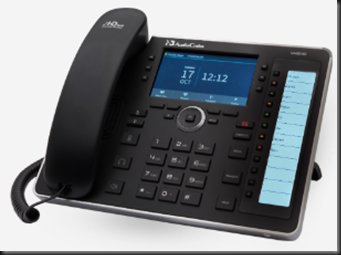
Audiocodes 445HD

A while back, I bricked a 450HD. Ooopseyo!

When I contacted Audiocodes to whine for a new one they sent me a 445HD also.  Why?  Beats me, maybe they think I will review it?

Here is the official marketing fluff. Assuming you take the time to read all that, does it all add up to “An advanced high-end business phone with a color screen and integrated sidecar for speed dial contacts and presence monitoring.”

Yes, I think it does.  If you are in the market for a higher-end low-end phone, this is it.  Need some color in your users life or they can’t keep up with the Jones?  This is it.  Need something to connect to Office 365 SfbO?  This is it.

image

Here is the 445HD feature list:

Certified for Skype for Business
Graphic 4.3" color multi-lingual LCD screen (480x272)
6 programmable multi-function keys
4 soft keys
12 programmable speed dial keys with presence monitoring on a dedicated LCD (376 X 60)
GbE Support
USB headset support

In case you have not done any professional reading here is the overall Audiocodes IP Phone “highlights.”

High voice quality
Support for SILK codec
Full duplex speaker phone
Robust security mechanisms
PoE or external power supply
Out of the box global redirection server support
Multi-language user interface
Centralized management with AudioCodes IP Phone Manager (available for download free of charge)

Build Quality

The only complaint I can gin up on this subject is the stand portion – I always think I want more adjustability.  Other than that (and that is extremely minor), the materials and construction are top-notch.

Does it work with Skype (Online or on-premises – better known now as SfBO and SfBS)?

Duh!  Why else would I be writing this?  Yes, near seamlessly.  Not totally seamless because to do web login I have to jump through some O365 hoops.  But, in the end, I will paraphrase a popular Norte Americano beer spot: “…works great, less hassle…”

I have full status for system users… if they are on SfB, then I see their presence.  The side car can be programmed with an extension on the system, and I get presence from that minimal information.  So nice.

Audio

Audiocodes provides great audio.  Maybe even excellent audio.  IMHO, much better than the competition.

But how is this thing to use?

I use it as a calendar minder, a phone call maker, a redial source because I am lazy, and a speaker phone because I don’t want a headset clamped on my noggin all day.  Did I say it has a color screen?  Visually, the 445HD works really well.

Buttons are large, with excellent tactile feedback. Programming the phone can be done via IP Manager, configuration files stored on an FTP or TFTP, or the device has a web interface.  All of this thought out for maximum ease of use, which is mostly delivered upon.  An example would be the attached sidecar buttons. Although, can it really be a sidecar if there is not a detachable piece?  It’s all one unit. 

So how about the “side buttons” which are referred to as “function keys.”  No matter.  Find a “function” key that has a blank display and press it.  The phone immediately pops to that menu and allows you to enter in your favorite bodega for delivery. 

image


and a few judicious key presses later we have lunch on the hook.

image

It won’t take an advanced degree in psychodynamics to figure out the rest of the phone either.  The controls are very clear and solid feeling.

Support

Depending on to whom you address the question, Audiocodes has great-to-excellent support for the HD IP Phones.  You can count on the dev’s there to be looking at their firmware and they are ever-improving things.  Mainstream, forward looking, and easy to contact.

Summary

I like this phone device.  Great price point, great feature set.  The only thing missing is touch, but the target for this device is not the touch crowd.  I can see this device as that “in-between” model where you need something more, but just not all that more (see 450HD).  Typical Audiocodes quality means you cannot go wrong.

You can get your very own 445HD right here.

YMMV

2017/09/06

AudioCodes X-UM

By now, I hope you already know that as of July 2018, Office 365 will no longer work with SBC connections linking your off-brand PBX to Exchange Online UM services (read voice mail).  For an actual read of the announcement, see this.

Here are the solutions offered by Microsoft:

  • Option 1: Complete migration from 3rd party on-premises PBX to Office 365 Cloud PBX.
  • Option 2: Complete migration from 3rd party on-premises PBX to Skype for Business Server Enterprise Voice on-premises.
  • Option 3: For customers with a mixed deployment of 3rd party PBX and Skype for Business, connect the PBX to Skype for Business Server using a connector from a Microsoft partner, and continue using Exchange Online UM through that connector. For example, TE-SYSTEMS’ anynode UM connector can be used for that purpose. (sic)
  • Option 4: For customers with no Skype for Business Server deployment or for whom the solutions above are not appropriate, implement a 3rd party voicemail system.

Personally, I would change Option 1 and Option 2.  Especially if you have any combination of complexity, multiple locations, and user count.  Couple that risk scale item with sheer lack of calendar, and I think it would be easier to get on-premises fired up and connected.  And, IMHO, doing 2 would make getting to 1 easier with a better user experience.

Option 4 is not really an option is it?  Everyone should want, need, and implement SfB.  Life is better with SfB.  Trust me.

About this time, the alert reader will notice that I skipped Option 3.  That’s because those nice folks at AudioCodes have somewhat solidified their plans for stepping into the breach.  How nice of them! 

AudioCodes has put together a very nice, comprehensive, suite of solutions based on their outstanding hardware and CCE experience. 

image

As the X-UM solution set, there are three of them:

image

Here is a bit different look at it…being a visual kinda guy, this is the view that helped me the most:

image

And then we have these further details for each scenario:

image

image

Microsoft licensing for the X-UM solution you choose is not covered, which makes sense, there are too many variations.  Here is the official blurb:

 image

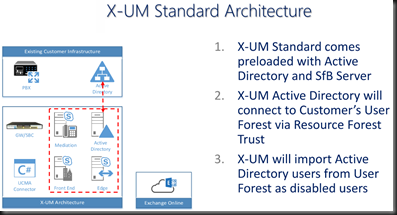
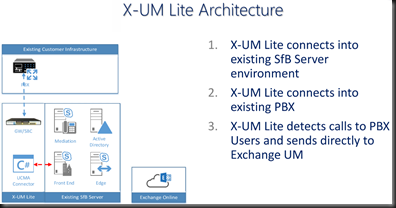
How about some architecture oulines?  I like pictures that show me things.  Here is the X-UM Standard and Lite.  Note that the “Lite” version relies on existing on-premises SfB resources.

image

image

Now, based on my current project, I know that there is going to be someone out there in reader-land who needs a visual of the call flows.  I know I do.

image

image

Summary

About now you are most likely wondering which of these will work for you. AudioCodes X-UM is based on proven hardware and proven solution approaches (CloudBond, CCE). If your environment is more complex, needs that existing PBX to coexist with Office 365 for your VoiceMail needs, then choose the flavor that answers your needs.  AudioCodes has you covered for any of the option 3 scenarios and could possibly help you (in the Lite version) with Option 1 and 2 also.

I know that somewhere above 75% of my customers all have some sort of “mixed deployment” usually due to call centers, business process, and culture.  Notice that none of those are easily changed before July 2018.  Ergo, we need to do something else in the short time we have available.  I submit that AudioCodes X-UM might well be that something.


As always, YMMV


2017/07/28

SfB Default AD Containers

Scenario

You know how those tin-foil-hat types are…

image

If it can be changed to “enhance” security, then by golly!  Let’s do it!  The problem, of course, is the rule of unintended consequences.  You know, what happens to something else because of action A, that is totally unplanned, and no one knows about it.

And, while I am mentioning it… have you ever noticed that the same team YOU have to run everything through for approval never asks your team if it is OK if they make a change?  They just do it?  Odd how that works out, eh?

Adelante.

The Oops!

It turns out that about 6 weeks ago, the aforementioned team instituted a change to the default AD containers.  To whit, they changed the default computer container to be something other than the OOBE.

Turns out that breaks SfB big time.  As in no more publishing the topology.  A Get-CsAdDomain fails.  But that is the clue to the fix.

The Fix

Simply run the SfB Domain prep again.


YMMV

2017/05/31

SQL Change Ports

The Port Change Issue

On a project where the SQL team has a policy of changing the SQL port away from the default of 1433? 

This does not pose a huge problem for your intrepid Skype (or Lync) deployment engineer.  If you are needing to know what to do, and maybe you have, oh, 30 or so front ends to modify, then maybe I can help you out a tad.

The issue is modifying the registry to tell your host server where to go to access the requisite port on the target SQL server.  As it turns out, I had to remember this, as it has been a bit since I had to last do this task. 

The Simple Fix to the Simple Issue

Luckily for you and me, it seems that every copy of a Windows operating system I looked at for this post (Win7, Win8, Win10, Server 2008+) have a utility in \windows\system32 called cliconfg.exe.  You can read up on that utility here.

A wonderful tool.  Here is it in Windows 10 form.  Which looks the same as Win7, so I think they will all pretty much appear to be the same. Actually, the Win7 version has a different set of window frames, so the appearance is more rounded instead of the ugly-ass Win10 metro crap.  But I digress.

image

What we need to do is select the Alias tab…the select Add.

image

For the purposes of this exercise, I need my system to talk to my SQL server (FQDN = sqlalwayson-a.tsoorad.net) on port 49001.  So, you set it up like this and then say OK.

image

image

Follow up that OK with an APPLY and your newly modified operating system will for thereafter talk to SQL server sqlalwayson-A.tsoorad.net on port 49001 vice 1433.  Simple.  Easy.  Works well.  Less filling.  Man, I am thirsty!

But Wait!  What if…

…you have like four user pools, and they all need to talk to the same monitoring server, but different archive targets per pool?  And what if there are like 30 front ends that need this modification, and every time you type this stuff in there is the possibility of spelling errors that mean system failure.  Now, I am sure there is some folks out there in techie land that are starting to chant “PowerShell!  PowerShell” -  but in this case, I am going to ignore them, and simply export a registry key, and then incorporate that into my server build process – which can be PowerShell-ized if you wish.

Here is the registry key to export.  HKLM\software\microsoft\mssqlserver\client\connectto

In my project, we had four SQL AG clusters, each with two nodes, a cluster name, and the AG name; all that needed to resolve by DNS.  So, our registry key looked somewhat like this: 16 entries with AG, cluster, node1, and node2 per supporting SQL cluster.  We then simply imported that into each server at build time.

image


Summary

The SQL mavens might well change ports on you.  If they do, there is an answer in form of cliconfg.exe.  If the scale is a tad larger than manual typing will cover, you can regedit your way to success.

YMMV


2016/06/30

YADR–Logitech H820e (dual)

OMG.

I had forgotten.  Back a few years ago, May of 2013 to be exact, I reviewed this headset.  I used it for a few months, and then other headsets came and went, and I kept going back to it.  About a year ago, it broke.  Not the headset’s fault, but a *&^%$# cat incident.  So I used other solutions.

The other day a box showed up with some new toys from Logitech, and one of them was a squeaky new Logitech Wireless Headset Dual H820.  DECT.  No software needed.  Plug n Play.  And no, not Plug n Pray, it really just jacks in and works.

image

Here is the official Logitech market-speak

SfB Connection

I have to say something.  uhm… it works perfectly.  Optimized for SfB/Lync, certified on the OIP.  What else can you say about a product that plugs in and your application goes “blink bonk” and starts to use it?


image

Comfort

Much as I remembered, oh so nice.  No wires tethering my skull to the laptop. I consider this to be a HUGE plus.

Audio Quality

Dang but this is a nice piece of gear for voice. And with the slider in the WB (as opposed to NB) wowzer!  For the unwashed, WB and NB is Wide Band and Narrow Band.  In the DECT world, this somewhat equates to signal quality and range.  And maybe battery life.  Music is pretty excellent also. 

Back to SfB Connections

SfB client will do stereo to this headset.  Oh yes.  For those of us who suffer from a previous lifetime that caused hearing loss, having an over-the-ear, or on-the-ear solution with actual speakers in cups rather than some microdot in a ear canal thing is a real bonus.  ooh ooh ooh.

Noise cancelling mic standard.  One of the problems I see with SfB/Lync is that the devices pick up every last little noise.  And when the audio stream is literally silent if no one is talking, then the ambient noise on either end can be a real distraction.  Logitech wizardry to the rescue.  This headset ignores just about everything except what is right in front of the mic boom.  Really well done.

Build quality is right up there in the excellent to superior bracket – as you would expect from Logitech.  Comfort – yep.  Range?  Dang, I can wander all over and not lose signal.  Another HUGE plus.  That makes two of them.

Summary

Build quality, SfB/Lync certified, comfort, features, functionality. After having used at least six different headsets over the last 18 months, I hereby declare the H820e as my favorite.  There are others that offer more widgets, more wires, more software, or are customizable to the nth degree, but none of them perform the core task of being a VOIP headset and delivering audio to your gourd nearly as well the H820e.  

And, you can still get your very own H820e right here.

YMMV

2016/06/06

WebConf modalities not working for internal users after server patching

This falls into the “oh wonderful” category…

https://technet.microsoft.com/en-us/library/security/ms16-065.aspx breaks Office Web Apps for internal users.  External users seem to be unaffected.

Conferencing modalities no longer function in Lync Server 2010, Lync Server 2013, or Skype for Business Server 2015 after you install Security Bulletin MS16-065Here is a fix workaround:

https://support.microsoft.com/en-us/kb/3165438

And people wonder why I always advise waiting 90 days or so before patching Lync and SfB host servers.

The documented update in the article is KB3156757, but the actual KB installed was KB3156756.  Which also is associated with MS16-065.

YMMV

2015/12/21

SfB Conferencing Fails

Disclaimer:  While I found the failures, I did not initially get the fix.  When I saw the fix, I then remembered what I had forgotten.  Dang do I hate it when that happens.

The Scenario

My current project is to replace a seriously ill Lync 2010 deployment with SfB.  As part of Phase 3 of this project, we will be doing full EV and HA/DR.  All in all, an interesting project.
We had the SfB pool installed, and finally we got all the bits and pieces of the network, firewalls, and load balancers done the way we wanted them to be done (with the attendent convincing of network and security teams that we really did need things to be the way we wanted)(and that the errors we were seeing in the various layers where mis-configs on the network, firewall, and HLB layers) so we could move forward with doing the basic client tests.  And from there, move to the more complex testing.  Alas, this did not go so well.  And finding the fix proved to be a bit trying.

The Error

When a user moved to the new SfB pool, no conferencing worked.  This means that 1:1 worked OK, but moving to three or more users in conference bombed immediately.  Some careful testing revealed an “error 500 source 329” which I have seen before, but associated with voice calls.  MVP Greig Sheridan has a nice error message blog.
image
Oddly, the SfB user could create a meeting – joining which failed miserably for users on both sides of the environment.  Moving the user back to 2010 resulted in the meeting working. 

The Culprit

Because the customer did not want the 2010 environment to be fixed, we did not go past validating topology before we started SfB installs.  What we found was that the customer had never cleaned up the conference directories.  And what appears to be true for the 2010-2013 migrations apparently still holds true for 2010-SfB migrations.  To whit: having an orphaned conference directory screws up 2013 (and SfB) but not 2010.  You can read the baseline stuff here and here.  While these two references don’t exactly match what we were seeing, they were close enough to get the stupid out of my system and allow me to move forward.

The Fix

In my case, I removed the orphaned conference directory with a remove-csconferencedirectory –force command, which I sort of thought might fix things.  But I also had to run (on each SfB front end pool server)
  • enable-cscomputer
  • bootstrapper
  • rebooted the entire mess.
Retesting was flawless.
YMMV

2015/07/15

Windows PKI SHA-1 to SHA-2

(How do you hear me now?)

Thanks go to fellow CDW co-workers Dean Sesko, Russell Despain, and Keith Crosby


What is the issue here?

Basically, the issue is that SHA-1 for PKI is going away in favor of SHA-2, and you WILL have customers that need help with this.


Reference:


AND…?

Any Microsoft supported operating system, properly patched/upgraded, and any Microsoft supported application, again properly patched/upgraded, will support SHA-2 PKI certificates.


Reference:

…there are some caveats: notably around XP and Server 2003, and oddly, Server 2008.

Reference:

So, there is not an issue with Microsoft supported products; the issue is with BYOD and Microsoft making a HUGE effort to support alternative browsers and operating systems. And those browsers and operating systems are fixing on deprecating their support of SHA-1.


Reference:

However, there are going to be numerous AD internal CA’s out there that are issuing SHA-1 certificates, and depending on how the environment is configured, the customer will need to renew their application certificates for internal use. Logically, it makes sense that the desirable outcome of renewing the application certificates is that the issuing PKI be SHA-2.

CDW AD resident experts advise instantiating a new Root CA, and if needed, a new subordinate CA for issuing SHA-2 certificates. But, you know those pesky customers, they may not want to do this. Which would call for modifying the existing structure to hand out SHA-2 vice SHA-1.


Reference:

Experimentation over the last several hours has revealed the following:

  • Migrating the existing SHA-1 CA went just fine.
  • The new SHA-2 Root Certificates updated almost immediately into the Trusted Root

clip_image001

  • I was able to request new SfB certificates and they were issued by the CA based on the new 3DES/SHA-2 root
    • However, the host server was not able to chain them up into the Trusted Root.
    • I rebooted.
    • I ran GPUpdate –force
    • I rebooted.
  • After waiting overnight, THEN the new certs chained up properly. Why this delay in chaining to the new Root I have no idea. I suggest that if you do this for real, that you do the work on one day and then plan on waiting for at least 8 hours before attempting to get new certificates and expecting them to chain up to the new root.

clip_image002

Testing:

After updating the internal certificates on my SfBSE to a new SHA-2 I successfully tested

  • using Win8.1 and Win7sp1
    • IE 11
    • Chrome Version 43.0.2357.134
  • Surface Pro 2 (8.1) IE
  • iPad (iOS 8.0.2) Safari

Firefox 39 fails – due to it not liking the root cert – why is FF so blinking difficult? Why does it have to have its’ own key chain? The O/S has the root cert! It does this same shit when installed on *nix. After manually importing my new root cert, it worked just fine.

clip_image004

clip_image005

  • SIP Phones.  I had to restart services (stop-cswindowsservice start-cswindowsservice) AFTER I changed the certificate to the new SHA-2 certificate before my AudioCodes 420HD and Polycom VVX-600 would log in.  Why, I do not know.


The SfB/Lync Connection!

You may have been wondering why *I* am worried about this.  Well, on literally every project with which I have been involved over the last few years, they all had *nix and Mac workstations, along with loads of iPhones, iPads, *nix tablets, droids, surface tablets, and here and there the odd Windows phone.  And, you have to know that, in most cases, all of these were attached to an internal corporate wireless.  And in some cases, the internal wireless was dropping these devices into the production network, which put them in a position to being able to directly contact Lync/SfB resources on internal servers, that, for the most part, had a PKI certificate from an internal CA.  With SHA-1.  You knew it had to be simple, right?

Any input to solving/addressing the observed delay would be most welcome. I, for one, totally expected to have the new certificate chain immediately – the appropriate root cert was in place!

YMMV

2015/03/04

Plantronics Blackwire C725-M

Do you work in a noisy office environment?  Does that noise get in the way of your concentration? Do you tend to put up some music on to mask that noise? 

Plantronics might have an answer for you.  The Blackwire series of Optimized for Lync headsets has another winner.  the C725-M.  Noise cancelling, stereo, and a set of features that might well make this your go-to headset.  Here is the official market-speak.  It even comes with a nice soft carry case.

image

The short list of goodies incudes:

From the top down we have:  YES, sweet!, maybe, handy, Pandora John approved, I don’t care.

You want more detail?  OK, fine.  The ANC works really well; I would prefer over-the-ear rather than on-the-ear.  Could be just me, but what is the point to ANC when the noise can just go around? 

Smart Sensor?  This puppy answers the call just by putting the headset on.  This might be a little odd to some, but this auto-answer feature is also on my Voyager so I am used to it.  Once you try it, you may never go back. 

Professional audio quality?  I think this will depend your definition of what “good” is. 

Inline controls?  See below.  But they work well.

Music? Personally, based on my testing, and knowing that the stream on Pandora is different from 3g to Wi-Fi. my tired ears could tell the difference.  And sounds pretty nice on both. 

As to the case, I don’t care, I don’t use them.  You, however, might think that the case is the best thing since the corner gas-station.

Errata

The microphone boom can go on both sides.  It all folds flat.  The ANC is really nice.  It answers the call for me. The inline module volume control has different tones for up and down.  The ANC is really nice.  There, now I have said it three times.

The line cord is a bit stiffer than some I have seen.  Which I like.  Less tangle coming out of Mr. Backpack.  Plantronics also has a comprehensive download and support site.  There is even specific software to enhance your Lync user experience.  Nice.

Comfort is a solid 9.5+ on the Tsoorad Goodness scale.  Not too much weight, and I did not feel like I had my head in a vise.

Lync Link

Of course, this blog would not be appropriate if I did not tie this device into Lync in some fashion.  Plantronics says the C725-M is Optimized for Lync.  How did that portion of the testing go?  Easy-peasy.  Plug n Play.  I had zero issues – all I did was plug into a USB port and I was up and running. The Inline module works as expected. Audio voice quality is excellent.

Summary

A winner.  No need to say more.

You can get one right here.

YMMV.

2015/02/19

International Call Test Number

Do you need to test outbound calling to international numbers but your customer doesn’t have anyone just sitting there waiting for your call (how dare they)? Well, Australia to the rescue!

This number is an automated time of day announcement from Australia,so you won’t be harassing anyone.  Keep in mind that your test will incur at least some charges to your customer, so make sure they know ahead of time.

Calling from the US:  011-613-966-94916

You may need to mod the international access prefix for your country, or make sure that your Dial Plan rules do what is needed.  Most users who make these calls will know international access numbers, after all, they are already making these calls.  Your PBX counterparts will also know the appropriate codes – or, they should know.


YMMV

2015/02/18

Upgrade Lync 2013 to Skype for Business 2015

Here we are in the 1st half of 2015, and the anticipated general availability of Skype for Business 2015 is fast approaching.  Microsoft has started to release details surrounding this new version of what could possibly be (and my opinion is) the best and fastest growing collaboration and communication tool on the market today. According to available data, 90% of the Fortune 500 use Lync in some capacity, and 89% of enterprises that trial Lync are including Enterprise Voice, Lync 2013’s flavor of SIP-based VOIP.  With that in mind, and leveraging the popularity of Skype, Microsoft has rebranded the Lync Server as Skype for Business Server 2015 for this new version release.

With all that in mind, and keeping in mind that upgrading what might be the core communication application for your organization, we need to start looking at what the planning process is going to look like for this upgrade evolution.

In this article, I will outline what I consider to be the crucial considerations.  I am not going to try to detail the product enhancements in this version, nor the pros and cons of taking this action; we will focus on the overall upgrade process and what your organization will need to consider BEFORE embarking on the procedures.

The General Idea

First off, Skype for Business Server 2015 (Skype4B) does not support three version coexistence.  This means that Microsoft recommends that if you are partially into an upgrade to Lync 2013 that you continue forward and complete that process.  If you have not started, then stand pat and upgrade from Lync 2010.

If you have Lync 2013, then you can take advantage of the in-place upgrade that is now available.  If you are on, and staying with Lync 2010 until upgrading to Skype4B, then you will be building new servers and moving into/onto them.  There is no path from OCS 2007 R2 or earlier.

Next, the overall flow is inside out, user pools first, then the supporting Lync server roles are upgraded; mediation servers, directors, and Edges.  Yes Matilda, there is still a director.

A Few Specifics

All of the Lync 2013 infrastructure that we know and love is going to look the same in Skype4B.  DNSLB, HLB, Reverse Proxy, firewalls, Web Access Servers, Persistent Chat, pool pairs, virtualization support, SBS/SBA; it is all there.  About the only significant change that I see is the support for SQL AlwaysOn Database Availability Groups.  If you wish, SQL clusters and SQL Mirroring are still supported. If you have mirroring now, there is a spiffy procedure to upgrade your mirror to AlwaysOn.

If you are using SQL AlwaysOn today with Lync 2013 – you can move straight into the upgrade, but Skype4B will never know that the supporting SQL is in an HA posture.  While things SHOULD work, you will be firmly in a non-supported scenario with Skype4B topology not having all the facts.

If you want to get the SQL AlwaysOn, keep in mind that the AlwaysOn requires SQL Enterprise with the attendant cost.  Unless your database team is dictating AlwaysOn for some technical or business reason, I simply cannot see the benefits of AlwaysOn over mirroring; but that could be just me.

Lync 2013 will run on Windows Server 2008 R2.  So will Skype4B.  However, if you take this route, you will be pretty much dead ended – Server 2008 R2 is getting a tad long in the tooth.  Take a look at the support cycle, and then make your own decision.  For the most part, I have been deploying Lync 2013 on Server 2012 R2.  If this is the case for your organization, or if you have been doing Server 2012, you should be OK.  But I would be thinking twice about moving forward with an in-place upgrade of Server 2008 R2 hosts. Server 2008 R2 uses a version of Windows Fabric that will update to Fabric 2.0, but about 100 or so bug fixes did not make it into v2, so using Server 2012 and 2012 R2 will get you the upgrade to Fabric v3, which is the optimum platform for Skype4B.

Whichever server host you choose to use, even the in-place upgrade has some prerequisites to install before running the Skype4B setup.  As you might expect, the Lync 2013 servers should get all windows updates and the prerequisites before moving forward; the upgrade process will error out if it thinks something is missing.  Nothing new here, but be prepared.

SQL again!

SQL on the front ends needs to be SQL 2012 SP1 (Express) to get the direct upgrade treatment.  So you might need to figure out some time to handle this before starting the core upgrade project.

Topology Builder

The Skype4B Topology Builder is going to be needed before you upgrade the first pool, and the Lync 2013 Topology Builder won’t open a topology that has been upgraded.  Most folks run Topology Builder on one of the Front End servers in Lync 2013; but you cannot get to the direct upgrade features from the Lync 2013 Topology Builder.  You are going to have to get the Skype4B Topology Builder onto something else; documented supported platform information is not available at this time, but a good guess will be x64 and Windows 8 or Server 2012 and up.

You are going to want to keep the Central Management Store until last.  Obviously, if you only have one server, this won’t be a possibility.  But if you have only one Enterprise Pool, you might want to consider standing up a 2013 Standard Edition to move the CMS onto; this will create a fall back position for you should things get ugly.  I also think that a judicious upgrader will run export-csconfiguration and export-csLISconfiguration before starting; again, for the obvious fall-back planning.

If you have Survivable Branch Appliance (SBA), there is no current upgrade available.  Microsoft is leaving that process to the SBA vendors.  You will need to plan for a maintenance window during the upgrade as the SBA pool will be in resiliency mode while the central site pool is down for the upgrade. After the pool comes back from the upgrade, the SBA will register back into the central site just as before, so no worries there.  According to the good folks at AudioCodes, it will most likely be until June 2015 before a vetted SBA upgrade process is fully tested; until then, the Skype4B pool will work with the Lync 2013 SBA just fine.

SBS will direct upgrade provided you have all the host server items covered just like on an SE or EE pool.

Pool Pairs

To direct upgrade pool pairs, the entire pool needs to be down.  I suggest that moving all of your users to the other pool whilst upgrading will be a prudent move.  Note that this does NOT MEAN doing a pool failover, just moving the users off.  You might also want to consider a little disaster proofing by moving the conference directories.  And keep in mind that your SBA structure will be down while the central site pool is down for upgrade.  I suppose you could redo the SBA backup registrar relationship, but I think that is way more work than is called for.

Conclusions

Skype for Business is coming and there is a different light at the end of this particular tunnel.  To whit, we can do in-place upgrades.  The supporting SQL backend and how to handle that aspect of your environment will need examination and forward planning.  Likewise, the host server version will demand attention and presents some decision points.

YMMV

2014/09/24

Lync 2013 Edge Hairpin

Many thanks go to Chard Johnston (AudioCodes), and Jeremy Silber (CDW)

Scenario

The project was Lync 2013 Enterprise, two sites, full HA, DR, and call recording using AudioCodes SmartTap. The edges in both sites were DNSLB.

The Symptoms

Once we started making more than a few calls to external numbers, we noticed that the SmartTap was not recording as expected.  This caused a few calls to the helpful AudioCodes support engineers.  It turns out that SmartTap does a little call-redirection magic, and captures all the necessary traffic to record both sides of a phone call from the edge servers.  And when one user lands on Edge1 and the other user lands on Edge2, we start seeing calls failing.

We were also failing regular calls between Lync users that used the Edge servers.  Same symptoms.  Calls would start, then fail when the time came to establish media.  Needless to say, this was not good.

Interestingly, this problem has been around for bit.  Jeremy Silber has an excellent article that outlines the problem, the cause, and the fix in explicit detail.  Even better, if you talk to Jeremy (I happen to have direct access) he can translate the contents of that blog into English!  Highly recommended reading. Having it translated to English so that either of my brain cells could comprehend was priceless.  Firewall rules had been through the change order process at least a month ago, so we thought we were good there.  All previous testing had been good.  But we had not tested voice/video yet.

What is going on here?

I had a heck of time getting those firewall rules in, not at the technical level, but at the explaining the “why” in English.  So to get my skills up to speed, I discussed the issue (and the fix) with Chard Johnston of AudioCodes – seeing as how he was buried in trying to get SmartTap working correctly.  After I showed Chard the hairpin requirement – see previous reference to Jeremy Silber – Chard went to Microsoft using his channels.  Apparently this discussion went on for a bit. Chard came back and created the following diagrams.


image


image

Why is this needed?  Well, if you look back at Jeremy’s blog, you will see that the candidate pairs that are exchanged between the users don’t have FQDN, they have IP.  And, done correctly, the IP will be that of the EXTERNAL PUBLIC IP of the AV service per edge.  So, the firewall must allow traffic from one public IP to simply hairpin back to the other edge public IP.

Remember that while SmartTap highlighted the issue, it was a firewall configuration that was the real culprit.  If we look at the reference article in the Lync 2013 documentation, we don’t find the requirement for the Edge server AV service to talk to the other edge pool server AV service via the public IP address.  Once you know the requirement exists, the information is there if you read between the lines a bit.

In the end, the requested firewall rules were not implemented correctly, so we had some one-way conversations going, and some quick adjustments by the firewall team had everything ironed out.

YMMV.

Lync 2013 SIP trunk with a twist

Scenario

Maybe like me, you have a split environment with an Lync 2013 EE pool, with a Lync 2013 SE, and you want to get a SIP trunk installed so that you can play with pilot Dial in Conferencing and maybe some light Enterprise Voice?  The guidance on direct SIP trunks is to stand up a separate Lync 2013 Mediation Server.  You can read up on that right hereThe mediation server “strong recommendation” is here.   Be that as it may, you might decide that it would be a more efficient usage of resources, especially for a pilot, to use the Lync 2013 SE as your mediation server.  And using a internet-based SIP trunk provider will get you the most bang for the buck albeit at the expense (maybe) of reliability.  I personally have had great results using internet-based SIP trunks, YMMV.

After reading up a bit, you realize that you are going to need a non-routable IP added to the Lync 2013 SE to make things work.  Why would you need that?  In my case, the internal subnetting and security was such that the SE needed another subnet to work with – security would not allow an unsecure connection ( a SIP Trunk straight to a production network server with no SBC on-premises).

How to

As luck would have it, Intelepeer – for a wide variety of reasons, my first choice for net new SIP trunks in an environment – was willing to work on a semi-custom plan to get our pilot up and running.  SIP trunks in Lync 2013 did not change much since Lync 2010, so we can use this guide from MVP Brian Ricks to get the basics accomplished.  Another MVP, Curtis Johnstone, has another SIP trunk article that is well worth reading.

Before you start though, what about that need for a mediation server?  In our scenario, we need to arrange for another NIC/IP on that SE so the mediation server can have a separate subnet.

This blog entry from Norway will walk you through what to do for the second NIC/IP needed. The sharp-eyed reader will note that the NIC setup looks like an external interface for a Lync Edge server.  Moving forward, you will need make up some firewall rules to get the requisite SIP call setup (TCP) and media flow (UDP) between your new mediation server NIC and the service up in SIP trunk land.  Depending on the firewall, you may want to double check to make sure that the NAT you setup is taking your mediation server traffic and sending it out the correct address.

While you may not have an SBC on-premises, you can be assured that the SIP trunk provider is going to have one, and that SBC will not communicate with an IP that is doesn’t have defined in the trunk setup.  I strongly recommend creating a group in your firewall, and restricting your SIP trunk traffic (that leaves your firewall) to only communicate with the provider.  1:1 NAT may not be possible on your firewall (why I cannot imagine, but there you go) so that is something you may want to consider before getting started.

Here is what we need:

image

The Results

Right out of the box, setup using the given guidance, outbound calls work, but would never disconnect if/when the called party hung up.  Inbound calls just failed. Turns out that there were two things, one Lync and one Intelepeer.

Lync

Based on this bit of Lync 2013 documentation, the “Centralized media processing” needs clearing.  In our case, Intelepeer is using TCP on one IP and UDP on two others.  Hence, clear the box.  In this case, we were also doing no encryption and Intelepeer basically told me that support for “Refer” ain’t there yet.

image

Intelepeer

On the Intelepeer side, their SBC was looking into the packets, finding the IP of the outside of SE/Mediation server (10.10.10.62) and trying to send SIP signaling traffic to that IP.  Obviously, that would not work.  At any rate, the Intelepeer engineer (a most helpful fellow) twiddled some bit on his end, and wala! Instant telephony in and out.  Fabulous.

Conclusions

If you need a path through a network maze, you can come up with one.  In this case, we needed to allow for the Security Mavens to have their (understandable in this case) way, and still be able to provide Lync with a SIP trunk to pilot Dial-in Conferencing and EV.  Total time that involved actual network and Lync hands-on touching?  Maybe two hours total over several weeks.

YMMV

2014/07/29

Lync 2013 Test Plan

For some reason, the concept of conducting full function tests prior to ending the Lync POC or pilot project has come up again and again.  Those pesky customers just keep insisting. 

Usually, the customer has already come up with a fairly exhaustive test plan on their own and all I need to do is help them revise or add expectations. If they have not developed their own test plan, I first point them to the Lync 2013 RASK. 

The Lync Rollout and Adoption Success Kit can be found here.  If you poke around the semi-convoluted structure you will eventually divine the logic, but you are probably better at that than I am.  At any rate, eventually you will find stumble upon this link:  http://www.microsoft.com/en-us/download/confirmation.aspx?id=37031 which is the download page for the Lync 2013 Rollout and Adoption Success Kit (RASK) Resources package.  A very nice piece of kit.  This download has the following format:

image

I have taken the liberty of showing the location of the subject for this article – the “Sample Pilot Test Plan.xlsx”.  What you see below is a modification of that fine piece of work. In its’ base form, the RASK test plan has saved me many hours of skull sweat – and most likely saved my customers many hours as well.  For a simple Lync deployment, you may be able to use it as is.

But the real value of the RASK test plan is to get your head into the game.  Accordingly, my modifications are just that, MINE  - as needed for a project, and then modified past that to serve as my personal baseline test plan.   

If you were to run a full system test and that included HA and DR, you would also iteratively fail Front End Pool members and run full-tests per this matrix with each pool member offline in turn.  And then you would need to create the same set of tests with perhaps one Edge Server offline and then consider your other environment details. And then loop through for each pool member off in turn et cetera. You may end up with a matrix with a considerable number of test cells to complete. I one time did a project where the core HA/DR test matrix resulted in 900+ individual test cells.  Each cell was one complete test that contributed to the overall upper level test.  Fun! But in the end, if someone asks you, you can show them, yes, we tested.

I try very hard to accomplish the testing inside out and and using this order of tests:

  1. Test the FE pool level -  this may include monitoring, archiving, persistent chat, and Office Web Apps Servers
  2. Test the Edge (Edge servers and reverse proxy)
  3. Test mobility clients
  4. MPOP scenarios

Resist the urge to use real users.  Gin up a set of test accounts, per pool, and use those accounts for the testing.  If you MUST use real accounts, be in control of the testing flow or you will be like this when things don’t go exactly right and the testers start veering off into the own little interest area.

So, without further ado, here is a sample what I use as my baseline in screen cap format – a download link can be found at the bottom of this article. 

 image

Here is the download link.

YMMV.

2014/05/16

NextHop Archive


If, like me, you have stretches of your life where you are living under a rock, you may have missed the notification that NextHop is being moved and phased out.  As noted in this article posted on NextHop 1 May 2014, NextHop content is frozen, with no new content to be added.  While there is a stated plan to migrate SOME NextHop content to its’ new home, I think it is very possible that not ALL content will migrate.  In addition, there are sub-contents (such as DrRez) (and the absolutely awesome Haiku material) that may not make the jump.

In an effort to preserve this data, I archived the entire NextHop site.  DrRez included.  You can find the archive here:

https://www.dropbox.com/s/g9wo9sg2835xd7z/NextHopArchive.zip

YMMV

2014/02/23

AudioCodes software E-SBC now certified

I had a great time at the Lync Conference 2014 last week.  Among other news, AudioCodes tells me that their Mediant Virtual Edition and Server Edition SBC is now Lync OIP certified.  AudioCodes tells me that it will take a bit for the OIP to get updated, but I think this is great news – especially for those who are doing straight SIP trunks.

YMMV

2014/01/30

Lync AIM Direct Federation

If you have been hiding under a rock (like me) then you might not know that as of June 2014, Lync federation to AIM will no longer go through Microsoft.  To whit:  “For Microsoft Lync customers, establishing a direct relationship with AOL is the only way to federate with AIM once our agreement with Microsoft ends in June 2014.”

You can read up on the official AOL guidance on how to continue forward with your AIM federation right here.

As always, YMMV.

2013/12/31

DHCP option 002 for Lync phones

Maybe I have been living under a rock… but I have been doing this manually… finally found a nifty chart so I can stick it in OneNote instead of having to figure it out each time – complete with instructions on how to calculate manually.  I take no credit, this is blatantly cut from a Cisco website source.

Standard Pacific time is GMT -8. This is a simpler way to calculate GMT with negative values:

1. The number of seconds equivalent to - 8 hours = - 8 hours * (3600 seconds / hr) = - 28800 seconds.

2. With a scientific calculator, enter the number -28800 in the calculator with decimal values. The (-) sign is very important. In order to get the negative sign in front, press the +/- key.

3. Choose Hex. This gives you FFFFFFFFFFFF8F80. This is because, by default, the calculator has Qword enabled.

4. In order to get rid of the extra Fs, choose Dword. This produces the value FFFF8F80. If you do not have this option in your calculator, use only the first eight digits from right to left.

5. The value placed in the DHCP pool configuration now becomes option 2 hex FFFF.8F80.


Table of Conversion of Different Offset Times into Hexadecimal

This table gives the conversion of the different time zones around the world. The hexadecimal values are set to have a fixed length of 32 bits as specified in Option 2 of the DHCP RFC 2132. For a world timezone map, refer to World Time Zone Map.

GMT offset (in hr)

GMT offset in seconds

GMT offset in Hexadecimal

0

0

0000.0000

+1

3600

0000.0E10

+2

7200

0000.1C20

+3

10800

0000.2A30

+4

14400

0000.3840

+5

18000

0000.4650

+6

21600

0000.5460

+7

25200

0000.6270

+8

28800

0000.7080

+9

32400

0000.7E90

+10

36000

0000.8CA0

+11

39600

0000.9AB0

+12

43200

0000.A8CD

-1

-3600

FFFF.F1F0

-2

-7200

FFFF.E3E0

-3

-10800

FFFF.D5D0

-4

-14400

FFFF.C7CD

-5

-18000

FFFF.B9B0

-6

-21600

FFFF.ABA0

-7

-25200

FFFF.9D90

-8

-28800

FFFF.8F80

-9

-32400

FFFF.8170

-10

-36000

FFFF.7360

-11

-39600

FFFF.6550

Example

Pacific Time Zone = GMT –8

60*60*8 = 28800.  Change sign. Now we have –28800.

image

Click the Hex button.  Now we have

image

Click the DWord button.  Now we have

image

Here is the value in the DHCP Server Options. Note that we take the DWord value and append “0x” to it.

image

YMMV

2013/12/30

AudioCodes 420HD Lync Phone Device Review


Initial Impressions

Great packaging; Clever base construction – not rickety, solid connection to base with a good angle sitting on the desk; Construction seems to be top notch – typical AudioCodes quality.  Cabling connection locations don’t get in each other’s way.  Switch ports for workstation/laptop pass-through well marked; the setup documentation (420HD IP Phone Quick Guide - included in the box) matches the actual contents of the box – something that seems to be lost on other vendors.

image

The phone needs to have power before the built-in switch works. Plugging the 420HD into my network between my switch and my laptop, but with no power, resulted in my laptop coming up on the local WAP (as it should).  Maybe I am making too much of this. If you have PoE, this is probably a moot issue.  But for those of us without the fancy-schmancy switches in the network and are using the power adapter, this may be a environment item to consider.  For what it is worth, this phone is firmware version 2.0.1.44.21.

image

Built in support for Lync

Take a gander at the deployment guide…pages 9-11 outline what is needed on the Lync side.  Trusting that my corporate peers had configured things correctly, I chose the “Sign in” option, and the phone simply queried me for login name, network user name, password, and in I went.  Very nice.  Assuming that the Lync environment is setup properly, this phone will just work.  Noted also is that I am in Portland, Oregon, and the server I connect to is in Chicago, Illinois.  This means that I am a completely remote user, and I unboxed this unit, did the setup and connected with no need for corporate IT to be involved.  SWEET!    I was up and using the phone with great results with Lync in a very short time frame.

image

Volume control and volume itself was very good.  Great audio quality. Clear, with good voice tone. The phone does not sound tinny or cheap at all.  It sounds very robust. Single button for voice mail.  Nice. As noted below, if the power fails and the phone drops off line, when the power comes back you auto-sign-in.  If you sign out, then you must enter domain credentials.  So, I see this as a positive – but an item for user training if you want to avoid help desk calls.

You can use this phone to sign in with a UPN and password, or you can use an extension number and PIN.  Again, see the referenced pages of the deployment guide

Usability

The 10 key + softkey choosing-which-buttons-to-use routine was less than optimal.  However, I read absolutely zero documentation and still had it working in a very short time frame.  Buried on page 13 of the deployment guide (see below) is what you need to know to help out your co-workers.  In my case, the “…and 1 for the special characters @ and .(dot)” – I figured it out, but it would be nice if that was in the USER MANUAL (see below).
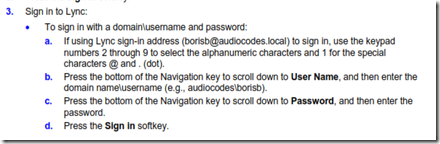
image

Oh wait.  I just found this on page 21 of the User Manual…
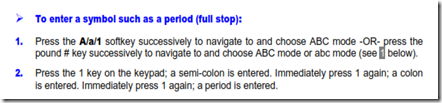
image

I guess I should start reading manuals again, eh wot?  In my defense, I don’t find this to be very clear.  Or maybe this type of stuff should be in the first few pages where a typical user might look.  Yes, I know, I am defending myself to some degree, but still…

Link to user documentation LTRT-11881 420HD IP Phone User's Manual Ver. 2.0.2

Link to Lync 420HD deployment guide LTRT-21920 AudioCodes 420HD Lync-Compatible IP Phone Deployment Guide.pdf

Issues

Searching the corporate directory

Having to type names in with the 10 key+softkey routine (as mentioned above) was a tad tedious.  After consulting with my friendly AudioCodes support engineer, it would seem that there is “something” not quite right, because according to the documentation, I should be able to enter a single letter – J for instance, and have the phone return all matches in the corporate directory that start with “J.” – We are looking into this and I will update as a resolution is found.

Device Passwords

The default admin password ‘1234’ did not work.  It seems that when the phone logs into the Lync environment, the user’s domain account and password take effect.  So, in my case, I had to use “John” and my domain password to get it to work.  Note that I did not include the full UPN, and not the NETBIOS format of domain\user; just username.  Odd.  How does that equate to an administrative login?  I ask this because the phone is logged in with my creds, and at that point a regular admin cannot access the phone’s web interface using the admin user and password.  And while I am noting that, pulling the power off the phone results in a dead phone (duh) but when the phone gets power again, it logged back in as me.  Without asking any questions.  It just logged in.  I can see where that might represent a security issue to some folks.  If anyone in AudioCodes-land reads this and can correct me on that supposition, I will gladly update this article.

D’oh! category

After some poking around, I “discovered” that if you sign out of the phone – THEN the default user name and password works  -  ‘admin’ with “1234’ – if you are signed into the phone, the only login that works is your user name and your domain password – and then all you get is the “user” subset of the web interface – none of the administrator level functions are exposed.  I don’t think I would be telling users that the web interface even exists, let alone telling them how to get into it, but that might be just me.

BTW, the user and admin logins can be changed…...

image

While I am using the device with Lync, here is the “OOB” support – it would seem that AudioCodes would like to have a larger market than just Lync.

image

Nit Pick

The web interface was clearly designed by someone using a large display.  It does not resize.  On my laptop with a 1920x1080 resolution, if I did not have the web interface full screen I had to scroll around in it to see important things like the “Submit” button.  Is it too much to expect to have a developer allow for dynamic resize?  This comment is not directed just at AudioCodes, but at others also.  You know who you are.  Not everyone has a 32 inch plasma for their primary display.

Checking out the internal dial plan on the phone

^(\d{11})$=+$1;^(\d{10})$=+1$1;^(1\d{10})$=+$1;^([2-9]\d{9})$=+1$1;^9(1[2-9]\d{9})$=+$1;^9([2-9]\d{9})$=+1$1;REDACTED AT THIS POINT to protect internal data.

That is a serious Regex one-liner!  Before I redacted, the phones’ internal dial plan went a good 15 lines down the page – all one string.  We could all be learning something from this.  I see phone strings in there that would indicate that this regex is being picked up from Lync.  Based on my understanding of how Lync clients work, this is how it should be.  In testing, dialing 5 digits and then waiting for the time out resulted in the phone dialing a correct number.  Nice.  In the stupid tricks bracket, I could call myself.  Entering my extension resulted in my Lync client toasting, my mobile getting the simulring, and when I ended the call, my Outlook getting a missed call notification.

Overall impression

Usability

Total setup time from looking at the box, to setting up the phone on the desk, to login and being connected to the office was less than 30 minutes.  I did nothing to my network, I did nothing to my account (I was already EV enabled).  I am a total remote/external user, so I pretty much expected this phone to work, and it did.  Mission accomplished. 

Quality

Quality is typical AudioCodes.  Solid feel, buttons are clearly marked and press cleanly, ports are labeled, while the audio quality and volume are excellent. I think that this is a clear winner

Lync Functionality

Works out of the box with no fiddling with the phone.  ‘Nuff said there.  I like it.

image

You can get your very own AudioCodes 420HD right here.

YMMV

test 02 Feb

this is a test it’s only a test this should be a picture