About Me

My photo
This is a blog for John Weber. One of my joys in life is helping others get ahead in life. Content here will be focused on that from this date forward. John was a Skype for Business MVP (2015-2018) - before that, a Lync Server MVP (2010-2014). I used to write a variety of articles (https://tsoorad.blogspot.com) on technical issues with a smattering of other interests. I have a variety of certifications dating back to Novell CNE and working up through the Microsoft MCP stack to MCITP multiple times. FWIW, I am on my third career - ex-USMC, retired US Army. I have a fancy MBA. The opinions expressed on this blog are mine and mine alone.

2014/07/09

Project Failures

Disclaimer: I have no idea who authored this blog, or which organizations website hosts the blog. 

As I read through the following article, I was faced with the classic introspection question: how does each of these apply to me?  http://calleam.com/WTPF/?page_id=2338

In the midst of some business process research I ran across this and it proved to be very interesting reading.  As a consultant, I participate in both sides of the sales process and on all sides and phases of project delivery.  I found comparing the failure attributes to projects in which I participated was very insightful.  Not every reason listed may apply to every project – but the level of detail and the implied attention to detail required of the consulting engineer is an excellent starting outline for necessary professional skills, and demonstrates the depth and breadth of knowledge and experience required to successfully deliver IT projects.

YMMV

2014/06/26

Lync 2013 Server 2012 replication issues

A slightly different twist on an old issue

Situation

I had a client using Windows Server 2012 as the OS for a Lync 2013 deployment.  Replication between the Edge and the Front End Enterprise Pool was not working. Everything appeared to be set correctly, you can browse to the replication location for the Edge (https://serverfqdn.domain.com:4443/ReplicationWebService), you can telnet to the Edge server on 4443.


The Fix

We are using all public certificates from a well-known CA (GoDaddy), so the certificates not being trusted from domain member to non-domain member was clearly not the issue.

After a bit of searching you find that adding some registry changes to the SCHANNEL on the edge servers and the Front End Pool members will resolve the issue. 

Like so:

[HKEY_LOCAL_MACHINE\SYSTEM\CurrentControlSet\Control\SecurityProviders\SCHANNEL]
"EventLogging"=dword:00000001
"ClientAuthTrustMode"=dword:00000002
"SendTrustedIssuerList"=dword:00000000

Or, for you PowerShell freaks out there: (lines wrapped)

New-ItemProperty -Path HKLM:\System\CurrentControlSet\Control\SecurityProviders\SCHANNEL\ -Name ClientAuthTrustMode -Value 2 -propertytype "DWord"
New-ItemProperty -Path HKLM:\System\CurrentControlSet\Control\SecurityProviders\SCHANNEL\ -Name SendTrustedIssuerList -Value 0 -propertytype "DWord"

If you want to get real fancy, you can affect multiple domain servers using remote PS.  For my current project I did this for 20 servers, 12 domain members and 8 out in the DMZ.

$credential = Get-Credential -Credential domain\user
Enter-PSSession -ComputerName FQDN -Credential $credential
New-ItemProperty blah blah blah
Exit

For you reg /s fans, copy the following to a handy file of your own with a .reg extension and click away.

Windows Registry Editor Version 5.00

[HKEY_LOCAL_MACHINE\SYSTEM\CurrentControlSet\Control\SecurityProviders\SCHANNEL]
"EventLogging"=dword:00000001
"ClientAuthTrustMode"=dword:00000002
"SendTrustedIssuerList"=dword:00000000

As always, YMMV

2014/06/16

Logitech ConferenceCam CC3000e review

I have been living the good life.  As proof, look what showed up at my door!

image

Seeing as how I am feeling a tad lazy, here are the official specifications.

What comes in the box

image

Looking at the contents of the box, we can see that this will not be the simple task I first thought.  Taking a quick inventory shows that there will be a least one session of “build this thing” and another of “how does this work” followed by “where to put this thing.”  Luckily, I had my handy-dandy Setup Guide that also came in the box.  But first, I will of course, attempt to assemble it without reading the Setup Guide; after all, what fun in life if you can’t ignore the instructions just once in a while?  And who knows, I might get it first try.  Hey even *I* can follow these instructions!

image

OK, I am back.  Not reading the instructions appears to somewhat successful.  I got the electrical part figured out quick enough (go me!) but the bracket thingy with Velcro pads and other mediaeval accoutrements got me puzzled.  It turns out the bracket thingy is wall mount; nice bit of thinking ahead, Logitech.  Having already cheated once, it became much easier.  So I gave in and read the instructions.  There, I said it.

Cables for the system are quite long – allowing me to place the various components where it made sense to my office feng shui.  Using the cubit and hand method, the camera and control unit cables are a good 18 feet long (the “official specifications” say 16 feet – OK, I believe them.  But my method is more fun). The power cable is a good 10 feet also (appreciate the included cable-ties.  A nice little touch). Clearly, the target implementation of the CC3000e is not your office cubicle.  This thing is meant for a medium sized conference room.

It Slices, It Dices…

Initial setup into my laptop did not go well.  When I plugged the unit together, the camera did the R2D2 thing, when I plugged in the USB, the camera did its thing again, but then I got this:

image

Uhm….I checked the box again.  Yes this is a Logitech.  And Logitech not working with USB is sort of unheard of.  Sure enough, from the Logitech support site comes this nugget.

image

Looks like I will be rebooting.  After a reboot, all seems well. I have to say, that is the first time I have seen that little routine from a Logitech USB device ever – so I will chalk this one up to my laptop being sideways (and it has been since the last round of Windows and Office updates).

A few more run-through gyrations with disconnecting USB and getting Skype out of the way and things were looking pretty good. I now have the following in my Lync client.

imageimage

Now let’s do a little test video call just to see what is what.  Audio quality is the expected excellent.  Good tone, good volume.  I can see this unit filling a medium conference room.  I bet most folks would miss the the satellite microphones you find on most conference room units.  But in my test, the volume and pickup even from across the room (10-12 feet) was very acceptable if not excellent.

I could play with the R2D2 camera head for a long time.  The remote has full control, and according to the setup guide, you can do “far end control” also but that requires a small download.  I did not do this, but I expect that the ability to control the camera from something other than the remote or the base unit might be warranted in a situation or three.

Field of view at about 10 feet is pretty nice, great resolution on the camera, and did I mention you can play with the zoom, pan, and tilt via remote?  Fun!  At any rate, with me (the dork in the red hat) in the frame for sizing, you can see where this unit will cover the FRONTAGE of a conference room let alone the long axis.  Pretty nice, IMHO.

clip_image002

At this point, the zoom can also be demonstrated…

clip_image002[4]

I had it pointed at my whiteboard across the room, but I did not want to erase the board, and it was FULL of secret squirrel data, so you will have to take my word for it that from across the room, the CC3000e will easily resolve a whiteboard.

Bottom Line

Lync integration, once I got past my laptop’s USB psychosis, was seamless.  Lync simply views this device in a native state and uses it for a speaker phone and a video source.  With a remote.  All with that wonderful Logitech build quality.  For my tired eyeballs, the video quality was also excellent, good field of view, detail resolution is wonderful; but there could be some time spent with contrast controls – as you can tell from the pictures, the overhead lighting coupled with outdoor daylight played hob with the contrast (see the pictures above).  As far as I can tell, Lync and the CC3000e pair up very well.  Skype also seemed to think that the CC3000e was pretty slick.  Even with my lack of reading skills, the total time from ‘open box’ to doing a full Lync conference call with the CC3000e was about than 30 minutes. 

If you are wanting a low cost solution for those mid-size conference rooms and don’t want to spend a small fortune, the Logitech CC3000e should be on your short list.

You can get one right here.

YMMV

2014/06/03

Unable to launch device manager

ASA ADSM won’t launch.

image

and then this:

image


I read numerous articles.  I went through the upgrades and downgrades of Java.  I did the various CLI on the console to enable the http, make sure the subnet I was on was authorized connection per the interface I was on.

Then I read some little blurb about Firefox.  D’oh!  Immediately worked.

Chalk up another one against using IE v anything.

Sad smile

YMMV

2014/05/16

NextHop Archive


If, like me, you have stretches of your life where you are living under a rock, you may have missed the notification that NextHop is being moved and phased out.  As noted in this article posted on NextHop 1 May 2014, NextHop content is frozen, with no new content to be added.  While there is a stated plan to migrate SOME NextHop content to its’ new home, I think it is very possible that not ALL content will migrate.  In addition, there are sub-contents (such as DrRez) (and the absolutely awesome Haiku material) that may not make the jump.

In an effort to preserve this data, I archived the entire NextHop site.  DrRez included.  You can find the archive here:

https://www.dropbox.com/s/g9wo9sg2835xd7z/NextHopArchive.zip

YMMV

2014/05/14

AudioCodes 440HD SIP Phone Review

I have been working with an AudioCodes 440HD SIP Phone for a few days now, and am finally prepared to make some comments.

Background Reading

First off, let’s look at the market-speak.  Here is the official blurb. And you may want to review my comments vis-à-vis the AudioCodes 420HD which will save me from repeating my comments on build quality, audio quality, and Lync support.

image [image%255B3%255D.png]

(for those who need to be told the 440HD is on the left)

The biggest difference between the two unit is the obvious; a built-in side-car with 12 programmable buttons which allow you to pre-set speed dials.The display is also larger; although not in color or touch. Me, and a bazillion other folks in this world like color.  Except that color and touch costs.  And the LCD functionality of the 440HD is clear, crisp, and legible.  And touch screen phones that I have had the privilege of using are sometimes finicky, picky, and near schizophrenic when it comes to the touch screen.  The 440HD is none of that.  The buttons are large, well-marked, they light up, and pushing the button elicits the response you expected.  Overall, a compromise solution that I understand and endorse.  Well done, IMHO.

A Few Gently Worded Observations

On the plus side, the built-in switch is GbE.  Sweet!  In addition, the 440HD will support the upcoming BToE firmware.  For information purposes, my 440HD updated itself to the newest beta BToE firmware with very little effort on my part.  I dropped the image into my FTP, and on the next power-cycle, the 440HD updated itself.  Painless. 

According to the official user guide, the 440HD also has a built-in busy-on-busy feature.  As a comment on the “official documentation” I will note that the screen caps in the documentation do not exactly match the displays on the phone.  But they are close enough to enable someone with more than a few operational brain cells to figure it out.  Having only two of those myself, I had to read stuff twice to make sense of it all.

Here is the doc

image

And here is the actual device

image

I strongly recommend reading the user guide, with 6 lines, 6 multi-function keys, 4 programmable keys, and 12 speed dial keys, the number of options on how to use this Lync phone, if my math is correct, approach the 1440 level. When you throw in the idea that you can also set sub-options, both of brain cells started to overflow. If that is not enough to cause your users to ask questions of you the expert, I don’t know what will.

Like the 420HD, the 440HD also supports location information; if your Lync environment is configured for location, you can choose a location as defined by your administrator so as to support E9-1-1.  Convenient if you want the emergency providers to show up at your door in Portland, Oregon, instead of the corporate headquarters in Chicago, Illinois.

The speed dial keys assignments can be selected out of the corporate directory!  Score!  And if you select the default call type (speed dial + BLF) (BLF = Busy Lamp Field) you can have the presence shown on the phone. Very nice.  In this finely focused picture, you can see four speed-dials configured.  The top one I have to use occasionally Disappointed smile, the second is without the BLF, the next two coincidentally show a busy and an available.  Ain’t that purty?

image

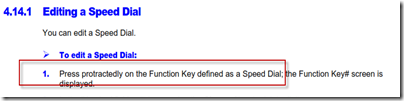
As a documentation note, if you are a norteamericano user, some of the terminology in the supporting documentation may be either amusing or confusing, depending.  For instance, to edit the aforementioned speed dial, here are the instructions:
image

I get it.  But, you have to know that I almost went and dug out my drafting supplies looking for my protractor set.

If you don’t want to use the keypad for login, and you are an external/remote user (like me), you have two options for login.  You can use the BToE (when it emerges from beta), or you can go into the web interface and enter your credentials.  BToE is covered here.  Let’s take a look at the web interface.

Press the menu button, then scroll down to the “Status” option. Under “Network Status” you will find the IP address that is assigned to the phone.  Using a standard browser, open http://whateveryouripis

image

With no-one is signed into the phone, the username is Admin and the PW is 1234.  Then select Configuration and Quick Setup.

image

Then simply fill in the data and click submit.

image

Logoff the web interface, then go to the phone and select “Status” and “Sign-in” and you should sign in.  For some reason, the phone does not like having you sign out; if you do, don’t be too surprised to have to go enter your password again.  I don’t understand why the phone does not hold the password in that scenario, but I will assume that an engineering decision was made that if you sign out of the phone then you don’t want to sign back in.  Which is a royal PITA for those of us who cannot use ext+PIN for login.  Adelante!

Summary

If you are looking at SIP phones, then this unit should be on your short list. The AudioCodes 440HD (their entire phone line actually) demonstrates very high quality in terms of packaging, build, and function. Audio quality is top-notch. In terms of price, very competitive.  A winner.

YMMV

Jabra Motion UC+ MS Review


More toys!  First up is the Jabra Motion UC+ MS.  Here is the market speak straight from Jabra.com.  Please note that the tested unit is the “…with travel and charge kit”

image

What’s in the box

First off, build quality is typical Jabra, right at the top of the pack. While the microphone boom folds and unfolds to provide the on/off function, it did not feel flimsy like the old Motorola HD devices did.  The Jabra feels substantial.

A nice half-moon, hard case that holds everything except the wall charger.  Everything includes the USB dongle, a USB cord, two extra ear-piece adapters, and the Jabra Motion itself.  The case itself is pretty nice; well made and provides a single spot to hold everything needed.  Well, except for the wall charger.  But, if you are on the road, most likely you will have your laptop and you can charge from that using the included USB cable.

image

The market speak (see above) claims 8 hours of talk time and 360 hours of standby.  I have been using this device for two straight days and it is still going.  When a call arrives, putting the unit into your ear answers the phone without having to push any buttons.  Nice.

Jabra claims a 100 meter range from base to unit.  I don’t know about that.  My cell phone would disconnect at about 30 feet (I assume the difference is in the BlueTooth version on the cell) and I don’t have a 100 meter known-distance-range to test the dongle range – but it seems to be pretty good.

I could not test the NFC pairing feature because my iPhone does not have that.  Hello!  Apple!  Are you listening?

An annoying?  nice?  feature:  power off if not in use.  But it resumes immediately upon speaking – whereby you get an aural notification and the device reconnects to the phone.  This feature uses the same motion sensors used to pick up the call when you put the device up to your ear.  I will note that in testing, when the device announces power off, it also seemed to resume aurally.  However, it only did that once, so I cannot comment further – maybe my head was shaking or something.  Either way, when in auto-power-off, the device resumed immediately.

Audio Quality

On the TsooRad Goodness scale, the audio of this device ranks at a 9.5 of 10.  In other words, nothing is perfect.  But I could not find any fault either.  Solid.  Good timbre, good volume, sound reproduction is crisp and accurate.

Lync Compatible

Note that my interest in this unit is the ability of the device to pair to my cell (an iPhone in my case) and my laptop at the same time.  How does that work?  Seamlessly.  Literally.  With no further effort on my part other than being logged into my Lync client and plugging the included USB dongle into an available port, I was making and taking calls with Lync but now I had the audio in my ear; at the same time, my cell operated as expected.  So nice.  Jabra also supplies a downloadable software package to further customize the user experience; I did not go that far – if it works just fine as is, why bother?

Summary

A very nice unit.  If you are looking for a travel device that connects to both laptop and cell so as to minimize your packing list, this should be on your list of contenders.

image

You can get your very own Jabra Motion UC+ MS right here.

YMMV

test 02 Feb

this is a test it’s only a test this should be a picture