About Me

My photo
This is a blog for John Weber. One of my joys in life is helping others get ahead in life. Content here will be focused on that from this date forward. John was a Skype for Business MVP (2015-2018) - before that, a Lync Server MVP (2010-2014). I used to write a variety of articles (https://tsoorad.blogspot.com) on technical issues with a smattering of other interests. I have a variety of certifications dating back to Novell CNE and working up through the Microsoft MCP stack to MCITP multiple times. FWIW, I am on my third career - ex-USMC, retired US Army. I have a fancy MBA. The opinions expressed on this blog are mine and mine alone.

2015/03/06

Plantronics BackBeat Pro

What do we have here?  Another toy!  How lucky am I?

image

BackBeat Pro by Plantronics  Officially, here is the feature list:


Pairing

Paired with laptop – but could not get it to give me audio.  Don’t know why.  I stopped trying after a bit;  I don’t like using BT on my laptop – BT drivers tend to screw with parts of the Office Suite so for several years now I simply disable BT on the laptop.  So, for me, nothing lost.

Paired with my iPhone first time out, and worked nicely.  It was a little disarming to not have a microphone boom in front of me, but the audio quality for the voice sending portion of this headset was good-excellent.

image


Audio Quality

Pandora music quality was excellent.  Volume was more than acceptable; there was more dB available than I find comfortable blasting into my gourd.  Frequency response, while I am not a human KHz meter, seemed to reproduce music well. The BackBeat Pro won’t ever replace my Infinity Studio Monitors in terms of pushing air, but hey, this thing is feeding straight into your ears.  And hugely impactful bass requires some size in the drivers with the ability to push air around.  Adele Rolling in the Deep has a thumpy bass line along with a solid drum beat – a good test of the music quality for bass response.  Even Garth Brooks sounded great. Overall, Music quality on the TsooRaD Goodness scale is at least a 9.

Controls

Holy Controllability Batman!  This thing has more controls than the space shuttle.  Well, maybe that is a tad exaggerated.  When paired with my iPhone, the BackBeat Pro rocked.  Full control of my play lists, and switching between music and using the phone was seamless.  Very well done. 

There is software for added functions, updating firmware, and for creating an entire Zen user experience. 

The Lync Link

Seeing as how I could not achieve BT nirvana with my laptop, what I did was leave the BackBeat paired to my phone and fired up my Lync Mobile client.  Nifty.  You have to love Lync Mobile.

Conclusions

A very nice piece of kit. Overall comfort level is excellent, audio quality is excellent.  Functionality with my iPhone was standard Plantronics goodness.  All of this and you get the Plantronics build quality also.

You can get your very own BackBeat Pro right here.

YMMV

2015/03/04

Plantronics Blackwire C725-M

Do you work in a noisy office environment?  Does that noise get in the way of your concentration? Do you tend to put up some music on to mask that noise? 

Plantronics might have an answer for you.  The Blackwire series of Optimized for Lync headsets has another winner.  the C725-M.  Noise cancelling, stereo, and a set of features that might well make this your go-to headset.  Here is the official market-speak.  It even comes with a nice soft carry case.

image

The short list of goodies incudes:

From the top down we have:  YES, sweet!, maybe, handy, Pandora John approved, I don’t care.

You want more detail?  OK, fine.  The ANC works really well; I would prefer over-the-ear rather than on-the-ear.  Could be just me, but what is the point to ANC when the noise can just go around? 

Smart Sensor?  This puppy answers the call just by putting the headset on.  This might be a little odd to some, but this auto-answer feature is also on my Voyager so I am used to it.  Once you try it, you may never go back. 

Professional audio quality?  I think this will depend your definition of what “good” is. 

Inline controls?  See below.  But they work well.

Music? Personally, based on my testing, and knowing that the stream on Pandora is different from 3g to Wi-Fi. my tired ears could tell the difference.  And sounds pretty nice on both. 

As to the case, I don’t care, I don’t use them.  You, however, might think that the case is the best thing since the corner gas-station.

Errata

The microphone boom can go on both sides.  It all folds flat.  The ANC is really nice.  It answers the call for me. The inline module volume control has different tones for up and down.  The ANC is really nice.  There, now I have said it three times.

The line cord is a bit stiffer than some I have seen.  Which I like.  Less tangle coming out of Mr. Backpack.  Plantronics also has a comprehensive download and support site.  There is even specific software to enhance your Lync user experience.  Nice.

Comfort is a solid 9.5+ on the Tsoorad Goodness scale.  Not too much weight, and I did not feel like I had my head in a vise.

Lync Link

Of course, this blog would not be appropriate if I did not tie this device into Lync in some fashion.  Plantronics says the C725-M is Optimized for Lync.  How did that portion of the testing go?  Easy-peasy.  Plug n Play.  I had zero issues – all I did was plug into a USB port and I was up and running. The Inline module works as expected. Audio voice quality is excellent.

Summary

A winner.  No need to say more.

You can get one right here.

YMMV.

2015/03/02

Asus Mobo & Server 2012 R2

Did you need to update your lab server?  Do you run a high-end gaming or media platform and need a boatload of RAM so you obtained an Asus mobo so you can have 32 or 64 GB of RAM?  Did you decide to go with a Windows Server 2012 R2 as a workstation host for the goodies you get with that?

If so, then I will make the guess that you discovered that the Asus-supplied driver disk claims that your operating system is not supported.  Horse pucky says you – with Windows 7/Server 2008 and Windows 8 (and 8.1)/Server 2012 (and R2) the core of the operating system is much the same and drivers will work on both, right?  Very frustrating to know something should work and be turned away by a mechanism to save the consumer from themselves.

This is now the second time I have run into this little gotcha; and for the second time, I worked around the issue the same way.  I suppose you could go find all the drivers and try to load them individually; however, one of the problems is that the LAN driver is a toughie.  Downloading the drivers and suite software direct from Asus runs you into the same issue – “your operating system is not supported” and you start questioning your sanity and direction in life.  My first experience with this was with Server 2008 R2 and an Asus P8z68 board.  This weekend I ran into this issue using a Asus Sabertooth X79 board and Server 2012 R2.  Specifically, I am using this mobo here.

What is the issue?

The *.ini files don’t include a proper operating system identifier that tells the driver/utility disk that it is OK to install for Server 2012 R2.  Very frustrating knowing that the drivers and whatnot will work just fine – well, there is an issue with the on-board Ethernet controller (and Intel 82579v) that the Server 2012 R2 doesn’t like – but I have a fix for that as well. 

A little error comes up with the audio drivers, but in my case, this is a headless VM host, and I am not too worried about that aspect of installing.  As it turns out, the audio driver install routine pitches and error, but then continues to install and works just fine.

The Fix

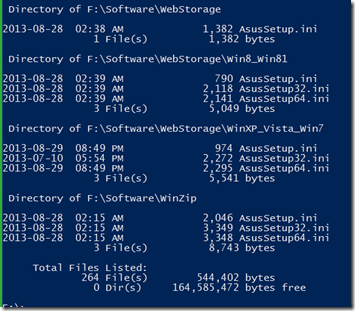
OK, so what do you need to do?  First, copy the CD to somewhere on a writeable drive.  Then find EVERY *.ini file in the resulting file structure.  You should end up with something like this:

image

and here is the end of the list…

image

Yes, that one line reads “264 File(s)”  that is a lot of them!  But, we do want to be successful, yes?  Note also that the very FIRST file listed is not “AsusSetup.ini” or “AsusSetup64.ini” – this is important. 

Let’s Dive In!

Cannonball, Can Opener, perhaps a graceful Swan dive or something you would see off the 10 meter board in a formal diving competition, pick your poison.  What you need to do is modify every last one of those ini files with the name “asussetup.ini” or “AsusSetup64.ini” – not the worlds best task for a Friday night, but you do want this to work, yes?

FWIW, I used this tool here.

Start by looking at the file \bin\Ascdinst.ini in your favorite editor, and find this piece:

WNT_6.3H_64 = Win81_64  --- Without getting too deep into the weeds, this line reads “Windows 8.1 Home Edition”

What you need to do is realize that this:   WNT_6.3I_64 = Win81_64 represents Server 2012 R2.

If you are trying to do this little routine with Server 2012 (why?) or Server 2008 (or R2) (why?) you can use these lines:

Server 2012 R2: WNT_6.3I_64 = Win81_64

Server 2012: WNT_6.2I_64 = Win8_64

Server 2008 R2: WNT_6.1I_64 = Win7_64

Server 2008: WNT_6.0I_64 = Win7_64

For those of us who are font-challenged, or maybe just a bit dim or blind, the “I” in those strings is a capital i.

What is going to happen here is that the installer is going to read the installed operating system as WNT_6.3I_64 and equate that to win81_64, which is supported for install.

At any rate, in your favorite editor, you want the appropriate section in the ascdinst.ini file to read thusly:

WNT_6.3P_32 = Win81_32
WNT_6.3P_64 = Win81_64
WNT_6.3P_32_MCE = Win81_32
WNT_6.3P_64_MCE = Win81_64
WNT_6.3H_32_MCE = Win81_32
WNT_6.3H_64_MCE = Win81_64
WNT_6.3H_32 = Win81_32
WNT_6.3H_64 = Win81_64
WNT_6.3I_64 = Win81_64

Once you get that first one done, the asussetup will be happy.  The other 263 files need to be done also to enable the individual components to install properly.  Happy grepping!  or, Happy notepad ++’ing, or however else you choose to do it. Yes, I know I said that some of the files don’t need to be done, but you never can tell which.  Actually you can, if the WNT_6.3H_64 line is not present, you don’t need to worry about that ini file.  But, do you really want to mess around with looking at each file?  No, I did not think so.  Pick a tool and use it.

As a nit-picky technical note, for your purposes, you really don’t need the WNT_6..3H_64 line at all, so you can just grep every ini file on the disk, and if it finds the WNT_6..3H_64 line in the file, replace it with WNT_6.3I_64 = Win81_64. Which *I* did not do, because there is always the chance that I might, for some reason known only to Microsoft, need to install the Windows 8.1 Home Edition on my 64GB Lab server.  You never can tell.  I might come down with a severe case of stupid one day.

LAN Driver

In a twist of technicality that I have no desire to attempt unraveling, Intel does not produce a driver for the 82579V GB Ethernet Controller that supports Server 2012 R2.  Don’t ask me to elucidate, I said I don’t know.  But, what remains is that even when you work your way through 264 different ini files doing the above routine, the LAN driver on the disk is going to barf on you because it doesn’t like Server 2012 R2.  Again, I don’t know why.

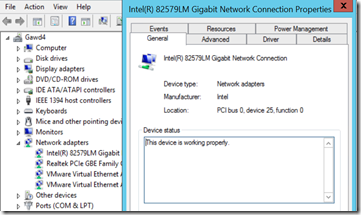
What I do know is that you can do the Device Manager thing, and tell Windows itself to install the 82579LM driver, which works splendidly.
image

If you go here: https://downloadcenter.intel.com/download/23073 and actually read the fine print, you will find this:

NOTE: The following devices do not have driver or software support for Windows Server 2012 R2:
- Intel® Ethernet Connection I217-V
- Intel® Ethernet Connection I218-V
- Intel® 82579V Gigabit Ethernet PHY

So, it would appear that the 82579LM driver is going to have to suffice. As you can see, I have plenty of traffic on the network, but as a fraction of the speed provided by the NIC, it doesn’t even make a pimple on the radar screen…

image

When we do a little file transfer to get a feel for actual speed, it certainly looks like we are getting GB speed.

image


Summary

At this point, remember that the first file you do is different from the rest in the terms of naming convention.  All the rest you need to worry about will say asussetup*.ini.  There is a bunch of language ini files; I don’t think you need to worry about those, unless of course you know something about language files being bit-specific that I don’t know.

Oh, BTW, this Asus board rocks.  Although I am not sure I will ever need all 30 USB ports.

YMMV

2015/02/19

International Call Test Number

Do you need to test outbound calling to international numbers but your customer doesn’t have anyone just sitting there waiting for your call (how dare they)? Well, Australia to the rescue!

This number is an automated time of day announcement from Australia,so you won’t be harassing anyone.  Keep in mind that your test will incur at least some charges to your customer, so make sure they know ahead of time.

Calling from the US:  011-613-966-94916

You may need to mod the international access prefix for your country, or make sure that your Dial Plan rules do what is needed.  Most users who make these calls will know international access numbers, after all, they are already making these calls.  Your PBX counterparts will also know the appropriate codes – or, they should know.


YMMV

2015/02/18

Upgrade Lync 2013 to Skype for Business 2015

Here we are in the 1st half of 2015, and the anticipated general availability of Skype for Business 2015 is fast approaching.  Microsoft has started to release details surrounding this new version of what could possibly be (and my opinion is) the best and fastest growing collaboration and communication tool on the market today. According to available data, 90% of the Fortune 500 use Lync in some capacity, and 89% of enterprises that trial Lync are including Enterprise Voice, Lync 2013’s flavor of SIP-based VOIP.  With that in mind, and leveraging the popularity of Skype, Microsoft has rebranded the Lync Server as Skype for Business Server 2015 for this new version release.

With all that in mind, and keeping in mind that upgrading what might be the core communication application for your organization, we need to start looking at what the planning process is going to look like for this upgrade evolution.

In this article, I will outline what I consider to be the crucial considerations.  I am not going to try to detail the product enhancements in this version, nor the pros and cons of taking this action; we will focus on the overall upgrade process and what your organization will need to consider BEFORE embarking on the procedures.

The General Idea

First off, Skype for Business Server 2015 (Skype4B) does not support three version coexistence.  This means that Microsoft recommends that if you are partially into an upgrade to Lync 2013 that you continue forward and complete that process.  If you have not started, then stand pat and upgrade from Lync 2010.

If you have Lync 2013, then you can take advantage of the in-place upgrade that is now available.  If you are on, and staying with Lync 2010 until upgrading to Skype4B, then you will be building new servers and moving into/onto them.  There is no path from OCS 2007 R2 or earlier.

Next, the overall flow is inside out, user pools first, then the supporting Lync server roles are upgraded; mediation servers, directors, and Edges.  Yes Matilda, there is still a director.

A Few Specifics

All of the Lync 2013 infrastructure that we know and love is going to look the same in Skype4B.  DNSLB, HLB, Reverse Proxy, firewalls, Web Access Servers, Persistent Chat, pool pairs, virtualization support, SBS/SBA; it is all there.  About the only significant change that I see is the support for SQL AlwaysOn Database Availability Groups.  If you wish, SQL clusters and SQL Mirroring are still supported. If you have mirroring now, there is a spiffy procedure to upgrade your mirror to AlwaysOn.

If you are using SQL AlwaysOn today with Lync 2013 – you can move straight into the upgrade, but Skype4B will never know that the supporting SQL is in an HA posture.  While things SHOULD work, you will be firmly in a non-supported scenario with Skype4B topology not having all the facts.

If you want to get the SQL AlwaysOn, keep in mind that the AlwaysOn requires SQL Enterprise with the attendant cost.  Unless your database team is dictating AlwaysOn for some technical or business reason, I simply cannot see the benefits of AlwaysOn over mirroring; but that could be just me.

Lync 2013 will run on Windows Server 2008 R2.  So will Skype4B.  However, if you take this route, you will be pretty much dead ended – Server 2008 R2 is getting a tad long in the tooth.  Take a look at the support cycle, and then make your own decision.  For the most part, I have been deploying Lync 2013 on Server 2012 R2.  If this is the case for your organization, or if you have been doing Server 2012, you should be OK.  But I would be thinking twice about moving forward with an in-place upgrade of Server 2008 R2 hosts. Server 2008 R2 uses a version of Windows Fabric that will update to Fabric 2.0, but about 100 or so bug fixes did not make it into v2, so using Server 2012 and 2012 R2 will get you the upgrade to Fabric v3, which is the optimum platform for Skype4B.

Whichever server host you choose to use, even the in-place upgrade has some prerequisites to install before running the Skype4B setup.  As you might expect, the Lync 2013 servers should get all windows updates and the prerequisites before moving forward; the upgrade process will error out if it thinks something is missing.  Nothing new here, but be prepared.

SQL again!

SQL on the front ends needs to be SQL 2012 SP1 (Express) to get the direct upgrade treatment.  So you might need to figure out some time to handle this before starting the core upgrade project.

Topology Builder

The Skype4B Topology Builder is going to be needed before you upgrade the first pool, and the Lync 2013 Topology Builder won’t open a topology that has been upgraded.  Most folks run Topology Builder on one of the Front End servers in Lync 2013; but you cannot get to the direct upgrade features from the Lync 2013 Topology Builder.  You are going to have to get the Skype4B Topology Builder onto something else; documented supported platform information is not available at this time, but a good guess will be x64 and Windows 8 or Server 2012 and up.

You are going to want to keep the Central Management Store until last.  Obviously, if you only have one server, this won’t be a possibility.  But if you have only one Enterprise Pool, you might want to consider standing up a 2013 Standard Edition to move the CMS onto; this will create a fall back position for you should things get ugly.  I also think that a judicious upgrader will run export-csconfiguration and export-csLISconfiguration before starting; again, for the obvious fall-back planning.

If you have Survivable Branch Appliance (SBA), there is no current upgrade available.  Microsoft is leaving that process to the SBA vendors.  You will need to plan for a maintenance window during the upgrade as the SBA pool will be in resiliency mode while the central site pool is down for the upgrade. After the pool comes back from the upgrade, the SBA will register back into the central site just as before, so no worries there.  According to the good folks at AudioCodes, it will most likely be until June 2015 before a vetted SBA upgrade process is fully tested; until then, the Skype4B pool will work with the Lync 2013 SBA just fine.

SBS will direct upgrade provided you have all the host server items covered just like on an SE or EE pool.

Pool Pairs

To direct upgrade pool pairs, the entire pool needs to be down.  I suggest that moving all of your users to the other pool whilst upgrading will be a prudent move.  Note that this does NOT MEAN doing a pool failover, just moving the users off.  You might also want to consider a little disaster proofing by moving the conference directories.  And keep in mind that your SBA structure will be down while the central site pool is down for upgrade.  I suppose you could redo the SBA backup registrar relationship, but I think that is way more work than is called for.

Conclusions

Skype for Business is coming and there is a different light at the end of this particular tunnel.  To whit, we can do in-place upgrades.  The supporting SQL backend and how to handle that aspect of your environment will need examination and forward planning.  Likewise, the host server version will demand attention and presents some decision points.

YMMV

2015/02/17

Lync QoS calculator


I pushed the rock away from the entrance to my cave and discovered that MVP Pat Richards has once again put out an awesome tool.

Quality of Service (QoS) Calculator – Plan Your Network, GPO, and Lync Config More Easily

http://www.ehloworld.com/2821

Check it out. Great stuff.

YMMV

2015/02/13

Lync 2013 Mobile call failure

Isiah Hudson, CDW UC Consultant, reports the following:

Failures of IM and calling to Lync 2013 mobile clients in two very specific scenarios. The findings are listed below:


Issue

When an IM is sent from an internal user (using any Lync client) to a user on the Internet using the Lync mobile 2013 client. The Internal user would get an error message saying the IM failed immediately after the Lync 2013 mobile user accepts the IM.

…or…

When a call (audio or video) is initiated from an internal user to a Lync 2013 mobile user on the Internet the call results in a failure.

This issue only impacted Lync 2013 mobile clients. The Lync 2010 mobile client worked fine in all IM and call scenarios.


Tell-Tale Signs

After the IM or call is accepted by the Lync 2013 mobile client the following a SIP/2.0 403 Forbidden message is generated by an FE server with the following information in it:

ms-diagnostics: 24118;Component="RTCC/5.0.0.0_UCWA/5.0.0.0";Reason="Application accepts invitations via static registration only.";Source="whatevertheFEservernameis.ad.local"


Solution

A ticket was opened with MSFT and after a couple of months of working on it the problem was the public certificate on the reverse proxy for the Lync external web services had SAN names in them that were not resolvable by public DNS. I am told by MSFT support that the Lync 2013 mobile client will try and resolve all SAN entries of the public certificate presented to it at sign-in. If it cannot resolve any SAN entry on the certificate you may experience the problems outlined in the Issue section above.


Take Away

Make sure all SAN entries on the public certificate you put on your reverse proxy for Lync can be resolved to an IP address or you will have a bad time.

And there you go.  Nice work Isiah!

YMMV

test 02 Feb

this is a test it’s only a test this should be a picture