About Me

My photo
This is a blog for John Weber. One of my joys in life is helping others get ahead in life. Content here will be focused on that from this date forward. John was a Skype for Business MVP (2015-2018) - before that, a Lync Server MVP (2010-2014). I used to write a variety of articles (https://tsoorad.blogspot.com) on technical issues with a smattering of other interests. I have a variety of certifications dating back to Novell CNE and working up through the Microsoft MCP stack to MCITP multiple times. FWIW, I am on my third career - ex-USMC, retired US Army. I have a fancy MBA. The opinions expressed on this blog are mine and mine alone.

2014/08/08

SharePoint Foundation compatible application could not found


Do you get these zippy error messages when you try to open a document in SharePoint (or should I say non-SharePoint?) and are thoroughly confused as to why it worked the other day but not today?

image

image

I got these errors today, so off to UofB and UofG to find an answer.  Searching on the phrase “edit document requires foundation” or “The document could not be opened for editing. A Microsoft SharePoint Foundation compatible application could not be found to edit the document” which were two of the other error messages I got resulted in a boatload of links both MS forum and other locations. 

These links were full of advice - all of which failed.  Towards the end of my search I found a spot that mentioned doing a full repair.  I thought  - “maybe, but I just (stupidly) ran Windows Update the other day and ran about 30 updates in – which included a bunch of Office 2013 updates” and the last part convinced me that I had nothing to lose.  So off I went and did a repair.

Voila!  My sacred OneNote file is now able to open and sync and be edited.  WHY? 

I don’t know what caused this, but I suspect, as it was working a while ago, that the updates the other day borked things up somehow. If it matters, I am running win8.1x64, Office 2013 x64, and a variety of other crap that is both Microsoft and other vendors both x86 and x64.

YMMV

2014/07/29

Lync 2013 Test Plan

For some reason, the concept of conducting full function tests prior to ending the Lync POC or pilot project has come up again and again.  Those pesky customers just keep insisting. 

Usually, the customer has already come up with a fairly exhaustive test plan on their own and all I need to do is help them revise or add expectations. If they have not developed their own test plan, I first point them to the Lync 2013 RASK. 

The Lync Rollout and Adoption Success Kit can be found here.  If you poke around the semi-convoluted structure you will eventually divine the logic, but you are probably better at that than I am.  At any rate, eventually you will find stumble upon this link:  http://www.microsoft.com/en-us/download/confirmation.aspx?id=37031 which is the download page for the Lync 2013 Rollout and Adoption Success Kit (RASK) Resources package.  A very nice piece of kit.  This download has the following format:

image

I have taken the liberty of showing the location of the subject for this article – the “Sample Pilot Test Plan.xlsx”.  What you see below is a modification of that fine piece of work. In its’ base form, the RASK test plan has saved me many hours of skull sweat – and most likely saved my customers many hours as well.  For a simple Lync deployment, you may be able to use it as is.

But the real value of the RASK test plan is to get your head into the game.  Accordingly, my modifications are just that, MINE  - as needed for a project, and then modified past that to serve as my personal baseline test plan.   

If you were to run a full system test and that included HA and DR, you would also iteratively fail Front End Pool members and run full-tests per this matrix with each pool member offline in turn.  And then you would need to create the same set of tests with perhaps one Edge Server offline and then consider your other environment details. And then loop through for each pool member off in turn et cetera. You may end up with a matrix with a considerable number of test cells to complete. I one time did a project where the core HA/DR test matrix resulted in 900+ individual test cells.  Each cell was one complete test that contributed to the overall upper level test.  Fun! But in the end, if someone asks you, you can show them, yes, we tested.

I try very hard to accomplish the testing inside out and and using this order of tests:

  1. Test the FE pool level -  this may include monitoring, archiving, persistent chat, and Office Web Apps Servers
  2. Test the Edge (Edge servers and reverse proxy)
  3. Test mobility clients
  4. MPOP scenarios

Resist the urge to use real users.  Gin up a set of test accounts, per pool, and use those accounts for the testing.  If you MUST use real accounts, be in control of the testing flow or you will be like this when things don’t go exactly right and the testers start veering off into the own little interest area.

So, without further ado, here is a sample what I use as my baseline in screen cap format – a download link can be found at the bottom of this article. 

 image

Here is the download link.

YMMV.

2014/07/24

A duplicate name exists on the network

There I was, doing some menial tasks associated with validating a full HA, multiple geographical site deployment.  We had just got the final Edge pool up, and were checking mobility client connections and functions.  In walks my client counterpart and he wants to deploy the monitoring server databases.  Previously the customer had modified the topology to include monitoring per pool, published the topology, and had reported that the databases did not install.

Easy-peasy says I.  So we opened the Topology Builder and worked through the process to deploy just a database.  We carefully chose our target server, changed the default locations for the data and the logs. For those readers who are dying to know how to accomplish this after having the pools already installed, here is a quick primer using Topology Builder.

(by no means is this an authoritative guide to installing monitoring databases – if you need that see this)

Adelante!  From the Topology Builder….

clip_image002

Select the SQL server you want, make sure it is highlighted, then click on advanced.

clip_image004

If your DBA does not care, you can leave these fields blank, if the DBA does care, then you will need to get with him/her and figure this out:

clip_image006

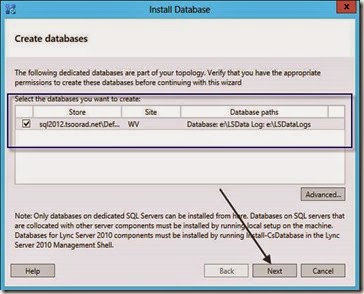
At this point, you are ready to go:

clip_image008

…and we were rewarded with the following announcement.

“You were not connected because a duplicate name exists on the network.”

In defense of our failure, the error message was in a very nice color of red.  In honor of that detailed bit of programming, you will note that I have colored my error message in the same brilliant hue.

We were using a service account that was a domain admin, had local logon rights to the target SQL server and was an SA equivalent on the target SQL server.  We double checked membership in the CSAdministrator and RTCUniversalServerAdmins groups. The SQL server was pingable.  The environment is using an alias for the SQL server FQDN.  So we verified that the FE pool member from which we were running PowerShell could see and ping the SQL server by FQDN, IP, and CName.  All good.  We also did a little judicious DNS peeking to make sure that a duplicate name did not exist.

So we tried the process again, but this time I brightly used the PowerShell cmdlet.

Install-CsDatabase -ConfiguredDatabases -SqlServerFqdn SQLServer.FQDN –Verbose

Failure, but the verbose option gave us another pretty red error with a bit more information…

WARNING: Install-CsDatabase failed.
WARNING: Detailed results can be found at "C:\Users\SVC_Lync\AppData\Local\Temp\5\Install-CsDatabase-201de519-f3ac-4f0f-a221-b0cacc897e27.html".

Install-CsDatabase : Command execution failed: You were not connected because a duplicate name exists on the network. If joining a domain, go to System in Control Panel to change the computer name and try again. If joining a workgroup, choose another workgroup name.

Not so good.

Having already checked permissions and names and DNS, we then turned to Bing’ing and the ubiquitous Google-fu.  After some detailed searching, some boring reading, and superfluous checking of various settings, I stumbled across this on Mark Menasi’s forum.  While it did not exactly apply, it was certainly worth a shot (after all, nothing else was working).  After a little discussion in which we decided on a plan to unwind this registry hack if results did not meet expectations, we did the following to the demon SQL server in question:

HKEY_LOCAL_MACHINE\System\CurrentControlSet\Services\LanmanServer\Parameters
Value name: DisableStrictNameChecking
Data type: REG_DWORD
Radix: Decimal
Value: 1

We then were successful with the install-csdatabase cmdlet.  LCsCdr and QoEMetrics databases are installed and we have data flowing.

YMMV.

2014/07/23

Where is my Lync PIN Stored?

I don’t know why this question came up, but a client asked me today: “where does Lync store the user’s conference PIN?” I hate questions to which I don’t know the answer.  A few ideas came to mind; a co-worker suggested that the PIN was in SQL somewhere.

So I went looking.  Dang!  and looked.  And poked.  And prodded.  But finally!

RTCLocal instance, RTC database.  The table is dbo.UserPinMembership.

image

But, when you look at it, the actual PIN appears to be a one-way hash (like AD storing passwords). 

image

So, even after you find the magical user PIN, do not attempt to edit this value directly or you will probably be sorry.  Instead, use the PowerShell cmdlets provided for that purpose.

image

Take a look at

Set-CSClientPin

Get-CSClientPinInfo

image

and if you are really adventurous,

Set-CSPinSendCAWelcomeMail which can be used sort of like this for the one-offs, or you can read a csv and set everyone at once.

Set-CsPinSendCAWelcomeMail -UserUri "sip:jweber@domain.com" -From "helpdesk@domain.com" -SmtpServer vmailbox.domain.com -Subject "your PIN" -Pin "135791" -Force -Verbose -UserEmailAddress jweber@domain.com

But trust me, don’t try to change or set the PIN using direct SQL edits.

YMMV.

2014/07/09

Project Failures

Disclaimer: I have no idea who authored this blog, or which organizations website hosts the blog. 

As I read through the following article, I was faced with the classic introspection question: how does each of these apply to me?  http://calleam.com/WTPF/?page_id=2338

In the midst of some business process research I ran across this and it proved to be very interesting reading.  As a consultant, I participate in both sides of the sales process and on all sides and phases of project delivery.  I found comparing the failure attributes to projects in which I participated was very insightful.  Not every reason listed may apply to every project – but the level of detail and the implied attention to detail required of the consulting engineer is an excellent starting outline for necessary professional skills, and demonstrates the depth and breadth of knowledge and experience required to successfully deliver IT projects.

YMMV

2014/06/26

Lync 2013 Server 2012 replication issues

A slightly different twist on an old issue

Situation

I had a client using Windows Server 2012 as the OS for a Lync 2013 deployment.  Replication between the Edge and the Front End Enterprise Pool was not working. Everything appeared to be set correctly, you can browse to the replication location for the Edge (https://serverfqdn.domain.com:4443/ReplicationWebService), you can telnet to the Edge server on 4443.


The Fix

We are using all public certificates from a well-known CA (GoDaddy), so the certificates not being trusted from domain member to non-domain member was clearly not the issue.

After a bit of searching you find that adding some registry changes to the SCHANNEL on the edge servers and the Front End Pool members will resolve the issue. 

Like so:

[HKEY_LOCAL_MACHINE\SYSTEM\CurrentControlSet\Control\SecurityProviders\SCHANNEL]
"EventLogging"=dword:00000001
"ClientAuthTrustMode"=dword:00000002
"SendTrustedIssuerList"=dword:00000000

Or, for you PowerShell freaks out there: (lines wrapped)

New-ItemProperty -Path HKLM:\System\CurrentControlSet\Control\SecurityProviders\SCHANNEL\ -Name ClientAuthTrustMode -Value 2 -propertytype "DWord"
New-ItemProperty -Path HKLM:\System\CurrentControlSet\Control\SecurityProviders\SCHANNEL\ -Name SendTrustedIssuerList -Value 0 -propertytype "DWord"

If you want to get real fancy, you can affect multiple domain servers using remote PS.  For my current project I did this for 20 servers, 12 domain members and 8 out in the DMZ.

$credential = Get-Credential -Credential domain\user
Enter-PSSession -ComputerName FQDN -Credential $credential
New-ItemProperty blah blah blah
Exit

For you reg /s fans, copy the following to a handy file of your own with a .reg extension and click away.

Windows Registry Editor Version 5.00

[HKEY_LOCAL_MACHINE\SYSTEM\CurrentControlSet\Control\SecurityProviders\SCHANNEL]
"EventLogging"=dword:00000001
"ClientAuthTrustMode"=dword:00000002
"SendTrustedIssuerList"=dword:00000000

As always, YMMV

test 02 Feb

this is a test it’s only a test this should be a picture