About Me

My photo
This is a blog for John Weber. One of my joys in life is helping others get ahead in life. Content here will be focused on that from this date forward. John was a Skype for Business MVP (2015-2018) - before that, a Lync Server MVP (2010-2014). I used to write a variety of articles (https://tsoorad.blogspot.com) on technical issues with a smattering of other interests. I have a variety of certifications dating back to Novell CNE and working up through the Microsoft MCP stack to MCITP multiple times. FWIW, I am on my third career - ex-USMC, retired US Army. I have a fancy MBA. The opinions expressed on this blog are mine and mine alone.

2012/03/22

Genuflection

There comes a time in every life, where something occurs, followed by another something, which can make you profoundly thankful.

Today, I am truly thankful for (among other bigger ticket items) the concept of server snapshots and people who know how to use them.  I made a rookie error and got bailed out.

2012/03/21

Create Mailbox Database Guide

One of the tasks common in Exchange 2010 is creating a mailbox database. If DAG is involved, then adding a second copy (or third or more) is also common. In addition, application servers such as RIM® Blackberry™ Enterprise Server and CommVault have service accounts that are typically granted permissions at the database level so that they can interact with the database mailboxes. This guide will show you how to create a database, add database copies, and change the database to support BES or similar third-party application service accounts. Powershell commands equivalent to the EMC GUI are shown – in the case of the database changes, powershell is the only method to make the necessary changes (although you could use ADSIedit if you were very brave/adventurous).

Assumptions

· You know the database and transaction log file location. If you are creating multiple database copies, the server data location is IDENTICAL between servers.

· This procedure assumes an existing Database Availability Group (DAG)

· You know the activation preference for subsequent database copies

· If the mailbox server upon which you are placing the active copy of the new database does not have a public folder (PF) database, you know which PF database you want the new mailbox database to use.

· You are using the default offline address book.

· You know the netbios\alias or username of the service accounts for applications such as BES or the Commvault backup agent.

You will need to adjust these commands to match your specific parameters. If you choose to do the file locations on the fly, the powershell/GUI creation process will create the paths for you.

Create the mailbox database

Open the EMC (Exchange Management Console)

Once that tool is open, expand the tree in the left pane until you can see the “Organization Configuration | Mailbox” as shown, and the select New Mailbox Database

clip_image002

Input the names as prompted

clip_image004

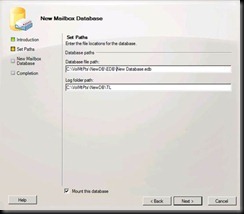
The program will input default locations for the database file path and the log folder path. You may not want this. Keep in mind, the database path needs to be a complete path, with file name. The log folder path is just the folder that will hold the log files.

clip_image006

Here is an example of paths that are different from the default
clip_image008

Check off the “mount this database” as you desire. I always leave it checked, and about 40% of the time, the database will mount properly. If it does not mount, give yourself about 10 minutes for AD to catch up, and then mount the database.

You get a chance to review your selection (and go back if needed)

clip_image010

Here is the new database creation process at the finish screen

clip_image012

Here is the underlying powershell commands for creating the new database and mounting the new database: (the first command wrapped – powershell commands need to be on one line)

new-mailboxdatabase -Server 'E2010THIRD' -Name 'New Database' -EdbFilePath 'C:\VolMtPts\NewDB\EDB\New Database.edb' -LogFolderPath 'C:\VolMtPts\NewDB\TL'

mount-database -Identity 'New Database'

Add Database Copy

From the same location in the EMC, choose the “Database Management” tab, select a mailbox database, and then select “Add Mailbox Database Copy” from the Action Pane.

clip_image014

When the wizard opens, note that you do not get to change the database name, the server(s) already with a copy of the database are shown, and you have a “preference” number. The preference number is used to determine automatic mount order should the active database fail. For the second copy, leave it as “2.” If you are making 3 or 4 copies and doing the creation in reverse order, you could set this to 4 or 3 and then do the lower precedence number later. If you set this number to “1” the original database will be raised to “2.” At any rate, browse for a new server to host the new database copy. When you have things the way you want them, click on “ADD.”

clip_image015

At the end, you will have a mailbox database with two copies, one copy mounted, the other healthy and ready to take over if needed.
clip_image017

Here is the powershell equivalent:

Add-MailboxDatabaseCopy -Identity 'New Database' -MailboxServer 'E2010SECOND' -ActivationPreference '2'

Add PF and OAB to new Mailbox Database

In the EMC, select the new database, and then right-click it to get at the properties as shown

clip_image018

Note the details regarding the database reflect the database as a logical entity, not a physical object.

clip_image019

Select the “Client Settings” tab and adjust the PF database and OAB to your environment.

clip_image020

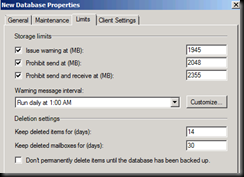
Select the “Limits” tab and adjust the database limits to your environment. This illustration shows the system database defaults.
clip_image021

Select the “Maintenance” tab and adjust the database to your environment.

clip_image022

Change database to support third-party applications

Once you have a new database, and a new copy of the database, and you have adjusted the database to meet the requirements in your environment, you need to change a few permissions to allow third-party applications such as Commvault® and BES™ to access the mailboxes housed in the database.

The database parameters that need adjusting are only exposed to powershell. To begin, open an Exchange Management Shell.

clip_image023

You should get something that looks like this.

clip_image024

BES and CommVault need read-as and send-as at the database level so that they can send and receive mail on behalf of the individual user. What needs to be done with a new database is grant permissions to the service account.

get-mailboxdatabase –identity “new database” | add-adpermission –user <service account> -extendedrights receive-as,send-as

YMMV.

2012/03/20

Lync and Mac iOS CU5

Yes!

The CU5 update for the Lync for iPhone and Lync for iPad apps have been posted to the Apple Store!

http://itunes.apple.com/us/app/microsoft-lync-2010-for-iphone/id484293461?mt=8

http://itunes.apple.com/us/app/microsoft-lync-2010-for-ipad/id484222449?mt=8

This update enables the Lync for iOS clients to sign in successfully using Forefront UAG 2010 SP1 as a Reverse Proxy (confirmed).

YMMV.

2012/02/22

Exchange 2010 WinRM and Powershell

Situation

Opening the Exchange Management Shell (EMS) on the server fails to connect to the local server with this error:

Connecting to remote server failed with the following error message : The WinRM client received an HTTP server error status (500), but the remote service did not include any other information about the cause of the failure. For more information, see the about_Remote_Troubleshooting Help topic.

Nice, huh?  Looking at the event log gave me an RBAC error and a a few others as shown…

(Process w3wp.exe, PID 3244) "RBAC authorization is unavailable due to the transient error: The Microsoft Exchange Active Directory Topology service on server localhost can't be contacted via RPC. Error 0x5."

Process w3wp.exe (PID=3244). An remote procedure call (RPC) request to the Microsoft Exchange Active Directory Topology service failed with error 5 (Error 0x5 (Access is denied) from HrGetServersForRole). Make sure that the Remote Procedure Call (RPC) service is running. In addition, make sure that the network ports that are used by RPC are not blocked by a firewall.

Process w3wp.exe (PID=3244). An remote procedure call (RPC) request to the Microsoft Exchange Active Directory Topology service failed with error 5 (Error 0x5 (Access is denied) from HrGetServersForRole). Make sure that the Remote Procedure Call (RPC) service is running. In addition, make sure that the network ports that are used by RPC are not blocked by a firewall.

What changed over the last week?  E2010 SP2 and RU1 had been run into the environment – but nothing else.

This was very frustrating because all the “normal” fixes to this did not work.  WinRM extensions, Kerberos auth on the powershell vdir, rebooting, you name it, I looked at it.  Nada.

The Fix

On a whim, while checking the PowerShell virtual directory path, and comparing a working server to this non-functioning server, I looked at the application pool…oh &%*!.  How did it get that way?  Four hours of chasing my tail.  Four hours of my life I cannot get back.

My only thought is that SP2 or SP2 RU1 borked that setting for some bizarre reason.  Here is a nice screen shot of what it was…

clip_image002[5]

…and what it should be:

clip_image002

YMMV

2012/02/20

0x2114 schema update failed

Subtitle: Fun with linkID and Schema LDF files

Scenario

On site getting a project rolling.  One of our first steps was to test the schema extending in lab.  Perfect execution.  So we submit for change control and get going the next morning.  Having just succeeded doing this task the day before in lab, we were not expecting any issues. Not so fast Bucko! 

Setup /prepareschema (setup /ps) got about 20 seconds in and dumped out with this little gem:

[02/09/2012 19:08:14.0737] [1] [ERROR] There was an error while running 'ldifde.exe' to import the schema file 'C:\Windows\Temp\ExchangeSetup\Setup\Data\PostExchange2003_schema18.ldf'. The error code is: 8245. More details can be found in the error file: 'C:\Users\me.adm\AppData\Local\Temp\5\ldif.err'

Oh wonderful.  But, no problem – let’s get to the bottom of this and get moving forward.  A closer read revealed that the ldf count was up to at least the 18th file, and probably higher.  (If you look at that directory, there is over 400 LDF files there….)  So, my conclusion is that something is not the same in the production AD as in the lab.  Looking at the ldif.err file shows this: (sorry about the crappy wrapping…)

Entry DN: CN=ms-Exch-Mobile-Mailbox-Policy-Link, CN=Schema, CN=Configuration,DC=domain,DC=local

Add error on entry starting on line 358: Unwilling To Perform

The server side error is: 0x2114 Schema update failed: An attribute with the same link identifier already exists.

The extended server error is:

00002114: SvcErr: DSID-032603BC, problem 5003 (WILL_NOT_PERFORM), data 8468


An error has occurred in the program

Personally, I really liked the idea of changing the error code in the file I was told to go look at… the server error said 8245, here in the ldif.err file we are given a value of 8468.  This is important though… it enabled me to find an EXACT fix.

What was Wrong

Long story short – at some point in the past, the client had done an application or something that grabbed the same linkID that the Exchange 2010 schema extension wanted to use.  So it pitches the error and quits out.  Here is the pertinent section of the ldif.log:

[02/09/2012 19:08:14.0284] [2] Beginning processing install-ExchangeSchema - LdapFileName: 'Setup\Data\PostExchange2003_schema18.ldf'

[02/09/2012 19:08:14.0284] [2] Running <C:\Windows\system32\ldifde.exe> with arguments <-i -s "XXX-W2K8-DC02.domain.local" -f "C:\Windows\Temp\ExchangeSetup\Setup\Data\PostExchange2003_schema18.ldf" -j "C:\Users\me.adm\AppData\Local\Temp\5" -c "<SchemaContainerDN>" "CN=Schema,CN=Configuration,DC=domain,DC=local">.

[02/09/2012 19:08:14.0705] [2] Process C:\Windows\system32\ldifde.exe finished with exit code 8245.

[02/09/2012 19:08:14.0721] [2] [ERROR] Unexpected Error

[02/09/2012 19:08:14.0721] [2] [ERROR] There was an error while running 'ldifde.exe' to import the schema file 'C:\Windows\Temp\ExchangeSetup\Setup\Data\PostExchange2003_schema18.ldf'. The error code is: 8245. More details can be found in the error file: 'C:\Users\me.adm\AppData\Local\Temp\5\ldif.err'

What is happening here?

The Fix

0x2114 schema update failed: searching that phrase or “an attribute with the same link identifier already exists” gave some interesting results – including this one:  http://support.microsoft.com/kb/917682 which is for Exchange 2003 and the advice is to modify the ldf file with an arbitrary number and, of course, in the future hope that no one created an install that wants to use that number for a LinkID.  After reading that article and several others like it, I concluded that the error was the same, but I did not like the solution.

Searching with the second value in the ldif.err log (8468) gave me a technet forum article that was so close to being my error that I was almost moved to genuflect in the direction of Redmond.  Here is the article.  Down towards the bottom is the interesting part, where is mentions “…German article which exactly described my problem…” BINGO!!  Anyone read German?  My search engine does….

For you bilinguals, here is the original and here is the translation.

The LinkID exists that the PostExchange2003_schema18.ldf file wants to use for ITS object is already in use.  OK.  Let’s look at the actual file, or at the very least a section of the file (it is several K of text).

In my case, the exchange install log pointed at this attribute inside the PostExchange2003_schema18.ldf as failing:

dn: CN=ms-Exch-Mobile-Mailbox-Policy-Link

A quick search of the PostExchange2003_schema18.ldf  file give us this section:

dn: CN=ms-Exch-Mobile-Mailbox-Policy-Link,<SchemaContainerDN>
changetype: ntdsSchemaAdd
adminDescription: ms-Exch-Mobile-Mailbox-Policy-Link
adminDisplayName: ms-Exch-Mobile-Mailbox-Policy-Link
attributeID: 1.2.840.113556.1.4.7000.102.50668
attributeSecurityGuid:: iYopH5jeuEe1zVcq1T0mfg==
attributeSyntax: 2.5.5.1
isMemberOfPartialAttributeSet: TRUE
isSingleValued: TRUE
lDAPDisplayName: msExchMobileMailboxPolicyLink
name: ms-Exch-Mobile-Mailbox-Policy-Link
oMSyntax: 127
oMObjectClass:: KwwCh3McAIVK
objectCategory: CN=Attribute-Schema,<SchemaContainerDN>
objectClass: attributeSchema
linkID: 1058
schemaIdGuid:: KqC15oH1QkyuYBCP58HttQ==
searchFlags: 0

(The DN: line, btw, is line 358 which is what the ldif.err log pointed to also.)

But, look at the “linkID: 1058” line… and then go back and read the German translation again.  And there is our fix.  We need to get a number into that value that no longer conflicts… but we want that number to be good from here on out also.  What is important about that German article is that it gives us the input for the value – but in AD terms without having to dream up a number and hope it never gets used, or contact Microsoft for an official linkID to use (something maybe the Exchange team did?)!  Apparently, using this number    (1.2.840.113556.1.2.50) causes the object to get created with a linkID that does not exist.  Sweet!

For a quick close to this issue, we copied the entire DVD down local, cranked up a quick notepad session, changed the linkID in question to the 1.2.840.113556.1.2.50 value, and re-ran setup /ps.  Success.

Keep in mind that you need to be very careful about editing the LDF files, much like AdsiEdit, what you do is quick and fairly permanent.

YMMV

2012/02/14

Update: Lync for Mac 2011 - Managed Preferences

Nlow here we have something very useful.  With the increased usage of the Apple Mac platform (I recently did a project that was over 50% Mac on the desktop) managing Lync clients on the Mac becomes increasingly important.  Microsoft has released updated guidance.  See the entire NextHop article here.

2012/02/09

PIC Provisioning Guide

Do you need help setting up the PIC feature in Lync or OCS?  Here is a great resource – no need for me to re-write it!

http://www.microsoft.com/download/en/details.aspx?id=14966

YMMV.

test 02 Feb

this is a test it’s only a test this should be a picture