This link here: http://telnetport25.wordpress.com/2008/02/28/suggested-hub-transport-hardware-config-for-exchange-2007-installations-of-5000-users/
represents an excellent e2k7 HT role sizing guide.
Enjoy!

This link here: http://telnetport25.wordpress.com/2008/02/28/suggested-hub-transport-hardware-config-for-exchange-2007-installations-of-5000-users/
represents an excellent e2k7 HT role sizing guide.
Enjoy!
Exchange 2007 SCR Setup
(or, subtitled, Patience is a Virtue)
1. Make sure that the drive array setup for the source server and the target server are identical. At a bare minimum, the same drive letters must be available. With enough space.
a. For this specific example
i. F: (logs)
ii. G: (SG1\DB1)
iii. H: (SG2\DB2) (public folder DB)
iv. Full paths are not needed upfront, but will work if they are present. What is needed is the duplicate drive arrangement. If the source server has the logs and whatnot on Drive F, then the target needs to have the same arrangement.
2. Ensure that the servers both have Exchange 2007 SP1
3. Modify the registry for remote streaming backup – this is “on” for RTM, “off” for SP1. This needs to be enabled or SCR will not work.
HKLM\System\CurrentControlSet\Services\MSExchangeIS\ParametersSystem
Name: Enable Remote Streaming Backup
Type: DWORD
Value: 0 = default behavior (remote backup disabled)
1 = remote backup enabled
4. Restart msexchangeis on each server.
5. Commands will work from each server, but for simplicity sake, we will operate commands from the target server because there is a chance that the update-storagegroupcopy may need to be run manually – and that requires working from the target server (same as CCR).
6. Commands that will be used – these are the same commands used for CCR and LCR. The difference is that SCR needs to have “-standbymachine targetserver)” at the end of them, or things don’t look right or work right.
a. Enable-storagegroupcopy
b. Suspend-storagegroupcopy
c. Resume-storagegroupcopy
d. Update-storagegroupcopy
e. Get-storagegroupcopystatus sourceserver\* -standbymachine targetserver
7. Enable-storagegroupcopy sourceserver\sg1 –replaylagtime 0.0:10:0 –truncationlagtime 0.0:10:0 –standbymachine targetserver
a. This enables the storagegroup for SCR, with a log file delay of 10 minutes, and waits for 10 more minutes before truncating the log file.
Replaylagtime- Time that the Microsoft Exchange Replication Service should wait before replaying logs. Default is 24 hours and max time is 7 days.
TruncationLagTime- Amount of time Microsoft Exchange Replication Service waits before truncating log files that have been copied to the target
b. Do this for each SG that is needed. Be Patient!
c. Be patient after running this command. About five minutes will do.
d. If there is a need to manually seed, wait the five minutes.
a. If needed, update-storagegroupcopy sourceserver\SG1 –standbymachine targetserver
b. Be patient. The command should resume the storagegroupcopy status to active when it gets done.
OK. So we have good SCR:

Do you have an email account in e2k7 that needs to grant full access to for a group of other people? Do they need to also be able to send-as that account?
1. Create the account.
2. Create a security group.
3. Populate the security group with the lucky individuals.
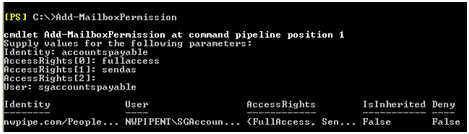
4. Run the following from the PS: add-mailboxpermission.
5. Step through the command. The zippy screen shot illustrates this. You can also give it the command on one long string if you can ever figure out the syntax.
a. The first identity is the account that is granting the rights.
b. The second identity is the account (in this case an SG) that needs to access/send-as.
6. You could modify this to just fullaccess or just sendas. Also receiveas.
7. Remove-mailboxpermission is the reverse of this process.
Wow.
I have zero idea who this guy is, but he deserves a medal of sorts for this blog on Exchange IMF, be it 2003 or 2007.
Very nice material.
http://exchangepedia.com/blog/labels/IMF.html
Kudos to Bharat Suneja whoever you are. Nicely done.
In order to succeed, your desire for success should be greater than your fear of failure. - Bill Cosby


