About Me

My photo
This is a blog for John Weber. One of my joys in life is helping others get ahead in life. Content here will be focused on that from this date forward. John was a Skype for Business MVP (2015-2018) - before that, a Lync Server MVP (2010-2014). I used to write a variety of articles (https://tsoorad.blogspot.com) on technical issues with a smattering of other interests. I have a variety of certifications dating back to Novell CNE and working up through the Microsoft MCP stack to MCITP multiple times. FWIW, I am on my third career - ex-USMC, retired US Army. I have a fancy MBA. The opinions expressed on this blog are mine and mine alone.

2018/05/21

Official SfB 2015 Server Disable TLS 1.0 and 1.1 part 3 guidance

updated 20181107


Microsoft update to what they think they are doing, how they are going to do it, and basically, another waffle episode on their part.


https://support.microsoft.com/en-us/help/4057306/preparing-for-tls-1-2-in-office-365


As you may be aware, we have covered the upcoming 31 October 2018 TLS 1.0/1.1 support being removed from O365.  You can find that guidance here.  As promised, Microsoft has finally published the last pieces of the series.
You can find part 3 here.
As usual, I strongly recommend that you start looking at this now – some of this might take a bit of planning and coordination on your part to accomplish in a clean fashion.

Now is the time to get your sales types contacting existing customers and offering to help.  This will not be a clean thing; rest assured that there will be “issues” and IMHO there is significant potential for unintended consequences.

YMMV

2018/05/14

IPP Manager Express Redux

A while back, I did a little write-up of Audiocodes IP Phone Manager Express.  You can read that right here.  A few days ago I installed a newer version and there is enough difference to warrant a redux.  Specifically, I would like to record for my own purposes a configuration that works (so I don’t forget) and maybe you can use it also.

Pre-Conclusion Statement

If you read no further, know this, I like the IPP Manager, I really do.

What are we doing here?

What we need to do is support a number of Audiocodes IP phones – a bunch of 405HD and 450HD models. We want some very basic changes made to the default OOBE configuration, nothing major, but we do want to be able to hand the phone to the user and have it just work.  Audiocodes calls this “Zero Touch” – which was enough of an attraction to get me to try it.  But, I ran into some “difficulties” when I attempted to interpret what somebody thinks is really outstanding documentation into a workable configuration.  After several emails, and several configuration sessions, I managed to achieve parity with the configuration genie. 

Diving In

Installation went as easily as before.  I did not understand the need for a clean server before and I don’t now.  Fuzzy logic on that one.  But, OK, I am in a freebie lab situation.  While the install is happening, let’s verify DHCP Option 160.  And right there we started having issues.  Which option to choose seems to be an ambiguous question as both seem to to work equally well, with ONE of them being preferred, but not required, and no clear (to me) guidance of which is which for my needs.  What I thought would work did not.  I had to use plan B.

Plan A: http://1.1.1.76/firmwarefiles;ipp/dhcpoption160.cfg

Plan B: http://1.1.1.76/firmwarefiles;ipp/tenant/Default

This did not jive with MY reading of the docs.  However, I am sure that I was doing something wrong, so I tried plan B.  At that point I was in Tshooting mode, and I don’t really know if the DHCP Option 160 choice fixed it or if it was the other part I did.  Either way, I found the documentation a smidge confusing.

At any rate

The install churns along, and before too long, we have this lovely “modern” “more visually attractive” “metro” site open on our local machine. You will note the devices already registered – so nice.

image

One of the things I neglected on my first pass through on the config of the tool, was the tenant.  Because the documentation said there was already one there… and so there was!  But it needed a touch of configuring itself, and that was a bit fuzzy as well. This version of the IPP Manager Express requires a “tenant” which is loosely equated to subnets, but could be a separate fiscal entity.  Clearly this line of management tool is meant for something much larger than my little slice of life.  OK, I can work with that.  A few more emails and a few guesses worked out the kinks in that one.

image

If you are doing the “see if the picture matches” thing, here is where you will find the mismatch.  My default tenant picture there is of my lab, where only have one subnet in my lab.  It is just me and my 8 favorite cartoon characters.  254 addresses is more than enough.  But, I have this customer.  You know those pesky customers.  They always seem to expect some sort of defined success.  And don’t you know these folks expected this tool to provision their phones when they have at least 12-15 subnets in the 172.xx.xx.xx/16 range, and the potential for having  SfB clients or a SfB-hosted phone on any of those segments to include the VPN segment.  Yes, Jimmy, I told them not to run the audio/video across the VPN.  You may sit now.

Defining the “tenant” with the proper subnet mask is REQUIRED.  Now, I suppose you could do something dogmatic and create a tenant for each subnet.  You could.  But I did not have a business requirement (see above) for that.  And notice that the subnet in the pic is a MASK not an actual IPv4 address.  We will wait while that runs through a digest cycle.

What we did was define the client subnet as 255.0.0.0 or, /8 which is actually a huge supernet.  But works for the simplicity angle we were also looking for.  We know it is not technically correct to address it that way; but what it did was allow the one IPP Manager to handle ANY address needed.  According to the default tenant in this configuration of  IPP Phone Manager Express, any address that can talk to the server is on a valid subnet.

Moving On

The next thing was the need for a blank template per IPP model (the 405HD and 450HD) and then each needed a customization file.  Included in the install distribution is firmware from about April 2018, and the phones will make use of those firmware files that are newer than the phone. The point here is that I needed to create my own templates before things worked.  I may have (almost certainly) done something wrong in my initial setup.  I know I expected it to be more like my old version – so there is no telling what I did wrong.  I just know that what I have now works. 

Templates

image

I am not going to go through the tenant template file – yours won’t be like mine, but you can clearly see where I have a default tenant configuration template for each phone type and they are tagged (the green/white check mark) as the default.

Once you get this far, you still have a dead stock phone.  Let’s take a look at the edit from here out.  Navigate through the various options and see what is what.   Then click on the button indicated.

That gets you to this:  Fill things out to suit your needs:

image

Make sure that you select the “default” button or not depending on your needs.  You can always go back and make a new one if needed. I know that was needed in my case. Now, you would think that would do it, right?  Well, unless I was making a lot of bad choices, no, now you need to EDIT the entire thing. 

“Ah saved it.”  Huh?  Did I not already do that?  I guess not.

Let’s select “Edit” on our new template.

image

And you get this:

image

Scroll your badself down to the bottom – and there are multiple panes here – confusing as all get out when you work remote…. get to here:

image

Generate your Global Configuration Template for this ONE PHONE MODEL.

image

Woot!

Now, not done yet, we want to edit the template:

Select this “Features” button:

image

In my case I needed the Daylight Savings Time and the Pin Lock.

Here is one, you can figure out the other I think.  But know that when you “SAVE” at the bottom, it will write a secondary config file that the global template will read and enforce.  And that file IS created when you click save.  Don’t ask me, the inconsistency killed me too.

image

Save it…this file is actually located on the ACPhoneMgr drive.

image 

Why the different file saving scheme I have no idea.  But you need both for this to work.  At this point, power cycling a phone does the trick. Phone installs new firmware; reboots, then changes configuration as we want.  So nice.

Conclusion

There is some disconnect between the versions, perhaps due to my lack of mental agility.  This version seems to have some fuzzy documentation – again it could be me.  This is nice piece of kit once you get it cranked. 

PS

I bricked a 450HD while testing this. Phone recovery did not go so well.  Have you ever wondered why a phone with a USB port doesn’t read that port for firmware and as part of the phone bootstrap routine install whatever it finds there?

As always, YMMV


2018/04/19

SfB Disabling TLS 1.0/1.1 Guidance

Update 20181107
Microsoft waffles yet again.
https://support.microsoft.com/en-us/help/4057306/preparing-for-tls-1-2-in-office-365


On October 31, 2018, Microsoft Office 365 will be disabling support for TLS 1.0 and 1.1. This means that, starting on October 31, 2018, all client-server and browser-server combinations must use TLS 1.2 or later protocol versions to be able to connect without issues to Office 365 services. This may require certain client-server and browser-server combinations to be updated.
https://support.microsoft.com/en-us/help/4057306/preparing-for-tls-1-2-in-office-365

SfB impact?

At a high level, this requires installing Skype for Business Server 2015 CU6 HF2, applying pre-requisite updates to .Net and SQL, and finally another, separate round of OS configuration updates, i.e. disabling TLS 1.0 and 1.1 via registry file import. It is critically important that you complete installation of all prerequisites, including Skype for Business Server 2015 CU6 HF2, prior to disabling TLS 1.0 and 1.1 on any server in your environment. Every Skype for Business Server, including Edge role and SQL Backends, require the updates. Also ensure that all supported (in-scope) clients have been updated to the required minimum versions. Don’t forget to update management workstations as well.

Background reading:

https://blogs.technet.microsoft.com/cloudyhappypeople/2017/12/22/the-end-of-support-for-older-tls-versions-in-office-365/
And then read part 1 here for more background specific to SfB/Lync and the supportability statements
https://blogs.technet.microsoft.com/nexthop/2018/04/18/disabling-tls-1-01-1-in-skype-for-business-server-2015-part-1/
Part 2 here gets into the weeds a bit on “How To Achieve”.https://blogs.technet.microsoft.com/nexthop/2018/04/18/disabling-tls-1-01-1-in-skype-for-business-server-2015-part-2/Part 3 will be published at a later date.  Woot!

Here is guidance for Lync Phone Edition (LPE):

https://techcommunity.microsoft.com/t5/Skype-for-Business-Blog/Certified-Skype-for-Business-Online-Phones-and-what-this-means/ba-p/120035 

General TLS1.2 whitepaper:

https://cloudblogs.microsoft.com/microsoftsecure/2017/06/20/tls-1-2-support-at-microsoft/

Here is the Microsoft Exchange equivalent:

Part 1https://blogs.technet.microsoft.com/exchange/2018/01/26/exchange-server-tls-guidance-part-1-getting-ready-for-tls-1-2/Part 2https://blogs.technet.microsoft.com/exchange/2018/04/02/exchange-server-tls-guidance-part-2-enabling-tls-1-2-and-identifying-clients-not-using-it/And big surprise, part 3 to be published later.

Summary

If you or your customer is doing anything with Office 365 hybrid, then you need to be reading all of this and figuring out your next steps.


2018/03/03

FastTrack Network Checking

You may not know but Microsoft is providing a fairly nice tool to check your network for SfB performance.  Free.  Free is a very good price, eh?

I am not going to extol the virtues and services offered by fastrack.microsoft.com, I just want to delve a little into the network checking tool.  And, this tool has been around for a bit.  So, I wanted to get a little updated review.

First off, I cannot even find this thing anywhere on the https://fasttrack.microsoft.com site.  Sorry.  Maybe I am blind,  but I am not seeing it anywhere.  There is probably some zippy button marked “tools” but I am just not groking.  Having said that, I know of

http://ap1-fasttrack.cloudapp.net/o365nwtest

http://em1-fasttrack.cloudapp.net/o365nwtest

http://na1-fasttrack.cloudapp.net/o365nwtest

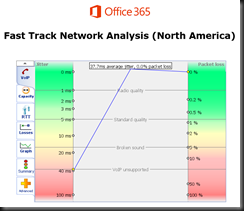
Here I am checking my lab tenant against the ap1 site.

image

Note the two addresses given by the tool…

image

The 76 address is my laptop, currently operating from a hotel out in the middle of the Oregon Cascade mountain range.  So, this connection is going to be testing from my laptop to the AP1 site to see how things stack up. 

With a little imagination, you could bury a workstation in some remote spot on your network, and pretty much map out the entire path to the world – giving a glimpse into how things line up.  This could be useful, yes?

You can see that the lag from here to there is running about 170 ms, which might be so great in some circumstances. 

image

Overall, the tool produces a raft of great info… here is the summary tab.  Note that something is not quite right as the tool cannot simulate VOIP traffic.  Could be something you need to look into here?

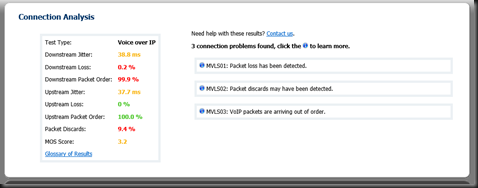
Here is the same test run against the NA1 site.  Note the differences.  We also now have a MOS score.  3.2 is not as good as we want, but doable.  Not too bad for out of a hotel where I am sharing bandwidth with 200 other rooms.

image

image 

We also got some nice jitter measurements on this run…

image

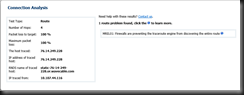
And finally, if you drive into the route tab, you will get more data points.

image

What do you think you could do with information such as this?

image

If you have questions about any attribute/factor measured in these tests, there is also a handy glossary. 


If you or your organization is considering moving to Office 365 in any capacity, this is one of the first tools you should be working. I have been telling customers for a long time that if we do our job right, then any problems will be network, firewall, or load balancers.  This tool can help you prove that.  In a more complex internal net, you might even be able to tell the network team right where to look!


YMMV

2018/02/01

AudioCodes HRS 458 Firmware 3.04.1192

Dropped off an HRS 458 at a customer yesterday, OOBE.  Setup took about 5 minutes (have to hook up cables and whatnot), created an account for it, and powered it up.

A little access to the web interface, and I have a unit up and running, logged into on-premises Skype for Business pool, and dang! 

The HRS starts barfing on finding the calendar for the account.  This is not good.  Some quick checking shows that the environment has no Autodiscover.domain.com record internal, but it does have an SRV.  I know, but don’t ask me.  Not my slice of life at this customer.

However, this does show that an OOBE for the HRS, firmware 3.0.2.xxxx needs to have something other than just an SRV record.

A little judicious communication revealed a new firmware being available for the HRS.  My contact inside AC indicated that his notes showed that the “problem” was resolved with 3.04.1192 release.  What the heck, I tried it. 

image

Voila!  Problem solved.

Of course, now we have to ask why no A record (or CNAME), and why put in the SRV record, not know why it was done, and then never question the mechanics of it, or actually solve the original issue that resulted in the SRV record.  Well, I get to ask at any rate, not sure I will ever get the answers.

YMMV


2018/01/24

IP Phones in the Teams Road Maps

Hello all,

I got some good stuff from my friend Daryl over at AudioCodes the other day.  Daryl Hunter is a voice architect over there; he just knows stuff.  Good source.

At any rate, the important tidbit for our purposes is that Daryl/AudioCodes thinks that Microsoft has a solid chance of making good on it's 2Q2018 target for IP phones to be used in Microsoft Teams.

Note the "Calling Road Map"


This means that your existing SfB/Lync IP phones can be re-used with Teams.  Nice.  Hate to buy that stuff more than once.

FYI, here is the two road maps.  Note that they conflict to a small degree, but generally say the same thing. 

The “static roadmap” PDF is here: https://aka.ms/skype2teamsroadmap and using phones is road mapped for 2Q2018.  The “interactive roadmap” is here: https://products.office.com/en-US/business/office-365-roadmap?filters=%26freeformsearch=teams%20calling#abc and shows the same info (CY2018) but doesn’t specific 2Q.  It was refreshed last Friday.  


I also think that the casual reader could benefit from reading the FAQ - it gives some quasi-good answers to the "why" questions that are bound to come up.

YMMV


test 02 Feb

this is a test it’s only a test this should be a picture