About Me

My photo
This is a blog for John Weber. One of my joys in life is helping others get ahead in life. Content here will be focused on that from this date forward. John was a Skype for Business MVP (2015-2018) - before that, a Lync Server MVP (2010-2014). I used to write a variety of articles (https://tsoorad.blogspot.com) on technical issues with a smattering of other interests. I have a variety of certifications dating back to Novell CNE and working up through the Microsoft MCP stack to MCITP multiple times. FWIW, I am on my third career - ex-USMC, retired US Army. I have a fancy MBA. The opinions expressed on this blog are mine and mine alone.

2017/11/01

AudioCodes 400HD firmware v3.04

Those fine folks (and apparently busy beavers) at AudioCodes have popped a new IP Phone firmware release out into the wild. Brings a nice new set of features/abilities to the 450HD in particular.

Please note that the official GA is still 3.0.1. Version 3.0.4 will be used as a candidate GA in the next several weeks. Admin and User’s manual will be ready in several weeks. Version 3.0.4 for all other 400HD models will be available within several weeks.

Here is a partial list of version 3.0 new features. For the full list of features, please refer to the Release Notes document:

· Boss-Admin (Delegated Line).

o Allows a relationship to be established between a boss' phone and an administrative secretary's phone, to streamline office workflow and enhance efficiency.

o Each phone can support up to five Bosses or Admins. One Boss can have up to five Admins. One Admin can have up to five Bosses. A many-to-many configuration is also supported.

clip_image001

o Call Pick-up

o Admin can forward to Boss' voicemail without picking up Boss' line

· HotDesk feature for enterprises that operate according to the 'touch-down desk' concept. Employees in these enterprises typically travel frequently to remote branches, or work in shifts. They can now sign in to a phone that is already signed in by another (CAP or regular) user without signing out the original user to whom the phone was assigned for primary use.

clip_image002

· AudioCodes' IP phones support Lync AutoDiscover Web Service Protocol [MS-OCDISCWS]. This feature improves discovery of the phone's SIP home server after signing in. Using the AutoDiscover procedure the phone is capable of finding its home server URL for a specific Skype for Business account, based on user credentials. It is specially efficient for Skype for Business online and hybrid environments, when phones must sign in to a different Skype for Business server according to the user’s account. Previously, the home server was found using DNS SRV records based only on a SIP account domain [MS-CONMGMT]. If AutoDiscover is unsuccessful, the phone falls back to SRV DNS.

· The phone's Call Log is synchronized with Microsoft's Exchange server. All devices that a user signs into are fully synchronized with the server. Each device reports every call from | to that user to the server. Each device then pulls the last 20 reported calls and performs synchronization. All lists in each device's Call Log except the Missed Calls list are synchronized.

· New screen theme reflects Skype for Business 2016 client look & feel | New softkeys match the de facto Skype for Business standard. This new feature ensures uniformity across all devices used by the same user, for Unified Communications. The following figure shows the new-theme idle screen:

clip_image003

· Dial Plan Normalization. Network administrators can enable and configure dial plans on the Microsoft Skype for Business server. Normalization rules can be downloaded from the server via in-band provisioning. The feature was fully certified and tested with Microsoft in this version. It was supported in previous versions, but without Microsoft certification.

· Multiple Emergency Numbers. A caller can select an emergency number from a list of emergency destinations. A dedicated number for the police, ambulance service, fire fighting service, etc., can be selected from a list of options. If the phone locks, emergency numbers will still be available and dialable via a new Emergency softkey that is displayed after the lock takes effect.

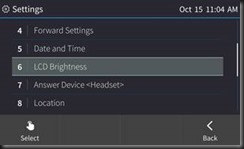
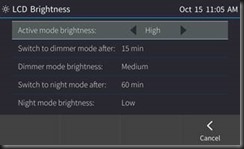
· Power Saving mode. When a phone enters Power Saving mode, the screen's brightness is reduced, lowering power consumption. The phone enters the mode after being inactive for a configured period (timeout). Any user activity returns the phone to regular Active mode.
clip_image004

clip_image005

· Malicious call tracing. Users can report a malicious call. If a user gets a call and wants to report it as malicious, the phone allows them to send a report to the Skype for Business server. To allow malicious call reporting by the phone, the feature must be enabled by the network administrator on the Skype for Business server (the option 'Enable malicious call tracing' must be selected).

· Sign-in can be cancelled during the signing in procedure. Users can cancel signing in after starting the sign-in process.

· Voice Quality Check. A new option to check IP phone voice quality has been added to the phone's Device Status menu.

clip_image006

clip_image007

Things seem to be moving forward very nicely at AudioCodes.

YMMV

2017/10/06

AC firmware v3.0.1.x BToE button greyed out

Scenario

BToE is pretty nice.  But let’s face it.  Not always easy to work with.  Especially when a service provider insists that a buried setting be configured so as to disable the manual concepts and default to automatic.

So, let’s figure out how to get an AudioCodes 450HD with the latest firmware (3.0.1.9.367) to play BToE with us like WE want, not how somebody else wants. 

OOBE for a phone that is going to be qualified for SfBO is with the BToE pairing forced to “automatic.”  This results in the button being greyed out when you go to MENU on the phone.  In this mode, BToE pass-though mode works just fine.  Web login to SfBO works as expected.

But what if you want to do something like, pair a wireless laptop with the handset device always CAT5 so you can just grab the laptop and go?  Like a laptop is designed to work? 

The Fix

What we need to do is light up the BToE button so we can get a pairing code (essentially a representation of the device IP).  Not exactly easy to find for those who don’t typically read 200+ pages of setup. Like me.

Hmmm… (page 113 of LTRT-14820 450HD IP Phone for Microsoft Skype for Business User’s manual ver.3.0.1.pdf) says

clip_image002

Going to the admin manual…. ( page 157 of LTRT-09943 400HD Series IP Phone for Microsoft Skype for Business Administrator's Manual Ver. 3.0.1)

clip_image004

And that does work to enable the BToE button.

The cfg file is available here – there is the semi-standard “download the file, modify the file with text editor, upload the file to phone routine.”

image

Here is how the phone cfg file looks by default…

image

And here is how it needs to look.  After uploading the cfg file, the phone will restart and you can then manually pair.  Remember that the manual pair code is case sensitive.

image

SfBO policy

Make sure that your Office 365 admins, if that role is not you, changes your online policy for ip phones to enable BToE, and further more to not change the pairing setting.  For more information see this.

https://webcache.googleusercontent.com/search?q=cache:hYptjYU9T9AJ:https://technet.microsoft.com/en-us/library/mt629497.aspx+&cd=1&hl=en&ct=clnk&gl=us

clip_image002[7]

Summary

BToE button greyed out, but automatic pass-through BToE works.  You want control of that button so manual pairing is possible for wireless connections.  Modification of the cfg file is required.

As always,


YMMV

2017/10/05

Restricted Office 365 OWA–Skype on-premises Integration

Scenario

Office 365 tenant established.  Exchange Online (EOL) for the user mailbox.  Skype for Business on-premises for IM/P.  Users are mixed – some have full Office suite, others are just a browser.  Security is tight.  No federation is desired or allowed with partners, vendors, spammers, or public (consumer) Skype. In addition, the requirement also stipulates that no authorized user can use the system remotely without going through a VPN. 

This last requirement means that remote users via the Edge server must be disallowed – but….won’t the Office 365 users be remote?  Great question.  We will cover that down below.

Because of the user software mix, we need the pure browser user to have OWA (EOL) integrate with the SfB on-premises.  Not the most attractive (visually and functionally) solution from the user perspective, but it does work.  Specifically, the function requirement was for OWA users to have presence information and be able to IM.

This article will not attempt to show the end user how to muddle through using SfB with EOL OWA.  The focus is just providing the service.

So, here is a visual of what we want… presence going both directions between the on-premises SfB users, and at least one of the users is using EOL OWA.

OWA User

clip_image002

On-premises user

image

How to

Obviously, we need an on-premise pool of some sort, and an edge server.  And then get your hybrid working.  In this case, the tenant (and the EOL work) was up and running before the SfB project started, so all we had to do was make sure that the Azure AD Connect was done right. 

  Danger Will Robinson!  

Because the AAD Connect was done prior to to SfB schema extension, the AAD connect will need to be FORCED to reread schema and synchronize.  You can read about this in a somewhat related post here. 

Moving on…

Having taken care of the obvious install and configuration items, the next thing is to establish hybrid posture.  If you have not already done so, you can read up on it here, here, and here.  Pay particular attention to this last reference.  Failure to do this will result in a no-go..  If you want all the fancy-schmancy integration, then you will need to do this here also. 

Now that you have all that done, we are done.  Right?

Well, no.  Remember that we needed to have no federation with anyone other than an Office 365 user, and no remote user access?  That seems to be a bit conflicting, yes?  But no.  A remote user is someone using a full client.  A bit of testing showed that Office 365 connecting to the on-premises SfB was a federation user not a remote user.

As a final bit of constraint, we did not want to be changing the external firewall.  So what to do?  Maybe we need to do a little something with Edge configuration and policy, eh?

Here is our Access Edge Configuration:

image

From the top down, we need to federate – Office 365 is a federation.  Per security requirement, no partner domain discovery, which closes out contacting anyone other than our own domain.  No need to send an archiving disclaimer to people we cannot talk to.  Per security, no remote user access.  Lastly, no outside access to web conferencing, so no need for those pesky anonymous attendees.  Just to confirm your deepest doubts, here is the SIP Federated Domains list:

image

Here is the External Access Policy:

image

Again, from the top, and note that we only have one thing checked…federated users is the requirement.  Nothing else needed… XMPP is pretty much dead nowadays anyhow; no remote users, ergo, no need for that, and without public user federation, no need for that either.

Conclusion

We had a set of requirements:  OWA integration between EOL and on-premises SfB.  Security concerns were that no other domains be contacted, and none of our domain users can be remote.  EOL users were not using Outlook, just OWA and we needed presence and IM.  We did not do the full OAuth as those features were not part of the specification.

YMMV

2017/10/04

AudioCodes Updated 4xx firmware

Audiocodes has released an updated 3.0.1 version for all 400HD models. Comparing to the 3.0.1 GA, this version includes mainly bug fixes. Please refer to the new release notes document to see the list of fixes. For customers that still did not move to 3.0.1 GA and plan to move to 3.0.1, it is recommended to use this version (instead the 3.0.1 GA).

Version name:

  • UC405HD_3.0.1.276.img
  • UC420HD_3.0.1.276.img
  • UC430HD_3.0.1.276.img
  • UC440HD_3.0.1.276.img
  • UC450HD_3.0.1.89.367.img

According to my source, these new firmwares are anticipated to be posted to the AudioCodes website (www.audiocodes.com) sometime early next week.  In the meantime, my phones (420, 440, 450) seem to get along right well with the new code.

As an interesting side note…my web login/BToE combination now works as expected.  Previously this was not working, and I know our corporate IT recently changed the Office 365 BToE status, and it could have been the firmware.  If you are having issues, maybe this firmware will help you.

I have a zip file with updated documentation and firmware files here.

YMMV

2017/09/06

AudioCodes X-UM

By now, I hope you already know that as of July 2018, Office 365 will no longer work with SBC connections linking your off-brand PBX to Exchange Online UM services (read voice mail).  For an actual read of the announcement, see this.

Here are the solutions offered by Microsoft:

  • Option 1: Complete migration from 3rd party on-premises PBX to Office 365 Cloud PBX.
  • Option 2: Complete migration from 3rd party on-premises PBX to Skype for Business Server Enterprise Voice on-premises.
  • Option 3: For customers with a mixed deployment of 3rd party PBX and Skype for Business, connect the PBX to Skype for Business Server using a connector from a Microsoft partner, and continue using Exchange Online UM through that connector. For example, TE-SYSTEMS’ anynode UM connector can be used for that purpose. (sic)
  • Option 4: For customers with no Skype for Business Server deployment or for whom the solutions above are not appropriate, implement a 3rd party voicemail system.

Personally, I would change Option 1 and Option 2.  Especially if you have any combination of complexity, multiple locations, and user count.  Couple that risk scale item with sheer lack of calendar, and I think it would be easier to get on-premises fired up and connected.  And, IMHO, doing 2 would make getting to 1 easier with a better user experience.

Option 4 is not really an option is it?  Everyone should want, need, and implement SfB.  Life is better with SfB.  Trust me.

About this time, the alert reader will notice that I skipped Option 3.  That’s because those nice folks at AudioCodes have somewhat solidified their plans for stepping into the breach.  How nice of them! 

AudioCodes has put together a very nice, comprehensive, suite of solutions based on their outstanding hardware and CCE experience. 

image

As the X-UM solution set, there are three of them:

image

Here is a bit different look at it…being a visual kinda guy, this is the view that helped me the most:

image

And then we have these further details for each scenario:

image

image

Microsoft licensing for the X-UM solution you choose is not covered, which makes sense, there are too many variations.  Here is the official blurb:

 image

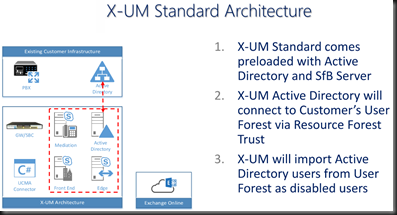
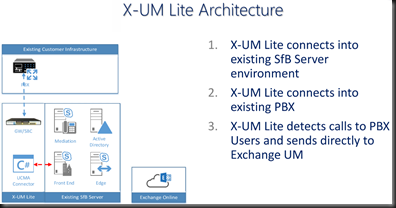
How about some architecture oulines?  I like pictures that show me things.  Here is the X-UM Standard and Lite.  Note that the “Lite” version relies on existing on-premises SfB resources.

image

image

Now, based on my current project, I know that there is going to be someone out there in reader-land who needs a visual of the call flows.  I know I do.

image

image

Summary

About now you are most likely wondering which of these will work for you. AudioCodes X-UM is based on proven hardware and proven solution approaches (CloudBond, CCE). If your environment is more complex, needs that existing PBX to coexist with Office 365 for your VoiceMail needs, then choose the flavor that answers your needs.  AudioCodes has you covered for any of the option 3 scenarios and could possibly help you (in the Lite version) with Option 1 and 2 also.

I know that somewhere above 75% of my customers all have some sort of “mixed deployment” usually due to call centers, business process, and culture.  Notice that none of those are easily changed before July 2018.  Ergo, we need to do something else in the short time we have available.  I submit that AudioCodes X-UM might well be that something.


As always, YMMV


2017/07/28

SfB Default AD Containers

Scenario

You know how those tin-foil-hat types are…

image

If it can be changed to “enhance” security, then by golly!  Let’s do it!  The problem, of course, is the rule of unintended consequences.  You know, what happens to something else because of action A, that is totally unplanned, and no one knows about it.

And, while I am mentioning it… have you ever noticed that the same team YOU have to run everything through for approval never asks your team if it is OK if they make a change?  They just do it?  Odd how that works out, eh?

Adelante.

The Oops!

It turns out that about 6 weeks ago, the aforementioned team instituted a change to the default AD containers.  To whit, they changed the default computer container to be something other than the OOBE.

Turns out that breaks SfB big time.  As in no more publishing the topology.  A Get-CsAdDomain fails.  But that is the clue to the fix.

The Fix

Simply run the SfB Domain prep again.


YMMV

2017/07/19

Technical Consulting

Something went through both of my brain cells today. And to keep a long story short, it centers on your approach to the question – whatever the question might be at the moment. But, let’s confine the definition to work, where we spend a goodly portion of our life, and how we would like that portion of life to be as good as possible.

I was listening to a hotshot answer what I narcissistically thought was a great question when the light bulb lit. His answer was not only covering the technical aspects that I needed to hear that he knew, but he was (quite cleverly) also feeding in the business angle aspects to the answer formula. In essence, he was answering my follow-on questions of “what is the business reason for taking this action and does this action resolve the situation with the minimum staff adjustments in terms of time and skill set and did you cover the hidden costs as well as storage, cpu, ram, racks, et cetera.”

In short, he was doing really well answering my question. And I know he was the same in front of the customer. Everyone needs to have this guy on the team.

At any rate, the light bulb lit up on the concept of technical v consulting answers. Mr. Hotshot could have stuck with the pure techno-babble, with lots of numbers, specifications, descriptions of how to do it, and all of that fun stuff. Surely, there is great value in having someone know exactly how to do whatever it might be right off the top of his or her head. I wish I could do that sometimes. I usually revert to being able to point them right at some reference work. Works for me. And reserves my spare brain cell for other things.

Details are critical to our success. Mr. Hotshot was clearly in the right spot – he can bang out the details like no-one’s business. And he knows what he does not know. And he knows how to defer the question to an issue parking lot for follow-up. Perfect.

Mr. Hotshot could also have just gone the technical route and ignored the consulting aspects until asked. All the logistics questions and staff and culture type stuff could have waited. There is some tremendous value in knowing all of that stuff even if at first glance it does appear to out of scope for our project. After all, “how is lunch served around here?” is an important project scheduling point.

But more to the point, what about using those consulting skills to identify architectural detail about the environment, impact to the project (and affecting the defining business goals/requirements) and perhaps dredge up more business? Gees. That sounds awful salesy huh? How about the idea that the design might need to change in mid-project? There is a benefit to having your very own in-house consultant, eh?

We have two approaches to doing what we do. You can be deep technical. You can dive in deep. I know a guy that you can call at almost any hour and pose some bizarre Active Directory or Registry question. Just be prepared to scribble fast because there is no way you will remember the details the forthcoming answer will encompass – but it is going to answer your issue. He knows some serious technical depth stuff.

But you can go too deep and lose your audience. What we do must be tailored to the audience. If a business decision maker is in the room, then you better be including that person in your audience profile. The technical team can wait a bit while you fill in their boss with the business details stuff and make his staff look like they were all over it from the beginning.

In our work, I see a real-life need for a consultant who can get into the technical errata, be able to walk and talk at the same time, and discuss business to the extent of your understanding; all of that without getting into even minor prevarication or truth stretching.

And here is our intrepid Mr. Hotshot fieldling my question tree with answers that meld the technical with the consulting. “Choices made for these reasons which tie to this technical answer and so on to this business requirement.” Or “we discussed the need for expanded storage” and “I expressed my concern that the network might not support the technical solution.” I know he gave those same answers to the customer and guess who was in the room? The customer’s CIO. And Mr. Hotshot is giving me answers like that. The conclusion should be obvious.

We have more work coming from that customer. That makes your work life better.

YMMV

test 02 Feb

this is a test it’s only a test this should be a picture