About Me

My photo
This is a blog for John Weber. One of my joys in life is helping others get ahead in life. Content here will be focused on that from this date forward. John was a Skype for Business MVP (2015-2018) - before that, a Lync Server MVP (2010-2014). I used to write a variety of articles (https://tsoorad.blogspot.com) on technical issues with a smattering of other interests. I have a variety of certifications dating back to Novell CNE and working up through the Microsoft MCP stack to MCITP multiple times. FWIW, I am on my third career - ex-USMC, retired US Army. I have a fancy MBA. The opinions expressed on this blog are mine and mine alone.

2012/06/12

2012/06/11

Lync HLB Edge

Lync Server 2010 has two modes of load balancing:  DNSLB (Domain Name System Load Balancing) and it also support hardware load balancing (HLB).  DNSLB works really well; however, there are some limitations regarding the Lync Edge when it comes to load balancing.  Specifically, because DNSLB is implemented at the client level, if your DNSLB is broken due to a server outage, then the remote users on downlevel clients, federated partners using OCS R2 (or earlier), XMPP clients, etc., may not work because they cannot find the second server; this is especially evident if the first server in the DNS records is the server that fails.  External Exchange UM sessions may also fail to work for the same reason.  Many implementations are therefore done with HLB on the Edge.  In a previous article, I showed how to setup a Kemp Load Balancer to support these two high availability modes for internal operations with Lync Server.  In this article, I will demonstrate HLB for the Lync 2010 Edge.

The Setup

Setting up the Lync Edge HLB is really all about understanding your network and the relationships between NICs on real servers versus IP on HLB VIP, IP on public edges of firewall/routers, and how traffic needs to flow from device to server to device to server.  And where traffic needs to go on the inside versus where the traffic needs to go when headed outside.  Clear as mud?  Excellent!

Kemp publishes a very nice document on “how to” accomplish HLB and Lync with their products.  Just so you can follow along, my lab is setup for the alternate deployment method shown on page 25.  I am using one Kemp VLB for both internal and external HLB functions. I am also using all roles consolidated and there are no directors.

image

My lab does not have a security issue as I address all security before traffic enters my lab net.  You should evaluate your risk and implement accordingly.  FWIW, I always advise clients to double firewall and use a set of HLB in the perimeter net for Lync (and OCS)(and everything else that needs it) along with internal HLB.  YMMV.

Here is how I have the lab setup for this exercise:

image

This illustrates what the Kemp documentation refers to as a “one-arm” deployment.

The Kemp documentation, along with the Microsoft Lync Server online documentation for Edge deployments, provides all the guidance you need.  I won’t try to duplicate those instructions here; instead, here is what my Kemp looks like after working through the configuration guide.

LyncEdgePool.tsoorad.net: 1.1.1.65 (Edge internal VIP on VLB)

     LyncEdge.tsoorad.net: 1.1.1.60 (Edge Server1 internal NIC)

     LyncEdge2.tsoorad.net: 1.1.1.61 (Edge Server2 internal NIC)

SIP.tsoorad.net: 10.10.10.60 (VIP on the VLB)

     SIP.tsoorad.net: 10.10.10.63 (Edge Server 1 external NIC)

     SIP.tsoorad.net: 10.10.10.66 (Edge Server 2 external NIC)

WC.tsoorad.net: 10.10.10.61 (VIP on the VLB)

     WC.tsoorad.net: 10.10.10.67 (Edge Server 1 external NIC)

     WC.tsoorad.net: 10.10.10.64 (Edge Server 2 external NIC)

AV.tsoorad.net: 10.10.10.62 (VIP on the VLB)

     AV.tsoorad.net: 10.10.10.65 (Edge Server 1 external NIC)

     AV.tsoorad.net: 10.10.10.68 (Edge Server 2 external NIC)

image

Observe that I am using the same LB as the previous article; I have added another NIC to the VM, bridged that NIC to the proper subnet, and started configuring.

Errata

As with all things, nothing is perfect.  The following items in the Kemp guide are noted for consideration and clarity.

Starting with section 8.2 (page 36) step 15, the guide says “For each Front-End server…”  It should really say Edge Server.  If you refer to the IP addresses given in the guide, and look at page 35, the guide clearly wants Edge server not Front-end, and common sense dictates the same.  This comment is made for each subsequent Real Server setup for Edge Services.

On page 26, section 5.1 (General Configuration – Disable Global SNAT) the option for “enable SNAT” is unchecked.  However, when doing the Edge external services for AV on page 42, in sections 9.6 and 9.7, the guide instructs us to “Select the Use Address for SNAT checkbox” – ooops!  Unless you go back and set the global to “ENABLE SNAT” the option does not show up in the Virtual Server Standard Options.  After enabling that option in the System Configuration | Miscellaneous Options | Network Options, THEN I got the check box for the Virtual Service | Standard Options.

image

image

Luckily, in response to my support request, the folks at Kemp support sent me an excellent description of how to find the check box in each location.

Summary

All in all, an almost painless evolution.  It literally took me longer to reconfigure my lab to support this exercise than it did to configure the Kemp to provide a full HLB Edge solution.  With the exception of the missing check box for SNAT and the mis-labeling of server IP to use, everything went as advertised.  If you need a high-availability solution for your environment that is fully supported by both the third-party and by Microsoft, this might be a good choice for your deployment.  For what is it worth, Kemp is also on the Exchange OIP, and I could easily use this same VLB for my Exchange deployment.

YMMV.

2012/06/05

Lync HLB using Kemp VLB

Situation

I have had several clients lately wanting to use a less-expensive, yet still fully supported, hardware load balancer (HLB) solution for their Lync high availability environment.  For most deployments, DNSLB (domain name system load balancing) works great; however, an HLB solution is still needed to provide HTTPS which cannot use DNSLB.  HLB solutions are expensive when used just for this purpose.  If an HLB stack already exists in the environment; great, we can use that.  But what about needing to emplace HLB just for this one purpose?  Can we use a less expensive solution and achieve our goals?

In this post, I will explore using a virtual hardware load balancer to provide the load balancing needed by Lync.  I chose to try Kemp for several reasons.  First, I have some experience with the product line, and second, they provide almost a turn-key solution for my lab’s virtualization platform (VMware).  Third, Kemp VLB is on Microsoft’s  Lync Server 2010 Load Balancer Partners approved list for both Exchange 2010 and Lync Server 2010.  First we will setup for full Lync Enterprise Edition HLB, then we will change to using DNSLB and having the HLB do just the web services.

Documentation

I strongly recommend that all Lync documentation be reviewed before working the HLB into your environment.  Microsoft provides online documentation for Lync.  Of specific interest is the Load Balancer Requirements. Kemp also has an excellent document on how to use their products with Lync. The Kemp product documentation is outstanding on giving you an understanding of what is needed and how to achieve your goal. You should also get a firm handle on the differences between doing a two-arm and a one-arm HLB setup.  Also be aware that the Kemp does not participate in the Lync 2010 Domain Name System Load Balancing (DNSLB).

Setup

Lync:  my lab is two Lync Enterprise Edition Servers in one pool, one Lync Archiving/Monitor server, a SQL 2008 R2 cluster, and two Lync Edge servers in a pool.  The lab internal IP is 1.1.1.0/24, and I have TMG between the lab and my office network which is 10.10.10.0/24.  The 10.0.0.0/24 net is essentially the internet to my lab.

LyncPool.Tsoorad.net: 1.1.1.35

LyncEE1.Tsoorad.net: 1.1.1.31

LyncEE2.Tsoorad.net: 1.1.1.32

WebCompInt.Tsoorad.net: 1.1.1.35

WebCompExt.Tsoorad.net: 1.1.1.35 (internal) and 10.10.10.58 (external)

LyncEdgePool.Tsoorad.net: 1.1.1.60

Kemp VLB:  1.1.1.5

image

For this article, we will configure the Kemp for the Enterprise Lync Pool.  Before we start, two Kemp documentation notes:

  • Port 7069 is listed as a required service for the front-end pool.  This was accurate for OCS 2007 R2 but is not used in Lync. 
  • Port 5074 is shown as a optional service; again, this was OCS 2007 R2 and Outside Voice Control was not part of Lync.

**Kemp says they will fix these two items in the next document version

Setup the Load Balancer

Setup of the Kemp VLB is as simple as putting the downloaded image in a location and pointing your virtualization solution to it.  Kemp has a Microsoft Hyper-V version and two VMware versions.  Pick your favorite and install.  I suggest that you investigate the single-arm solution first as that is somewhat easier.  If you choose a two-arm install, you will need to change the default gateway on all your servers.  I changed the provisioning defaults on mine to 1GB RAM and 1 CPU core and it is running just fine.  I also made a point of choosing the network for the virtual machine before I started it.  The Kemp startup instructions are here.  I changed the defaults on mine to 1GB RAM and 1 CPU core and it is running just fine. Once you get past the licensing routine, you can login to the VLB.

image

Full HLB Configuration

Using an hardware load balancer for all Lync 2010 services involves more than a few ports. However, the Kemp documentation in concert with the Microsoft online documentation covers everything you need to know to be successful.  To avoid too much detail and tedious reading (and writing), all you need to do is follow the Kemp document for Lync 2010 configuration.  Here is my working configuration that matches my lab diagram above.

image

Items of note:

Notice that these three items have a “+1” after the VIP:port (e.g. 1.1.1.35:443).  What I did was to leverage the “extra ports” setting in the VIP construction and add a port to the base VIP so that the VIP is servicing more than one port.  In case (1) and case (2), they are both web services that land on the same front end server, but on a different port.  As an experiment, I put port 80 with 443 (internal traffic) and port 8080 with 4443 (external traffic).  All four ports work just fine! 

image

The Virtual Services is showing some of my services as down – mainly because I am not using CAC  - I did not want to confuse things by leaving out a service for our example. 

The Kemp also clearly shows a service as being up or down, and also which real server under the VIP is not online per service.  So, before you jump all over the “extra ports” example above and lump everything onto one VIP, keep in mind that Lync has multiple things going on at one time and that is the best reason to keep things separate.  Here is the same setup with one server offline.  Note that 1.1.1.32 is shown in red across the board indicating that something is not quite right.

image

Kemp as part of Lync Server 2010 DNSLB

To use this same setup with Lync DNSLB is very simple.  First, realize that all that is going to change from the Lync perspective is that the LyncPool that previously was IP 1.1.1.35 will now have DNS A records that point clients to 1.1.1.31 and 1.1.1.32 with a preference hash that the Lync 2010 client deciphers and uses to find the pool MEMBER server.  The Lync web services get a new URL that is 1.1.1.35.  Basically, if the traffic destined for the Lync Enterprise Pool is HTTP or HTTPS, it needs to land on the HLB first.

So here is the new lab diagram.  Only one thing has changed:  The LyncPool IP is now two IP’s.

image

The Kemp documentation does not cover setup for pure DNSLB; and it really does not need to do so – it is so simple, even *I* could do it.  Here it is.  Note that I pulled the 80 and 8080 services out to their own VIP.

image

Summary

For Lync Server 2010 to be highly available, there are two options: using pure Hardware Load Balancers or using Microsoft’s DNSLB.  Either way, an HLB is needed for the Lync Web Services.  If you want to reduce your costs and stay in a supported posture, Kemp is one solution that provides both.  In addition, Kemp is very easy to use and comes in both appliance and virtual.

2012/06/04

today’s quote

"Life is a grindstone. Whether it grinds you down or polishes you up depends on what you are made of."

-unknown

2012/05/23

Click to Dial explained

VoipNorm just posted a very nice article on “ Lync 2010 Mobile and Desktop Click-to-Join for Non-Enterprise Voice Users .“  In reading through it, I noticed that he makes the statement that “I have heard people say repeatedly that you need to enable EV for Click-to-Join, but this is not true for either the desktop or mobile clients.”

This statement is accurate in that the user does not need to be EV-enabled, but based on several experiences, I will say that there needs to be some connection to the PSTN for Click-to-Join to work with any client.  I am pointing this out because I have had to explain to a potential client that there needed to be some connection {via gateway, SIP trunk (or some other magic)}, before dial-in conferencing (or outcalling) would work.

Just a clarification from my pea-brain, otherwise, another excellent piece of work from VoipNorm!

YMMV.

2012/05/04

Exchange 2010 refuses to install

Background Information

Recently, I was faced with servers that failed to install with an esoteric error regarding being unable to find a specific GUID and the identity being null. I ended up punting this issue to CSS rather than burn hours repeatedly trying (and failing) to find a solution on my own.  I was happy to discover that it took no less than 5 premier support engineers over 17 hours to resolve this issue – at least I have the satisfaction of knowing that the root cause was bizarre.  Interesting to note that this fix also resolved another issue where autodiscover created a POP account for a non-domain machine but a regular Exchange account for domain machines.
During the failed installs, the local machine would get the Exchange Management tools, but they would not open local, but they would attach at the EMS level to another machine; the EMC would open but then error out on assigning rights for activity.  Usually when you see this type of brew-up, re-running setup /prepareAD puts things back to normal.  However, this action failed for me also.  After the org group fixes, you will note that the EMS fix was to move the IIS to “all unassigned” from a fixed IP.  I believe that I may have set the fixed IP in an effort to get the EMS winRM to work.  If so, my mistake for not moving that back.
Long story short, somebody mail-enabled the Microsoft Exchange Security Groups.  So the GUID that was being looked for by the installer was the Organization Management group.  Once that was fixed, the next group in line caused the same error.  And so on down the line.  The issue trace notes are below.  There are some interesting resolution steps there.


The Issue

An Exchange 2010 environment  needed a new CAS – we were installing a new CAS specifically to handle a high number of mobile devices because of CPU thrashing and iPhones.  What should have taken about an hour total ended up in two evenings of my time (and the internal staff time) along with over 17 hours of Microsoft CSS time. 
Exchange 2010 refused to install onto the new server no matter what I did.  Very stubborn.  The Management tools install would go just fine (but then not open properly). 
We got this error in both the GUI install and command line install, as well as the eventlog. 
Description: Exchange Server component Client Access Role failed.
Error: Error: The following error was generated when "$error.Clear();
          if ($RoleIsDatacenter -eq $false)
          {
            $delegatedRoleGroupGuid = [Microsoft.Exchange.Data.Directory.Management.RoleGroup]::DelegatedSetupWkGuid;
            $delegatedSetupRG = Get-RoleGroup $delegatedRoleGroupGuid;
            add-ExchangeAdministrator -role ServerAdmin -Identity $delegatedSetupRG.Identity -Scope $RoleNetBIOSName;
          }
        " was run: "The operation couldn't be performed because object '261928d1-f5d1-445b-866d-1d6b5bd87a09' couldn't be found on 'TACOMA.corp.domain.com'.".
The operation couldn't be performed because object '261928d1-f5d1-445b-866d-1d6b5bd87a09' couldn't be found on 'TACOMA.corp.domain.com'.
Error:  The following error was generated when "$error.Clear();
          if ($RoleIsDatacenter -eq $false)
          { 
$delegatedRoleGroupGuid = [Microsoft.Exchange.Data.Directory.Management.RoleGroup]::DelegatedSetupWkGuid;
            $delegatedSetupRG = Get-RoleGroup $delegatedRoleGroupGuid;
            add-ExchangeAdministrator -role ServerAdmin -Identity $delegatedSetupRG.Identity -Scope $RoleNetBIOSName;
          }
        " was run: "Cannot bind argument to parameter 'Identity' because it is null.".
Cannot bind argument to parameter 'Identity' because it is null.


Attempting to install the HT role resulted in a version of this error as well.  Except that this one mentioned not being able to find an SMTP connector to the internet  - which was bogus, a connector existed.
Setup cannot detect an SMTP or Send connector with an address space of '*'. Mail flow to the Internet may not work properly.
The EMC would open, and then pitch and error about a remote forest.
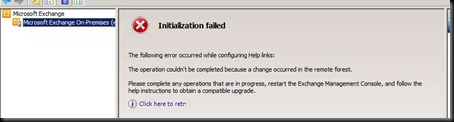
clip_image002
The EMS would open, but not connect to the local server but would attach to a remote server.
image
All of these things pointed to a permissions issue; however, adding the role (as a test) to a working mailbox server went just fine.  Really odd.  I also tried setup /prepareAD thinking that “something” went sideways.  No dice.  Setup /prepareAD failed to run.  It just dumped out.  At this point I recommended the client open a case with CSS.

The Solution

First, what happened is that someone (NOT ME!) mail-enabled all the groups in the Microsoft Exchange Security Groups container.  I have never had a reason to do this before; evidently, this is not a recommended action – serious side effects!  Also remember that it took 17 hours for CSS engineers (five of them working in shifts) to resolve this issue.  This work is not for the faint of heart and I would recommend that if you are facing this issue, or think you are, that you call CSS.
The fix (as provided by CSS) is outlined below.
YMMV

-    Setup /prepareAD is failing.
-    Error message received is as below.
[04/27/2012 02:38:43.0455] [2] Used domain controller DC.corp.Company.com to read object CN=Exchange Servers,OU=Microsoft Exchange Security Groups,DC=corp,DC=Company,DC=com.
[04/27/2012 02:38:43.0471] [2] [ERROR] Unexpected Error
[04/27/2012 02:38:43.0471] [2] [ERROR] The well-known object entry with the GUID "6c01d2a7-f083-4503-8132-789eeb127b84", which is on the "CN=Microsoft Exchange,CN=Services,CN=Configuration,DC=corp,DC=Company,DC=com" container object's otherWellKnownObjects attribute, refers to a group "CN=Exchange Servers,OU=Microsoft Exchange Security Groups,DC=corp,DC=Company,DC=com" of the wrong group type. Either delete the well-known object entry, or promote the target object to "Universal, SecurityEnabled".
[04/27/2012 02:38:43.0471] [2] Ending processing initialize-ExchangeUniversalGroups
[04/27/2012 02:38:43.0487] [1] The following 1 error(s) occurred during task execution:
[04/27/2012 02:38:43.0487] [1] 0.  ErrorRecord: The well-known object entry with the GUID "6c01d2a7-f083-4503-8132-789eeb127b84", which is on the "CN=Microsoft Exchange,CN=Services,CN=Configuration,DC=corp,DC=Company,DC=com" container object's otherWellKnownObjects attribute, refers to a group "CN=Exchange Servers,OU=Microsoft Exchange Security Groups,DC=corp,DC=Company,DC=com" of the wrong group type. Either delete the well-known object entry, or promote the target object to "Universal, SecurityEnabled".
[04/27/2012 02:38:43.0487] [1] 0.  ErrorRecord: Microsoft.Exchange.Management.Tasks.InvalidWKObjectTargetException: The well-known object entry with the GUID "6c01d2a7-f083-4503-8132-789eeb127b84", which is on the "CN=Microsoft Exchange,CN=Services,CN=Configuration,DC=corp,DC=Company,DC=com" container object's otherWellKnownObjects attribute, refers to a group "CN=Exchange Servers,OU=Microsoft Exchange Security Groups,DC=corp,DC=Company,DC=com" of the wrong group type. Either delete the well-known object entry, or promote the target object to "Universal, SecurityEnabled".
[04/27/2012 02:38:43.0487] [1] [ERROR] The following error was generated when "$error.Clear();
initialize-ExchangeUniversalGroups -DomainController $RoleDomainController -ActiveDirectorySplitPermissions $RoleActiveDirectorySplitPermissions
" was run: "The well-known object entry with the GUID "6c01d2a7-f083-4503-8132-789eeb127b84", which is on the "CN=Microsoft Exchange,CN=Services,CN=Configuration,DC=corp,DC=Company,DC=com" container object's otherWellKnownObjects attribute, refers to a group "CN=Exchange Servers,OU=Microsoft Exchange Security Groups,DC=corp,DC=Company,DC=com" of the wrong group type. Either delete the well-known object entry, or promote the target object to "Universal, SecurityEnabled".".
[04/27/2012 02:38:43.0487] [1] [ERROR] The well-known object entry with the GUID "6c01d2a7-f083-4503-8132-789eeb127b84", which is on the "CN=Microsoft Exchange,CN=Services,CN=Configuration,DC=corp,DC=Company,DC=com" container object's otherWellKnownObjects attribute, refers to a group "CN=Exchange Servers,OU=Microsoft Exchange Security Groups,DC=corp,DC=Company,DC=com" of the wrong group type. Either delete the well-known object entry, or promote the target object to "Universal, SecurityEnabled".
[04/27/2012 02:38:43.0487] [1] [ERROR-REFERENCE] Id=443949901 Component=
[04/27/2012 02:38:43.0487] [1] Setup is stopping now because of one or more critical errors.
[04/27/2012 02:38:43.0487] [1] Finished executing component tasks.
[04/27/2012 02:38:43.0502] [1] Ending processing Install-ExchangeOrganization
[04/27/2012 02:38:43.0502] [0] The Exchange Server setup operation didn't complete.  More details can be found in ExchangeSetup.log located in the <SystemDrive>:\ExchangeSetupLogs folder.
[04/27/2012 02:38:43.0502] [0] End of Setup
Troubleshooting:
-    The problem is happening because of some issue with the USGs in the Microsoft Exchange Security Groups container.
-    Opened LDP.exe
-    Accessed the Configuration partition.
-    Right clicked on Microsoft Exchange.
-    Clicked modify option.
-    Pasted the  B:32:A7D2016C83F003458132789EEB127B84:CN=Microsoft Exchange,CN=Services,CN=Configuration,DC=corp,DC=Company,DC=com in the value.
-    Clicked on Delete Radio button.
-    Clicked on Run.
-    Forced AD replication.
-    Ran Setup /prepareAD again.
-    It again failed with the same message but this time the Group is different.
-    Noticed that a new ExchangeServers1 group has been created.
-    We wanted to check why this issue happening for multiple groups.
-    So we compared the LDP dump of the old Exchange Servers and the new Exchange Servers1 group.
-    The old group was mail enabled. It had exchange attributes like legacyExchangeDN, proxyAddresses, mail, mailnickname etc...
-    Checked the GAL and Exchange Servers group is visible there.
-    We have no idea how this happened or who mail enabled these groups.
-    Same is the case with other Groups in that OU as well.
-    We removed the corresponding entries for the remaining groups from CN=Microsoft Exchange,CN=Services,CN=Configuration,DC=corp,DC=Company,DC=com.
-    Forced AD Replication and ran setup /prepareAD again.
-    This time setup succeeded.
-    We successfully installed the CAS role as well.
-    Powershell is not connecting to the local server.
-    We are getting the below error.
========
The WinRM client sent a request to an HTTP server and got a response saying the requested HTTP URL was not available. This is usually returned by a HTTP server that does not support the WS-Management protocol.
========
-    Checked the bindings on Default Web Site from IIS manager.
-    HTTP was bound to a specific IP rather than All Unassigned.
-    Changed it to All Unassigned and restarted IIS.
-    Powershell started working fine.
-    We are having issues with Management roles for admins.
-    The Server Configuration section is not visible in EMC and we are not able to see user properties from EMC.
-    Get-Mailbox returns only the logged on user's details even though the logged on user is an ORG Admin.
-    This looks like a RBAC issue.
-    Checked AD permissions
-    The admin user has Full Control on all containers.
-    Still he is not able to Administer user accounts from EMS or Shell.
-    Tested ECP access and it also failed with Access Denied.
-    Identified http://social.technet.microsoft.com/Forums/en-US/exchange2010/thread/8f9a1881-d66d-4d8a-a6ff-06729a701999
-    We followed the below steps to resolve the issue.
==============
Do the following on the Exchange 2010 server using the same account used to install Exchange 2010.
1)     Open Windows PowerShell (not the Exchange Management Shell)
a.       If you have UAC enabled, right click Windows PowerShell and click Run as administrator.
2)     Run Start-Transcript c:\RBAC.txt and press enter
a.       This will start logging all commands and output you type to a text file.
3)     Run Add-PSSnapin *setup and press enter
a.       This adds the setup snap-in which contains the setup cmdlets used by Exchange during install. You may see errors about loading a format data file. You can ignore those errors.
DO NOT run any other cmdlets in this snap-in without direction from Microsoft. Doing so could irreparably damage your Exchange installation.
4)     Run Install-CannedRbacRoleAssignments -InvocationMode Install -Verbose and press enter.
a.       This cmdlet should create the required role assignments between the role groups and roles that should have been created during setup.
b.       Be sure you run with the Verbose switch so we can capture what the cmdlet does.
5)     Run Remove-PSSnapin *setup and press enter
6)     Run $Session = New-PSSession -ConfigurationName Microsoft.Exchange -ConnectionUri http://<FQDN of Exchange 2010 server>/PowerShell/ -Authentication Kerberos and press enter
a.       Be sure to replace <FQDN of Exchange 2010 server> with the FQDN of your server.
7)     Run Import-PSSession $Session and press enter
8)     Run Get-ManagementRoleAssignment and press enter
9)     Run Stop-Transcript and press enter
=============
-    This resolved the RBAC issue as well.


2012/05/03

Lync TrustModelData

The Issue

Recently, I had a small issue with Lync 2010 clients objecting to the certificate on the autodiscover.company.com CAS server.

The internal domain in use for SIP was company.local, and the CAS had company.com, although autodiscover.company.local was also on that cert.

Interestingly, we first looked at strict DNS naming, however, that did not appear to be the root cause. A colleague pointed out to me that he thought the TrustModelData might be doing it, so we investigated that route.

The error popped up as soon as autodiscover.company.com (the SMTP domain) was added to DNS. Here is the error :

image

Lync is hardcoded to act on finding Autodiscover, and it immediately attempts to connect to the advertised EWS.  In our case, the SMTP domain does not match the SIP domain (company.com v company.local).

The Fix

As it turns out, there is a registry entry in HKLM to control this behavior – by default this key is populated with a selection of Microsoft Online entries – none of which matched our company.local. We pushed the following registry change with SCCM; GPO was not an option due to XP workstations. 

This option is NOT part of Lync in-band client provisioning, and you can put the entry in either

HKEY_LOCAL_MACHINE\Software\Policies\Microsoft\Communicator\TrustModelData 

OR

HKEY_CURRENT_USER\Software\Policies\Microsoft\Communicator TrustModelData

and APPEND your SMTP domain to the list.

SNAGHTMLf6ce697

The precedence for applying these changes is:

(1) In-band provisioning, (2) HKLM, (3) HKCU, (4) Lync option set in client. 

Because of this ordering, we decided on using HKLM for our registry change so that all users of the workstation would get the change.

YMMV.

test 02 Feb

this is a test it’s only a test this should be a picture